Freedom251 › Presentation Management Software

SlideLizard CREATOR
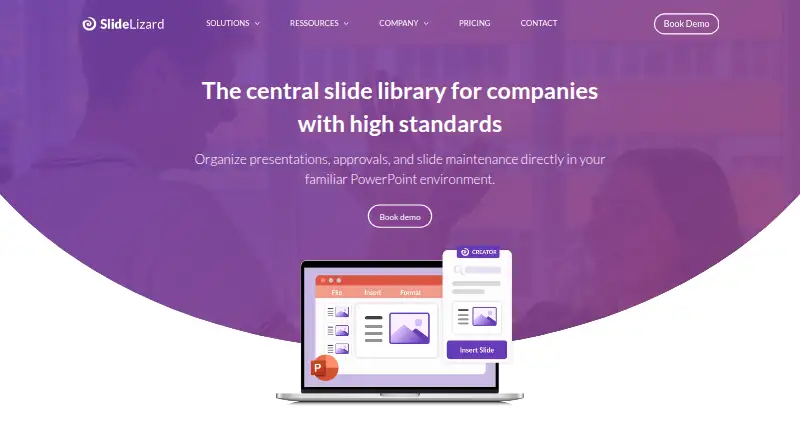
What SlideLizard CREATOR is
SlideLizard CREATOR is a centrally managed slide library used directly in PowerPoint. Companies can provide approved slides, images, videos, icons, logos, and templates while controlling who may view, edit, or share them. A change to a library slide can be applied automatically across presentations. Slides can be marked in progress, approved, or out of date, and the CI Checker checks colors, fonts, logos, and other corporate design rules. Search supports keywords, slide text, and visual elements. Automatic versioning lets users view, compare, and restore earlier versions. Organizations can use SlideLizard’s cloud server or integrate the product into their own IT infrastructure. SlideLizard says data remains in Europe, with data centers in Germany and the Netherlands, and describes the service as GDPR compliant. Presenter and attendee data travels over HTTPS. The PowerPoint plugin is listed for Windows PCs, including Windows 7–11 with PowerPoint 2016–2024 or Office 365. Pricing is available by demo or quote, and there is no free plan.
Who it suits
CREATOR is designed for companies with many presentations, multiple departments, brand standards, and recurring approval workflows. It suits teams that want centralized PowerPoint content and version control.
What it does well
- Central library keeps approved presentation assets together
- Slide changes can update presentations automatically
- Approval statuses show content readiness
- Search covers text and visual elements
- Previous versions can be compared and restored
What to know first
- Pricing is available only by request
- No free plan
- PowerPoint plugin support is listed for Windows PCs
- Mac availability is not yet listed as supported
Limits
There is no free plan. Pricing for the SlideLizard CREATOR plan is provided on request.
Plans
| Plan | Billed and limits | Price |
|---|---|---|
| SlideLizard CREATOR | Pricing not publicly stated; request a demo or quote | On request |
As slidelizard.com lists them, read 8 Oct 2026. The maker's own page has the final word.
Getting started
- Open the SlideLizard CREATOR website
- Request a demo or quote for pricing
- Choose SlideLizard cloud hosting or company IT integration
- Install the SlideLizard PowerPoint plugin on a supported Windows PC
- Use the library and assign access rights, statuses, and approved assets
Verdict
SlideLizard CREATOR centralizes presentation assets, approvals, brand checks, and version history within PowerPoint. Its Windows-focused plugin support and quote-based pricing should be considered before adoption.
Questions
Does SlideLizard CREATOR have a free plan?
No. The product is offered as paid software, with pricing available by request.
Which platforms support the PowerPoint plugin?
The download page lists Windows PCs, including Windows 7–11, with PowerPoint 2016–2024 or Office 365.
Can companies host SlideLizard themselves?
Yes. It can run on SlideLizard’s cloud server or integrate into a company’s own IT infrastructure.
Does it include version history and approvals?
Yes. Automatic versioning supports viewing, comparing, and restoring earlier versions, and slides can have approval statuses.
How is presentation access controlled?
Individual access rights determine who can view, edit, or share presentation slides.
Facts from SlideLizard CREATOR's own pages
- Access control
- Individual access rights control who can view, edit, or share presentation slides. · slidelizard.com, 8 Oct 2026
- Approvals
- Slides can be assigned statuses such as in progress, approved, or out of date. · slidelizard.com, 8 Oct 2026
- Asset library
- Teams can access approved images, videos, icons, logos, and templates directly in PowerPoint. · slidelizard.com, 8 Oct 2026
- Design checks
- The CI Checker analyzes slides for deviations in corporate colors, fonts, logos, and other design rules. · slidelizard.com, 8 Oct 2026
- Encryption
- SlideLizard says presenter and attendee data is transferred over HTTPS connections. · slidelizard.com, 8 Oct 2026
- Founded
- 2017 · slidelizard.com, 28 Sept 2026
- Headquarters
- Linz, Austria · slidelizard.com, 28 Sept 2026
- Hosting
- The product is offered through SlideLizard’s cloud server or can be integrated into a company’s own IT infrastructure. · slidelizard.com, 8 Oct 2026
- Intended users
- The product is designed for companies with many presentations, multiple departments, brand standards, and recurring approval processes. · slidelizard.com, 8 Oct 2026
- Mac availability
- The download page invites users to leave an email address to be contacted when SlideLizard is available for Mac. · slidelizard.com, 8 Oct 2026
- Platform support
- The download page says presenters install the SlideLizard PowerPoint plugin on Windows PCs and lists Windows 7–11 and PowerPoint 2016–2024 or Office 365 as supported for the plugin. · slidelizard.com, 8 Oct 2026
- Product
- SlideLizard CREATOR is a centrally managed company slide library used directly in PowerPoint. · slidelizard.com, 8 Oct 2026
- Search and versioning
- The slide management feature page describes keyword search, searching slide text or visual elements, and automatic versioning with the ability to view, compare, and restore previous versions. · slidelizard.com, 8 Oct 2026
- Security
- SlideLizard says data stays in Europe, with data centers in Germany and the Netherlands, and describes the service as GDPR compliant. · slidelizard.com, 8 Oct 2026
- Slide updates
- Changes to a slide can be automatically applied across presentations so teams have current content. · slidelizard.com, 8 Oct 2026
- Support
- The CREATOR page directs support inquiries to [email protected]. · slidelizard.com, 8 Oct 2026
Where SlideLizard CREATOR stands on Freedom251
- Presentation Management Software#24 of 24