
Sidenote
What Sidenote is
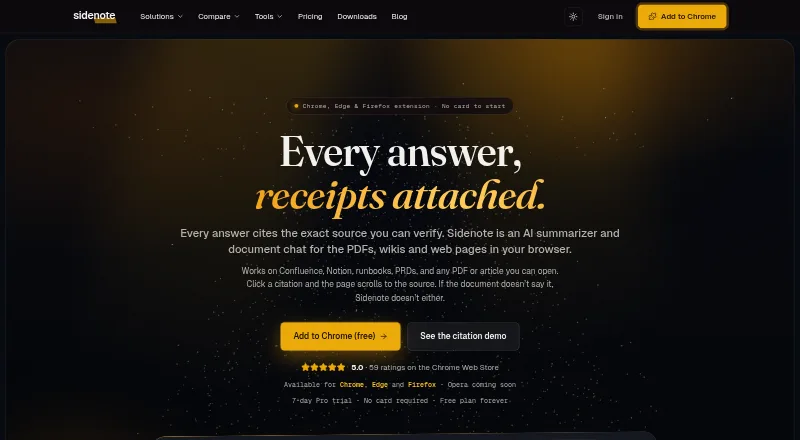
Sidenote is a browser reading assistant that answers questions about documents and links each answer to the passage it uses. Selecting a citation takes the reader to that text and highlights it. Its document tools include summaries, explanations, glossaries, search, notes, highlights, tags, starred documents, and collections for working with multiple files. It reads PDFs displayed in a browser, including scanned PDFs with OCR, and accepts PDF, DOCX, PPTX, TXT, MD, MDX, and RTF uploads. Dedicated integrations are available for Confluence, Notion, Google Docs, Slack canvases, SharePoint, and OneDrive. Browser extensions are listed for Chrome, Edge, and Firefox, with Opera described as coming soon. The Free plan allows 3 documents per month, 5 MB per document, 10 summaries, 10 explanations, 3 glossary builds, and 10 chat turns, with no collections or Confluence space indexing. Pro costs £10/mo, billed monthly, and a 7-day Pro trial requires no card. The maker says content is not used to train AI models. Documents are stored in the UK; users can keep them while an account is open or choose Discard, which purges a document within 24 hours.
Who it suits
Sidenote suits people who read browser documents and want answers linked back to their source passages. Its listed use cases include engineering, product, customer success, legal, operations, and research teams.
What it does well
- Citations scroll to and highlight the source passage.
- Reads scanned PDFs with OCR and accepts seven upload formats.
- Includes summaries, explanations, glossaries, search, and reading notes.
- Integrates with Confluence, Notion, Google Docs, Slack canvases, SharePoint, and OneDrive.
- The 7-day Pro trial requires no card.
- Users can choose Store or Discard document retention.
What to know first
- Free plan has a 3-document monthly limit.
- Free plan has no collections or Confluence space indexing.
- Opera extension is described as coming soon.
- Sidenote says it is not yet SOC 2 certified.
Limits
The Free plan allows 3 documents per month at up to 5 MB each, 10 summaries, 10 explanations, 3 glossary builds, and 10 chat turns; it has no collections or Confluence space indexing. The 7-day Pro trial is limited to 10 documents, 20 summaries, and 10 chat turns.
Plans
| Plan | Billed and limits | Price |
|---|---|---|
| Free | forever · 3 documents/month · 5 MB/document · 10 summaries/month · 10 explanations/month · 3 glossary builds/month · 10 chat turns/month · no collections or Confluence space indexing | Free |
| Pro | monthly · 25 documents/month · 20 MB/document · 75 summaries/month · 70 explanations/month · 15 glossary builds/month · 35 chat turns/month · collections up to 5 documents | £10 a month |
| Pro Max | monthly · 250 documents/month · 75 MB/document · 750 summaries/month · 700 explanations/month · 150 glossary builds/month · 250 chat turns/month · collections up to 25 documents · Confluence indexing 500 pages/month | £100 a month |
| Team (annual billing) | billed annually · Pro-level caps per member · shared team collections · SAML SSO with domain auto-join · team owners/admins get Confluence indexing at 500 pages/month | £14.40 a year |
| Team | monthly · Pro-level caps per member · shared team collections · SAML SSO with domain auto-join · team owners/admins get Confluence indexing at 500 pages/month | £18 a month |
| Pro+ | monthly · 50 documents/month · 40 MB/document · 150 summaries/month · 140 explanations/month · 30 glossary builds/month · 50 chat turns/month · collections up to 10 documents · Confluence indexing 200 pages/month | £20 a month |
As getsidenote.app lists them, read 29 Sept 2026. The maker's own page has the final word.
Getting started
- Visit https://getsidenote.app/.
- Use the web app or install the extension for Chrome, Edge, or Firefox.
- Choose the Free plan or a paid plan; Pro is £10/mo, billed monthly.
- Start a 7-day Pro trial without entering a card, if desired.
- Upload a supported document or open a browser-rendered PDF.
- Choose Store or Discard retention for documents.
Verdict
Choose Sidenote if you want document answers with citations that lead back to highlighted source text, along with a broad set of reading and organization tools. The Free plan has monthly document and tool limits; teams needing shared collections or Confluence indexing can look at a Team plan. Organizations requiring SOC 2 certification should note that Sidenote says it has not yet been certified.
Questions
Is there a free plan?
Yes. The Free plan is billed at no cost and includes monthly document and tool limits.
How much does Pro cost?
Pro costs £10 a month, billed monthly. The pricing note gives the price as £10/mo.
What platforms and browsers are supported?
Sidenote is available as a web app and browser extension. The site lists extensions for Chrome, Edge, and Firefox; Opera is described as coming soon.
Can it read uploaded documents?
Yes. Uploads can be PDF, DOCX, PPTX, TXT, MD, MDX, or RTF. It also reads browser-rendered PDFs, including scanned PDFs with OCR.
Which services does it integrate with?
Dedicated integrations include Confluence, Notion, Google Docs, Slack canvases, SharePoint, and OneDrive.
Who supports Sidenote?
Sidenote is supported by its solo developer, Lewis Hadden. The maker lists email support at [email protected].
Facts from Sidenote's own pages
- Browser availability
- The site lists Chrome, Edge, and Firefox extensions, with Opera described as coming soon. · getsidenote.app, 29 Sept 2026
- Cited answers
- Answers cite source passages, and clicking a citation scrolls to and highlights the passage in the page. · getsidenote.app, 29 Sept 2026
- Compliance limit
- Sidenote says it is not yet SOC 2 certified and that formal attestation is on its roadmap. · getsidenote.app, 29 Sept 2026
- Data residency
- Documents are stored in Supabase in the UK eu-west-2 London region, encrypted at rest and isolated per account with row-level security. · getsidenote.app, 29 Sept 2026
- Document tools
- Features include summaries, explanations, glossaries, multi-document collections, document search, notes, highlights, tags, and starred documents. · getsidenote.app, 29 Sept 2026
- File support
- Sidenote reads browser-rendered PDFs, including scanned PDFs with OCR, and accepts PDF, DOCX, PPTX, TXT, MD, MDX, and RTF uploads. · getsidenote.app, 29 Sept 2026
- Headquarters
- Whittlesey, United Kingdom · getsidenote.app, 23 Sept 2026
- Integrations
- Dedicated integrations include Confluence, Notion, Google Docs, Slack canvases, SharePoint, and OneDrive. · getsidenote.app, 29 Sept 2026
- Privacy
- The maker says user content is never used to train AI models and its AI providers use no-training defaults on the API tiers used. · getsidenote.app, 29 Sept 2026
- Retention
- Users can choose Store retention while the account is open or Discard, which purges a document within 24 hours; users can also delete library documents at any time. · getsidenote.app, 29 Sept 2026
- Support
- The maker lists support by email at [email protected] and says it is supported by its solo developer, Lewis Hadden. · getsidenote.app, 29 Sept 2026
- Trial
- The 7-day Pro trial requires no card and has limits including 10 documents, 20 summaries, and 10 chat turns. · getsidenote.app, 29 Sept 2026
- What it does
- Sidenote is an AI reading assistant that answers questions about documents in the browser and shows where each answer came from. · getsidenote.app, 29 Sept 2026
- Who it is for
- The maker describes use cases for engineering, product, customer success, legal and operations, and research teams. · getsidenote.app, 29 Sept 2026
Where Sidenote stands on Freedom251
- AI Summarizers#20 of 36