Freedom251 › Audience Response Systems
SeminarSmack
What SeminarSmack is
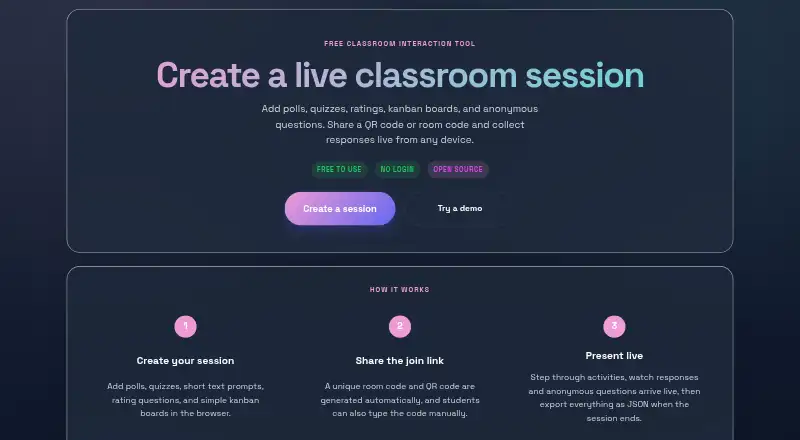
SeminarSmack is a free classroom interaction tool for presenters creating live sessions and collecting student responses. Presenters can run polls and quizzes, optionally revealing correct answers, and add short text prompts or 1–5 star ratings with comments. Kanban boards let participants place ideas, links, images, GIFs and videos into presenter-defined columns. Students can submit anonymous questions, generating a lightweight presenter notification. Joining requires no app installation or sign-up: students scan a QR code, open a direct link or enter a room code. Responses can be downloaded as JSON after a session closes. The project is open source under the MIT license and can be self-hosted. Self-hosting requires a Supabase project URL, publishable anon key and enabled Realtime. Drafts stay in educator browser localStorage, while the presenter page is the live-session source of truth. Configured multi-device updates use Supabase Realtime Broadcast.
Who it suits
SeminarSmack suits presenters and educators running informal interactive sessions where students respond from phones or other devices. It is useful when no app install or student account should be required.
What it does well
- Free and open source
- Live polls and quizzes
- Anonymous questions
- QR, link or room-code joining
- JSON response exports
What to know first
- Host token is not full authentication
- Room codes suit informal use
- Self-hosting requires Supabase setup
- Drafts use browser localStorage
Plans
| Plan | Billed and limits | Price |
|---|---|---|
| Free | Free to use · No login · Open source | Free |
As seminar-smack.com lists them, read 11 Oct 2026. The maker's own page has the final word.
Verdict
SeminarSmack provides polls, quizzes, prompts, ratings, kanban activities and anonymous questions without requiring student accounts. Its free MIT-licensed project supports web, API and self-hosted use, with security limits suited to informal classroom sessions.
Facts from SeminarSmack's own pages
- Anonymous questions
- Participants can submit questions during a session, and presenters receive a lightweight notification. · seminar-smack.com, 11 Oct 2026
- Anonymous responses
- Yes · seminar-smack.com, 22 Sept 2026
- Exports
- Presenters can download session responses as JSON after closing a session. · seminar-smack.com, 11 Oct 2026
- Free plan
- Yes · seminar-smack.com, 22 Sept 2026
- Intended users
- The site describes presenters building and hosting sessions and students joining to respond live from their phones or other devices. · seminar-smack.com, 11 Oct 2026
- Joining
- Students can join by scanning a QR code, opening a direct link, or entering a room code, without an app install or sign-up. · seminar-smack.com, 11 Oct 2026
- Kanban cards
- Participants can add ideas, links, images, GIFs, and videos to presenter-defined columns. · seminar-smack.com, 11 Oct 2026
- License
- The project is open source and MIT licensed. · seminar-smack.com, 11 Oct 2026
- Live polling
- Yes · seminar-smack.com, 22 Sept 2026
- Live Q&A
- Yes · seminar-smack.com, 22 Sept 2026
- Other activities
- Sessions can include short text prompts, 1–5 star ratings with optional comments, and kanban boards. · seminar-smack.com, 11 Oct 2026
- Personal data
- The README says students are not required by the app to identify themselves and advises educators to avoid prompts requesting unnecessary personal data. · github.com, 11 Oct 2026
- Polls and quizzes
- Presenters can run live polls and quizzes with an optional correct-answer reveal. · seminar-smack.com, 11 Oct 2026
- Purpose
- SeminarSmack is a classroom interaction tool for creating live sessions and collecting responses. · seminar-smack.com, 11 Oct 2026
- Quiz mode
- Yes · seminar-smack.com, 22 Sept 2026
- Realtime service
- When configured, live updates use Supabase Realtime Broadcast; the README says the app depends on Supabase’s third-party realtime infrastructure for live multi-device sessions. · github.com, 11 Oct 2026
- Security limits
- The README describes the host token as a lightweight browser-side control guard, not full authentication, and says room codes and local submission limits suit informal classroom use rather than high-stakes assessment. · github.com, 11 Oct 2026
- Self-hosting
- The maker says users can self-host a copy; the README’s setup requires a Supabase project URL, publishable anon key, and Realtime enabled. · seminar-smack.com, 11 Oct 2026
- Session storage
- The maker’s README says session drafts are stored in the educator’s browser localStorage and the presenter page is the source of truth during a live session. · github.com, 11 Oct 2026
Where SeminarSmack stands on Freedom251
- Audience Response Systems#51 of 118