Freedom251 › AI Hairstyle Generators
SeeMyCut
What SeeMyCut is
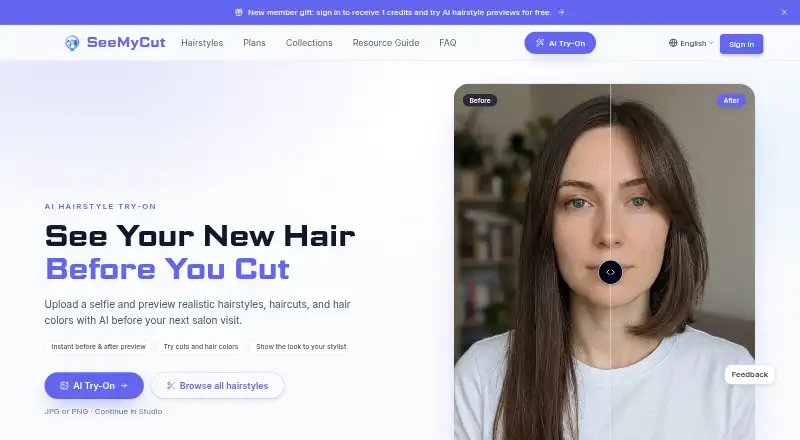
SeeMyCut is a web tool for previewing hairstyles, haircuts and hair colors on a selfie before a salon visit. Users choose a hairstyle direction, generate a preview and compare the result with their original photo. The catalog covers cuts, lengths, textures, braids, updos, bangs and colors, with categories for men and women. The company recommends a clear, front-facing JPG, PNG or WebP photo. It says private try-on photos are not treated as public hairstyle gallery content and previews are not shown publicly. Lighting, photo angle and current hair length can affect how useful a preview is. No app installation is required; users can upload from the homepage. Eligible new users receive one credit after their first sign-in to try previews for free. Annual plans list 100, 300 or 800 monthly credits, premium hairstyles, front, side and back previews, HD generation and watermark-free results. The pricing note lists plans from $84/yr; the Basic Annual plan is $84 a year, Pro Annual is $168 a year and Premium Annual is billed at 336.00 USD annually.
Who it suits
SeeMyCut suits people comparing cuts or colors before a salon visit and those who want a visual reference to share with a stylist or barber. It works through a web browser without installation.
What it does well
- Previews cuts, hairstyles and hair colors.
- Catalog includes styles for men and women.
- Eligible new users receive one free credit.
- No app installation is required.
- Plans list watermark-free results.
What to know first
- Lighting, angle and current hair length affect previews.
- Paid annual plans are listed from $84/yr.
Limits
The annual plans provide 100, 300, or 800 credits per month, corresponding to about 100, 300, or 800 try-ons. The listed annual plans are paid; the facts do not give a quota for the free plan.
Plans
| Plan | Billed and limits | Price |
|---|---|---|
| Pro Annual | $168.00 annually; page displays $19.99$14.00/month · 300 credits/month (about 300 try-ons) · all premium hairstyles · front/side/back previews · HD generation · faster queue · priority support · no watermark or ads | $168 a year |
| Premium Annual | $336.00 annually; page displays $39.99$28.00/month · 800 credits/month (about 800 try-ons) · all premium hairstyles · front/side/back previews · HD generation · early access to new features · faster queue · VIP support · no watermark or ads | $336 a year |
| Basic Annual | $84.00 annually; page displays $9.99$7.00/month · 100 credits/month (about 100 try-ons) · all premium hairstyles · front/side/back previews · HD generation · standard support · no watermark or ads | $84 a year |
As seemycut.com lists them, read 3 Oct 2026. The maker's own page has the final word.
Getting started
- Open the SeeMyCut website
- Sign in to receive an eligible new-user credit
- Upload a clear, front-facing JPG, PNG, or WebP photo from the homepage
- Choose a hairstyle direction or browse the style catalog
- Generate a preview and compare it with your original
- Select an annual plan if you need additional monthly credits
Verdict
SeeMyCut offers a way to compare possible hairstyles and colors before discussing them with a stylist. Photo conditions can affect the preview, so treat it as a visual reference rather than a guaranteed result.
Questions
Does SeeMyCut have a free plan?
Yes. A free plan and a free trial are available, and eligible new users receive one credit after their first sign-in.
What platforms does SeeMyCut support?
It runs on the web, including mobile web access, and requires no app installation.
What photo should I upload?
The site recommends a clear, front-facing JPG, PNG, or WebP image.
Can I preview hair color?
Yes. Hair-color previews are supported alongside hairstyle and haircut previews.
How much do the annual plans cost?
Basic Annual is $84 a year, Pro Annual is $168 a year, and Premium Annual is listed at $28 a year with billing shown as 336.00 USD annually.
Are uploaded try-on photos public?
The company says private try-on photos are not treated as public gallery content and previews are not shown publicly.
Facts from SeeMyCut's own pages
- Download/install
- The site says no app installation is required and users can upload from the homepage. · seemycut.com, 3 Oct 2026
- New-user credits
- Eligible new users receive 1 credit after their first sign-in to try AI hairstyle previews for free. · seemycut.com, 3 Oct 2026
- Photo guidance
- The site recommends a clear, front-facing JPG, PNG, or WebP photo. · seemycut.com, 3 Oct 2026
- Photo handling
- The company says private try-on photos are not treated as public hairstyle gallery content and that previews are not shown publicly. · seemycut.com, 3 Oct 2026
- Preview limitations
- The company says lighting, photo angle, and current hair length can affect how useful an AI preview is. · seemycut.com, 3 Oct 2026
- Preview workflow
- The site describes choosing a hairstyle direction, generating a photorealistic preview, and comparing before and after. · seemycut.com, 3 Oct 2026
- Product
- SeeMyCut lets users upload a selfie and preview hairstyles, haircuts, and hair colors with AI before a salon visit. · seemycut.com, 3 Oct 2026
- Style catalog
- Users can browse cuts, lengths, textures, braids, updos, bangs, and colors, with categories for men and women. · seemycut.com, 3 Oct 2026
- Support
- The company lists [email protected] as its contact email. · seemycut.com, 3 Oct 2026
- Use cases
- The site presents the tool for salon preparation, comparing cuts or colors, and sharing a visual reference with a stylist or barber. · seemycut.com, 3 Oct 2026
Where SeeMyCut stands on Freedom251
- AI Hairstyle Generators#23 of 26