Freedom251 › Game Graphics Optimization Software
ScopeBuddy
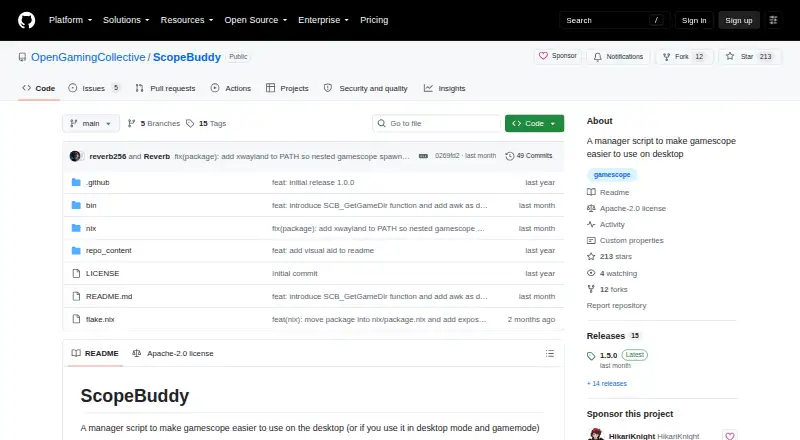
What ScopeBuddy is
ScopeBuddy is a free Linux manager script that makes Gamescope easier to use on the desktop. It fixes Steam Overlay and SteamInput when nested Gamescope runs in desktop mode, while supporting global or per-game Gamescope arguments and environment variables. The script can detect display resolution, HDR, VRR, and refresh rate on KDE Plasma, GNOME, and wlroots compositors, subject to documented tool requirements and limitations. When Steam Gaming Mode is detected, ScopeBuddy can skip Gamescope and use a separate configuration. Documentation covers Steam and Lutris, with manually assigned identifiers supporting configuration files for launchers such as Heroic. Configuration files are Bash scripts sourced before Gamescope and the game starts. Base requirements are Bash, Gamescope, Perl, and awk; some detection features also need compositor tools and jq. Installation options include direct downloads, GitHub releases, NixOS flakes, Fedora derivatives, and the Arch AUR. The project uses Apache-2.0 licensing and points to a separate Flathub GUI.
Who it suits
ScopeBuddy suits Linux desktop players who configure Gamescope with Steam, Lutris, or supported launchers. It is also relevant to users managing HDR, VRR, refresh-rate detection, or per-game launch settings.
What it does well
- Free Apache-2.0 project
- Fixes nested Gamescope Steam issues
- Per-game and global configurations
- Display detection for major compositors
- Works with Steam and Lutris
What to know first
- Linux only
- Requires Bash, Gamescope, Perl, and awk
- Some detection needs extra tools and jq
- HDR outside Gamescope is experimental
Verdict
ScopeBuddy focuses on Gamescope configuration and Steam integration rather than providing a general game launcher. Its script-based setup offers detailed control, but users must satisfy Linux dependencies and compositor-specific requirements.
Facts from ScopeBuddy's own pages
- Configuration
- It supports global and per-game Gamescope arguments and environment variables. · github.com, 8 Oct 2026
- Configuration scripts
- ScopeBuddy configuration files are sourced as Bash scripts before Gamescope and the game run, allowing users to run scripts as part of launch configuration. · docs.bazzite.gg, 8 Oct 2026
- Desktop environments
- Display detection supports KDE Plasma, GNOME, and wlroots compositors, using tools such as kscreen-doctor, gdctl, gnome-randr, and wlr-randr. · github.com, 8 Oct 2026
- Display detection
- It can detect display resolution, HDR, VRR, and refresh rate, with documented compositor-specific requirements and limitations. · github.com, 8 Oct 2026
- Downloads
- Installation instructions cover direct script downloads, versioned GitHub releases, NixOS flakes, Fedora derivatives, and Arch Linux via the AUR. · github.com, 8 Oct 2026
- Experimental HDR
- HDR in non-gamescope contexts is experimental and requires a Proton 10 or newer variant with experimental Wayland support. · github.com, 8 Oct 2026
- Game configuration
- It supports global and per-game gamescope arguments and environment variables. · github.com, 8 Oct 2026
- Game launchers
- The documentation gives setup instructions for Steam and Lutris and describes rudimentary AppID-like configuration for launchers such as Lutris or Heroic. · docs.bazzite.gg, 8 Oct 2026
- GUI
- The README points to a community-made graphical configuration tool called ScopeBuddy-GUI. · github.com, 8 Oct 2026
- Installation
- The project documents manual script installation, NixOS Home Manager flakes, Fedora derivatives through Terra, and an Arch AUR package. · github.com, 8 Oct 2026
- Launchers
- The documentation describes using ScopeBuddy with Steam and Lutris, and says manually assigned app identifiers can support configuration files for launchers such as Heroic. · docs.bazzite.gg, 8 Oct 2026
- License
- The repository identifies its license as Apache-2.0. · github.com, 8 Oct 2026
- No-gamescope mode
- Setting SCB_NOSCOPE=1 lets users use ScopeBuddy functions while bypassing gamescope. · docs.bazzite.gg, 8 Oct 2026
- Overlay and input
- It fixes Steam Overlay and SteamInput when used with nested gamescope in desktop mode. · github.com, 8 Oct 2026
- Purpose
- ScopeBuddy is a manager script that makes Gamescope easier to use on the desktop. · github.com, 8 Oct 2026
- Requirements
- The listed requirements are Bash, Gamescope, Perl, and awk; some display auto-detection features require additional compositor tools and jq. · github.com, 8 Oct 2026
- Steam fixes
- It fixes the Steam Overlay and SteamInput when using nested Gamescope in desktop mode. · github.com, 8 Oct 2026
- Steam Gaming Mode
- When it detects Steam Gaming Mode, ScopeBuddy can skip Gamescope and use a separate configuration. · docs.bazzite.gg, 8 Oct 2026
Where ScopeBuddy stands on Freedom251
- Game Graphics Optimization Software#28 of 34
- Graphics optimisers#30 of 35