Freedom251 › File Conversion Software
Scan2CAD
What Scan2CAD is
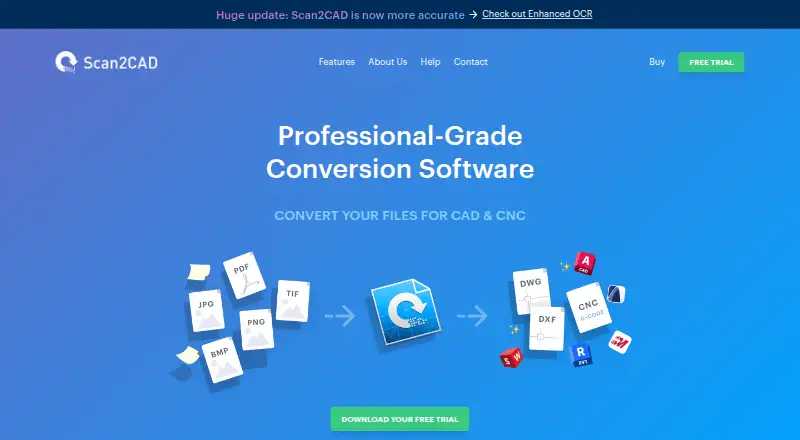
Scan2CAD is desktop software for turning scanned images and PDF files into editable CAD and CNC outputs. It can create DXF or DWG files while converting layers, text, and objects, and it can produce DXF or G-code for common CNC machines. Batch conversion processes files from a folder or multiple PDF pages in one operation. The software runs on Windows 7 or higher and macOS 14.8 or higher, with listed desktop and API availability. Standard conversions keep files on the user’s computer. Enhanced conversion is optional, disabled by default, and uploads a file to a secure server for improved accuracy. Optional Enhanced OCR improves text conversion using plan credits that reset at subscription renewal. Pro costs $89 a month, billed monthly, with unlimited conversions, support, and updates. Business costs $1,599 a year, billed annually, and adds batch conversion, the Scan2CAD Automate Python API, network licensing, and offline licensing. The 14-day trial includes every feature. Business network licenses allow one simultaneous user per license, while offline licenses cannot use Enhanced conversions. Scan2CAD was founded in 1997 and is headquartered in Worcester, United Kingdom, and serves designers and engineers.
Who it suits
Scan2CAD suits CAD professionals, manufacturing teams, designers, and engineers converting scans or PDFs into CAD and CNC files. Pro fits individual or team users needing unlimited conversions, while Business suits organizations needing Python automation, floating network licenses, or offline licensing.
What it does well
- Converts images and PDFs to layered DXF or DWG
- Produces DXF and G-code for common CNC machines
- Batch processes folders or multiple PDF pages
- 14-day trial includes all features
- Standard conversions stay on the user’s computer
- Free 24/7 email support is advertised
What to know first
- No free plan is available
- Pro costs $89 a month
- Enhanced conversions upload files to a secure server
- Offline licenses cannot use Enhanced conversions
Limits
The trial lasts 14 days. Enhanced OCR uses credits included with a plan and those credits reset at subscription renewal; offline Business licenses cannot use Enhanced conversions. Business network licenses allow one simultaneous user per license.
Plans
| Plan | Billed and limits | Price |
|---|---|---|
| Pro | billed monthly · Unlimited conversions · 24/7 support and updates · Auto-renews; cancel anytime | $89 a month |
| Business | billed annually · Batch conversion and Python API · Network licensing · Offline licensing · 24/7 support and updates | $1,599 a year |
| Scan2CAD Pro | billed monthly · Unlimited conversions · 24/7 support and updates included · Auto-renews; cancel anytime | $89 a month |
As scan2cad.com lists them, read 20 Sept 2026. The maker's own page has the final word.
Getting started
- Open the Scan2CAD website
- Download the Windows or macOS desktop software
- Start the 14-day trial with all features
- Choose Pro at $89 a month or Business at $1,599 a year
- Use standard local conversion or enable optional Enhanced conversion
- Use Scan2CAD Automate and batch conversion with Business
Verdict
Choose Scan2CAD when you need image or PDF conversion into CAD drawings or CNC files, especially with batch processing or automation. Pro provides unlimited conversions, while Business is the choice for Python API access, network licensing, or offline licensing. Look elsewhere if you require a free plan or cannot upload files for optional enhanced conversion.
Questions
How much does Scan2CAD cost?
Pro costs $89 a month, billed monthly. Business costs $1,599 a year, billed annually.
Is there a free trial?
Yes. The trial lasts 14 days and includes all features.
Which systems does it support?
The site lists Windows 7 or higher and macOS 14.8 or higher. Scan2CAD also lists an API.
Does it offer a Python API?
Yes. Scan2CAD Automate provides a Python API on the Business tier.
Can conversions run offline?
Business offers offline licensing. Offline licenses cannot use Enhanced conversions.
Facts from Scan2CAD's own pages
- Automation API
- Scan2CAD Automate provides a Python API for automating Scan2CAD features and is available on the Business tier. · scan2cad.com, 7 Oct 2026
- Batch conversion
- Batch conversion can convert files in a folder or multiple PDF pages in one run. · scan2cad.com, 7 Oct 2026
- CAD conversion
- Converts images and PDFs to DXF or DWG with layers, text, and objects converted. · scan2cad.com, 7 Oct 2026
- CNC conversion
- Converts images and PDFs to DXF and G-code for common CNC machines. · scan2cad.com, 7 Oct 2026
- Company history
- The company says Scan2CAD was started over 20 years ago and is used by customers in over 90 countries. · scan2cad.com, 7 Oct 2026
- Enhanced OCR
- Enhanced OCR is optional, improves text-conversion accuracy, and uses credits included with plans that reset at subscription renewal. · scan2cad.com, 7 Oct 2026
- Floating network licenses
- Business network licenses float among users, with one simultaneous user per license. · scan2cad.com, 7 Oct 2026
- Founded
- 1997 · scan2cad.com, 28 Sept 2026
- Headquarters
- Worcester, United Kingdom · scan2cad.com, 28 Sept 2026
- Intended users
- The pricing page positions Pro for CAD professionals and manufacturing teams; the About page says the product serves designers and engineers, from one-person studios to Fortune 500 companies. · scan2cad.com, 7 Oct 2026
- Local processing
- Standard conversions store files on the user's computer rather than sending them to a web server for conversion. · scan2cad.com, 7 Oct 2026
- Offline licensing
- Business offers offline licensing, but offline licenses cannot use Enhanced conversions. · scan2cad.com, 7 Oct 2026
- Optional cloud conversion
- Enhanced conversion is optional, disabled by default, and uploads a file to a secure server for improved conversion accuracy. · scan2cad.com, 7 Oct 2026
- Support
- The company advertises free 24/7 support by email and says replies usually arrive within two hours. · scan2cad.com, 7 Oct 2026
- Supported systems
- The site lists Windows 7 or higher and macOS 14.8 or higher. · scan2cad.com, 7 Oct 2026
- Trial
- The free trial lasts 14 days and includes all features. · scan2cad.com, 7 Oct 2026
Where Scan2CAD stands on Freedom251
- File Conversion Software#55 of 69
- Image Vectorization Software#22 of 26