Freedom251 › AI Quiz Generators

SayaLab
What SayaLab is
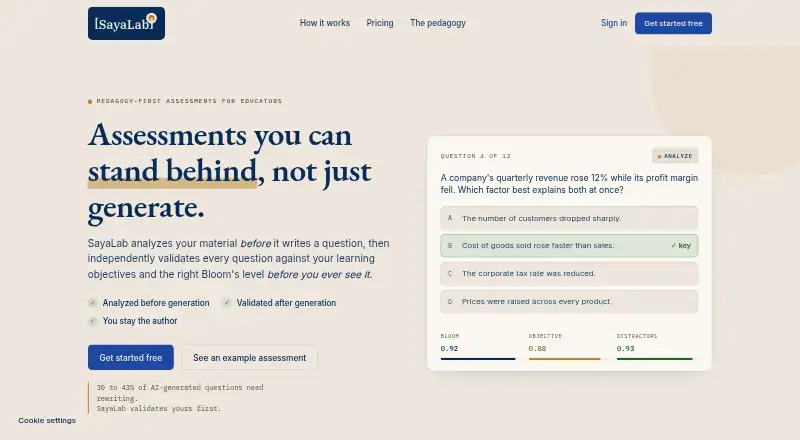
SayaLab is a web tool that analyzes educational material and creates assessment questions aligned with learning objectives and Bloom’s taxonomy. It first extracts objectives, identifies the Bloom’s levels supported by the material, and flags content that is insufficient for assessment. Generated questions are checked for cognitive level, objective and source alignment, distractor plausibility, and clarity; weak items regenerate automatically. Inputs include PDF, DOCX, PPTX, text, and lecture images. The Free plan allows 30 questions per 30-day cycle, every question type including essay, full analysis and validation, and PDF, CSV, and JSON export. Pro allows 300 questions per cycle, adds QTI and Google Forms export, and lets users regenerate any question. Pro costs $20 a month, billed $20 per month or $200 per year. The site lists Google Forms, Canvas through QTI, and Moodle through QTI as integrations. Free requires no card, and Pro can be cancelled anytime.
Who it suits
SayaLab suits university lecturers, instructional designers, and corporate learning and development teams creating objective-aligned assessments. It supports document, text, and lecture-image inputs.
What it does well
- Analyzes objectives before question generation
- Automatic regeneration of weak questions
- Supports lecture images and documents
- Free export to PDF, CSV, and JSON
- Pro adds QTI and Google Forms export
What to know first
- Free plan limited to 30 questions per cycle
- Pro costs $20 a month
- Pro raises the allowance to 300 questions per cycle
Limits
Free allows 30 questions per 30-day cycle. Pro allows 300 questions per cycle; QTI and Google Forms export and regenerating any question are Pro features.
Plans
| Plan | Billed and limits | Price |
|---|---|---|
| Free | forever · 30 questions / 30-day cycle · every question type, including essay · PDF, CSV, and JSON export · full content analysis and validation | Free |
| Pro | $20 / mo; or $200 / year · 300 questions / cycle · QTI and Google Form export · regenerate any question | $20 a month |
As sayalab.net lists them, read 7 Oct 2026. The maker's own page has the final word.
Getting started
- Open the SayaLab website
- Use the Free plan without entering a card, or choose Pro
- Upload a PDF, DOCX, PPTX, text file, or lecture image
- Let SayaLab analyze objectives and supported Bloom’s levels
- Generate and review the assessment questions
- Export in the formats included with your plan
Verdict
SayaLab combines material analysis with question generation and validation based on stated learning objectives and Bloom’s taxonomy. The free tier covers core analysis and exports, while Pro expands question volume and LMS-oriented export options.
Questions
What does SayaLab cost?
The Free plan is 0.00 USD and billed forever. Pro costs $20 a month or $200 a year.
What can the Free plan export?
Free includes PDF, CSV, and JSON export. Pro adds QTI and Google Forms export.
Which files can I upload?
Supported inputs are PDF, DOCX, PPTX, plain text, and lecture images.
How many questions are included?
Free includes 30 questions per 30-day cycle. Pro includes 300 questions per cycle.
Which integrations are listed?
The site lists Google Forms, Canvas through QTI, and Moodle through QTI.
Can I cancel Pro?
The site says Pro can be cancelled anytime.
Facts from SayaLab's own pages
- API
- The site invites people building on its API to contact the company. · sayalab.org, 7 Oct 2026
- Canvas and Moodle
- The site lists Canvas (QTI) and Moodle (QTI) integrations. · sayalab.org, 7 Oct 2026
- Exports
- The Free plan includes PDF, CSV, and JSON export; Pro adds QTI and Google Forms export. · sayalab.org, 7 Oct 2026
- Google Forms
- The site lists Google Forms as an integration and says Pro includes Google Form export. · sayalab.org, 7 Oct 2026
- Intended users
- The site names university lecturers, instructional designers, and corporate learning and development teams as intended users. · sayalab.org, 7 Oct 2026
- Material analysis
- Before generating questions, it extracts learning objectives, identifies the Bloom’s levels the content supports, and flags when material is insufficient to assess. · sayalab.org, 7 Oct 2026
- Payment and cancellation
- The site says the free tier requires no card and Pro can be cancelled anytime. · sayalab.org, 7 Oct 2026
- Pedagogical approach
- The site says its validation uses Bloom’s taxonomy, Biggs’ Constructive Alignment, and item-writing research to assess cognitive level, alignment, and distractor quality. · sayalab.org, 7 Oct 2026
- Plan limits
- Free includes 30 questions per 30-day cycle, while Pro includes 300 questions per cycle. · sayalab.org, 7 Oct 2026
- Purpose
- SayaLab analyzes educational material and creates assessment questions aligned to learning objectives and Bloom’s taxonomy. · sayalab.org, 7 Oct 2026
- Question validation
- It checks each question’s cognitive level, objective alignment, distractor plausibility, source alignment, and clarity, and weak questions regenerate automatically. · sayalab.org, 7 Oct 2026
- Uploads
- Supported input formats listed are PDF, DOCX, PPTX, text, and lecture images. · sayalab.org, 7 Oct 2026
Where SayaLab stands on Freedom251
- AI Quiz Generators#26 of 29