Freedom251 › Language Pronunciation Apps
Sanako Connect
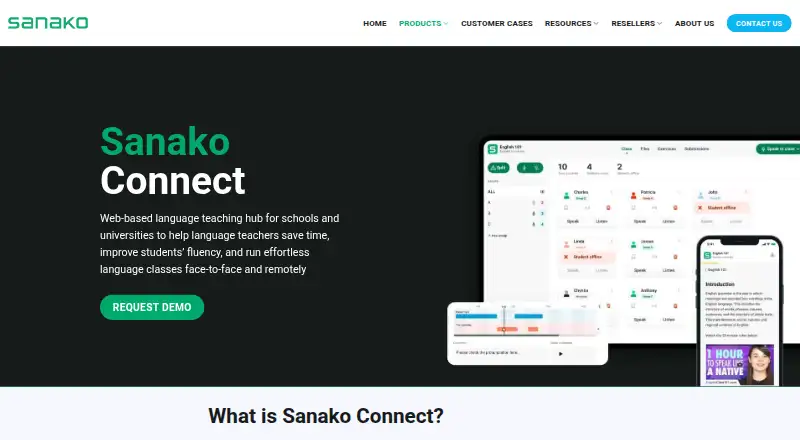
What Sanako Connect is
Sanako Connect is a browser-based platform for professional educators running live or self-paced language classes in high schools, colleges and universities. Teachers can organize pair and group discussions or role-plays, monitor the groups and collect recordings for later review. For pronunciation practice, it provides automatic feedback and scores based on speech models for most modern languages. Teachers can also run speaking assessments for multiple students at once and hold controlled live speaking and listening exams.
Teachers can build interactive work from existing audio or video, including flashcards, vocabulary tests, listening comprehension and gap-fill activities. YouTube videos can be embedded, and teachers can also use their own audio and video files. Students enter a session through a unique link or QR code without logging in. Shared files must be smaller than 100 MB; examples include MP3, MP4, PDF and PPTX.
Connect is available on web, Android, iOS, Linux, macOS and Windows. Its separate US and EU infrastructure instances keep data within each instance’s geographic region, according to its security statement. Data at rest is encrypted with AES-256, while connections use HTTPS with TLS 1.2 or later. The product is described as FERPA, COPPA and GDPR compliant. Pricing is by quote, with a 12-month minimum and packages starting at 15 concurrent student users.
Who it suits
Sanako Connect suits language teachers in high schools, colleges and universities who need live discussion, speaking assessment and self-paced exercises in one browser-based classroom. It is also relevant to educators who want students to join sessions by link or QR code without signing in.
What it does well
- Supports live pair and group discussions, role-plays and recording review.
- Provides automated pronunciation feedback and scoring for most modern languages.
- Creates interactive exercises from audio and video resources.
- Students can join without logging in.
- Runs on web, Android, iOS, Linux, macOS and Windows.
What to know first
- Pricing requires a quote.
- Subscriptions require at least a 12-month term.
- Packages start at 15 concurrent student users.
- Shared files must be under 100 MB.
Limits
Subscriptions have a 12-month minimum, and packages begin at 15 concurrent student users. Shared files must be under 100 MB.
Plans
| Plan | Billed and limits | Price |
|---|---|---|
| Sanako Connect subscription | 12-month minimum; 3- and 5-year contracts are also available · Minimum 15 concurrent student users · packages from 15 to unlimited concurrent users · quote required | On request |
As sanako.com lists them, read 9 Oct 2026. The maker's own page has the final word.
Getting started
- Open the Sanako Connect website.
- Request a quote for a subscription with at least 15 concurrent student users.
- Use Connect through the web platform or an available Android, iOS, Linux, macOS or Windows platform.
- Create a class session and share its unique link or QR code with students.
Verdict
Choose Sanako Connect for language classes that need live speaking activities, pronunciation feedback, controlled exams and interactive tasks. Its quote-based subscription and 15-user minimum may be a poor fit for an individual teacher or a smaller group.
Questions
How much does Sanako Connect cost?
Pricing is available on request. The subscription has a 12-month minimum; three- and five-year contracts are also available.
How many students can a plan support?
Packages start at 15 concurrent student users and extend to unlimited concurrent users.
Which platforms does it support?
Sanako Connect is available on web, Android, iOS, Linux, macOS and Windows.
Do students need an account to join?
Students can enter a session using its unique link or QR code without logging in.
What file types can teachers share?
Shared files must be under 100 MB. Examples include MP3, MP4, PDF and PPTX.
What security and compliance details are provided?
The security statement describes AES-256 encryption for data at rest and HTTPS connections using TLS 1.2 or later. The product is described as FERPA, COPPA and GDPR compliant.
Facts from Sanako Connect's own pages
- Assessments
- Teachers can run simultaneous speaking assessments and controlled live speaking and listening exams. · sanako.com, 9 Oct 2026
- Authoring and materials
- Teachers can create interactive tasks from existing video or audio files and build exercises such as flashcards, vocabulary tests, listening comprehension and gap-fill activities. · sanako.com, 9 Oct 2026
- Company history
- Sanako says it began in 1961, when its first language laboratory was made under the name Tandberg Educational. · sanako.com, 9 Oct 2026
- Compliance
- The product page describes Connect as FERPA, COPPA and GDPR compliant. · sanako.com, 9 Oct 2026
- File limit
- Shared files must be under 100 MB; the FAQ lists MP3, MP4, PDF and PPTX as examples. · sanako.com, 9 Oct 2026
- Founded
- 1961 · sanako.com, 28 Sept 2026
- Headquarters
- Turku, Finland · sanako.com, 28 Sept 2026
- Hosting and regions
- Connect runs on separate USA and European Union infrastructure instances, and the security statement says data is not transferred outside the instance's geographic region. · sanako.com, 9 Oct 2026
- Platforms
- Connect is fully web-based, requires no installation or app download, and works through a modern internet browser; the FAQ says all operating systems are supported. · sanako.com, 9 Oct 2026
- Pronunciation
- The platform provides automatic pronunciation feedback and scoring using speech models in most modern languages. · sanako.com, 9 Oct 2026
- Purpose
- Sanako Connect is a browser-based language teaching platform for live and self-paced classes, aimed at professional educators in high schools, colleges and universities. · sanako.com, 9 Oct 2026
- Security
- The security statement says data at rest is encrypted with AES-256 on MongoDB Atlas and Amazon S3, and connections use HTTPS with TLS 1.2 or greater. · sanako.com, 9 Oct 2026
- Speaking practice
- Teachers can set up live pair and group discussions or role-plays, monitor groups and collect recordings for review. · sanako.com, 9 Oct 2026
- Student access
- Students can join a session by following its unique link or scanning a QR code without logging in. · sanako.com, 9 Oct 2026
- Support
- Sanako provides Connect documentation, FAQs, user guides, IT department information and a security statement through its Help page. · sanako.com, 9 Oct 2026
- Video integration
- Teachers can embed YouTube videos or use their own audio and video files as study resources. · sanako.com, 9 Oct 2026
Where Sanako Connect stands on Freedom251
- Language Pronunciation Apps#33 of 33