Freedom251 › Salon App Builder Software

SalonSynq
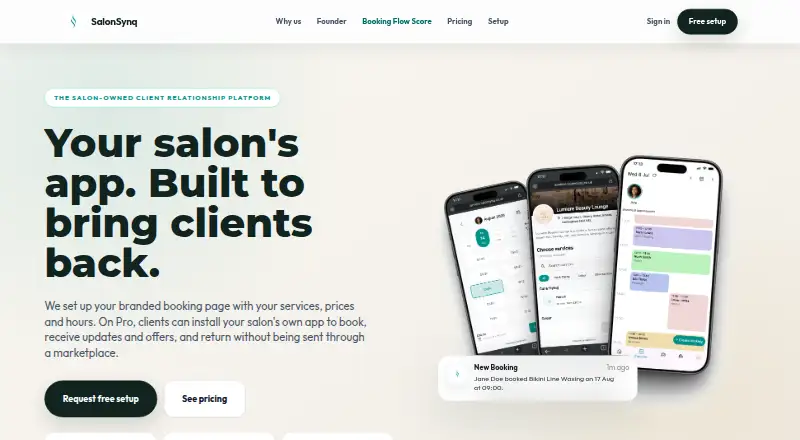
What SalonSynq is
SalonSynq provides booking and business tools for salons and independent beauty professionals. It can create a branded booking page showing services, prices, and hours, and supports team calendars, bookings, reminders, deposits, payment features, cancellation and no-show workflows, reviews, notifications, and analytics. Start is free for one solo professional and includes unlimited bookings, manual payment logging, a vanity booking link, and email reminders, with no SalonSynq online payment fee. Flex is also free and adds no-show protection, online deposits, and Tap-to-Pay on phone, with a 6% transaction fee. Pro costs £22 a month and includes up to four team members at no extra cost, a branded client app, rebooking journeys and offers, and automated SMS reminders; it charges a 2.2% transaction fee plus 20p per online payment. Pro salons can publish updates and offers in the branded app, and scheduled rebooking reminders stop when a client books again. Payments are processed by Stripe or another supported provider. SalonSynq says it does not store full card details and emails users within 24 hours when setup is complete.
Who it suits
SalonSynq suits hair stylists, braiders, barbers, nail technicians, lash and brow artists, and mobile beauty professionals. Solo professionals can use Start, while teams of up to four can use Pro.
What it does well
- Branded booking pages show services, prices, and hours.
- Start includes unlimited bookings for one user.
- Pro includes up to four team members at no extra cost.
- Rebooking reminders stop when a client books again.
- Full card details are not stored by SalonSynq.
What to know first
- Flex charges a 6% transaction fee.
- Pro costs £22 a month.
- Pro charges 2.2% plus 20p per online payment.
Limits
Start is for one solo professional. Flex charges a 6% transaction fee; Pro costs £22 a month and charges 2.2% plus 20p per online payment.
Plans
| Plan | Billed and limits | Price |
|---|---|---|
| Start Plan | Free; no monthly fee · Unlimited bookings · 1 user · manual payment logging · vanity booking link · email reminders · no SalonSynq online payment fee | Free |
| Flex Plan | Free + fees when you earn · All Start features · no-show protection · online deposits · Tap-to-Pay on phone · 6% transaction fee | Free |
| Pro Plan | £22/month; 2.2% transaction fee + 20p per online payment · All Flex features · up to 4 team members free · branded client app · rebooking journeys and offers · automated SMS reminders | £22 a month |
As salonsynq.co.uk lists them, read 2 Oct 2026. The maker's own page has the final word.
Getting started
- Visit the SalonSynq website.
- Install SalonSynq Partner from the App Store or Google Play.
- Continue setup in the iOS or Android partner app.
- Choose Start, Flex or Pro for the features and fees that suit your business.
- Wait for SalonSynq’s email confirming setup completion, which it says arrives within 24 hours.
SalonSynq is booking and business software for salon and beauty professionals, covering solo operators through small teams. It suits businesses that want a free booking foundation and can justify payment fees or a monthly upgrade for deposits, branded apps and retention campaigns.
Overview
SalonSynq brings business profiles, service and price setup, booking links, calendars, reminders, deposits, payment workflows, cancellation and no-show handling, reviews, notifications and analytics into one system. A branded booking page displays your services, prices and opening hours, so a solo professional can offer direct online booking without paying a subscription.
Payment processing uses Stripe or another supported provider, and SalonSynq says it does not store full card details. For booking data, the salon or professional is generally the controller and SalonSynq the processor; the company says it does not sell personal information. It describes access controls, encrypted transport where appropriate, cloud controls, monitoring and operational logs as part of its protection measures.
Key features
- Booking and client management: Unlimited bookings on Start, service configuration, team calendars, reminders, reviews and analytics cover the operational basics. Start is deliberately solo-only, so growing businesses will need Flex or Pro for broader workflows.
- Payments and attendance protection: Start records payments manually and has no SalonSynq online-payment fee. Flex adds online deposits, no-show protection and Tap-to-Pay on a phone, but charges 6% per transaction. That is useful when missed appointments cost more than the fee, less so for high-volume businesses.
- Retention tools: Pro adds a branded client app, service-based rebooking journeys that stop once a client books again, offers and automated SMS reminders. Client messaging, loyalty programs, retail offers and push notifications support ongoing engagement, but these retention features are not part of the free tiers.
- Setup and partner apps: SalonSynq says it emails users within 24 hours when setup is complete. SalonSynq Partner is distributed through the App Store and Google Play, with new users continuing setup in the iOS or Android partner app.
Pricing
| Plan | Price and limits | What you get |
|---|---|---|
| Start Plan | £0.00, billed free; one user | Unlimited bookings, manual payment logging, vanity booking link, email reminders and no SalonSynq online-payment fee. |
| Flex Plan | £0.00, billed free plus fees when you earn; 6% transaction fee | Everything in Start, plus no-show protection, online deposits and Tap-to-Pay on phone. |
| Pro Plan | £22.00 per month; 2.2% transaction fee plus 20p per online payment | Everything in Flex, up to four team members at no extra cost, branded client app, rebooking journeys, offers and automated SMS reminders. |
Start fits a solo professional who can handle payment recording themselves. Flex keeps the subscription free while adding ways to secure appointments, but its 6% fee is the key cost to model. Pro is aimed at small teams and businesses actively using branded-app engagement; it combines the lowest stated payment rate with a fixed monthly charge.
Platforms
SalonSynq runs on Android, iOS and the web. The Partner app is available on both major mobile app stores.
Who it's for
The workflows are intended for hair stylists, braiders, barbers, nail technicians, lash and brow artists and mobile beauty professionals. Start is strongest for one-person businesses. Flex suits solo operators who need deposits or no-show controls, while Pro is the practical fit for salons with up to four team members and a focus on repeat visits and promotions.
Pros and cons
- Pros: Free plans support unlimited bookings; Flex adds deposits and Tap-to-Pay without a monthly fee; Pro includes four team members and a branded app; payment processing is handled by external providers rather than storing full card details.
- Cons: Start permits only one user and requires manual payment logging; Flex's 6% transaction fee can be substantial; branded-app, SMS and automated rebooking tools require Pro's £22 monthly fee plus payment charges.
Alternatives
For a broader software shortlist, see Salon App Builder Software.
- ScheduleAnyone is worth choosing if you need Windows or macOS support, or a free allowance of up to 200 appointments and three staff for up to six months.
- WellnessLiving suits businesses seeking classes alongside appointments and dedicated client and staff apps, with its Starter plan at $62 per month when billed annually.
- Aura'd is a better free fit when 50 bookings a month and five services are enough and you can forgo reminders, analytics and custom branding.
- Next is an alternative for free booking and scheduling with an optional $5-per-month unlimited SMS add-on.
- Salonist offers a free marketplace listing capped at 50 appointments per month, with paid plans beyond that.
- Tonso is an option when you prefer passing booking fees to clients rather than paying a subscription.
- salOWN targets web-only use with one stylist, 50 bookings per month and calendar sync on its free plan.
- Appy Pie Salon App Builder is for businesses wanting app-store publishing, hosting, SSL, push notifications, Stripe payments and loyalty from $18 per month.
Verdict
Choose SalonSynq if you are a solo beauty professional or a small salon that wants unlimited free bookings and a clear path to deposits, team scheduling and branded retention tools. Look elsewhere if a percentage-based payment fee is unacceptable, your team exceeds four members, or you need a different platform mix than Android, iOS and web.
Verdict
SalonSynq offers a free starting point for solo professionals and a paid option with team and branded-app features. Compare each plan’s payment fees and included tools against the way your business handles bookings.
Questions
Does SalonSynq have a free plan?
Yes. Start and Flex are each listed at £0.00 per free. Flex charges a 6% transaction fee when you earn.
What does Start include?
Start includes unlimited bookings, one user, manual payment logging, a vanity booking link and email reminders. It has no SalonSynq online payment fee.
What does Pro cost?
Pro costs £22 a month, plus a 2.2% transaction fee and 20p per online payment.
Which platforms does SalonSynq support?
SalonSynq is available on Android, iOS and the web. New users continue setup in the iOS or Android SalonSynq Partner app.
How are payments processed?
Payment processing is provided by Stripe or another supported payment provider. SalonSynq says it does not store full card details.
Facts from SalonSynq's own pages
- Branded booking
- SalonSynq sets up a branded booking page with the salon’s services, prices and hours. · salonsynq.co.uk, 2 Oct 2026
- Client retention
- Pro salons can publish updates and offers through their branded app and schedule service-based rebooking reminders that stop when a client books again. · salonsynq.co.uk, 2 Oct 2026
- Data protection roles
- For client booking information, the salon or professional is usually the controller and SalonSynq usually acts as processor; SalonSynq says it does not sell personal information. · salonsynq.co.uk, 2 Oct 2026
- Integrations and providers
- The privacy policy names AWS, MongoDB Atlas, AWS S3, Firebase/Google, Stripe, Apple and Google among service providers it may share information with as needed. · salonsynq.co.uk, 2 Oct 2026
- Intended users
- The maker describes workflows for hair stylists, braiders, barbers, nail technicians, lash and brow artists, and mobile beauty professionals. · salonsynq.co.uk, 2 Oct 2026
- Limits
- The Start plan is for one solo professional, while Pro includes up to four team members at no extra cost. · salonsynq.co.uk, 2 Oct 2026
- Partner apps
- SalonSynq Partner is available on the App Store and Google Play, and new users continue setup in the iOS or Android partner app. · salonsynq.co.uk, 2 Oct 2026
- Payment processing
- Payment processing is provided by Stripe or another supported payment provider, and SalonSynq says it does not store full card details. · salonsynq.co.uk, 2 Oct 2026
- Product
- SalonSynq provides software tools for salon and beauty businesses, including business profiles, booking links, service setup, team calendars, client bookings, reminders, deposits, payment features, cancellation and no-show workflows, reviews, notifications and analytics. · salonsynq.co.uk, 2 Oct 2026
- Security
- SalonSynq says it uses access controls, encrypted transport where appropriate, cloud security controls, monitoring and operational logging to protect personal information. · salonsynq.co.uk, 2 Oct 2026
- Setup
- SalonSynq says it emails users within 24 hours when setup is complete. · salonsynq.co.uk, 2 Oct 2026
- Support
- The terms direct questions to [email protected]. · salonsynq.co.uk, 2 Oct 2026
Where SalonSynq stands on Freedom251
- Salon App Builder Software#6 of 37