Freedom251 › RSS Reader Software
RSS Guard
What RSS Guard is
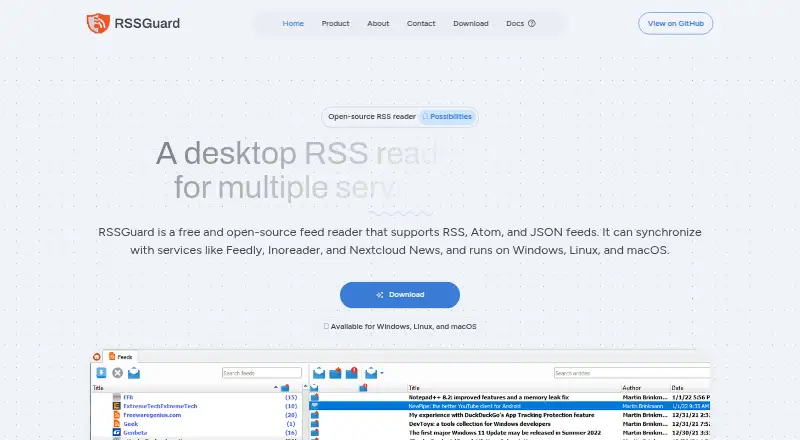
RSS Guard is a free, open-source desktop app for reading feeds and playing podcasts on Windows, macOS, and Linux. It reads RSS, Atom, JSON Feed, iCalendar, and Sitemap sources, and supports services including Feedly, Inoreader, Tiny Tiny RSS, Nextcloud News, Gmail, FreshRSS, and The Old Reader. Its built-in podcast player uses mpv or FFmpeg. JavaScript filters can remove duplicate articles, filter items, and assign labels; full-text extraction and offline reading are also supported. Storage choices include embedded SQLite or a MariaDB server. The app includes dark and light themes, skins, customizable toolbars, and native support for the Gemini protocol. Standard includes a built-in QtWebEngine browser; Lite instead uses a text-based viewer. RSS Guard says it has no telemetry, collects no user data, shows no targeted ads, and requires no registration. It can work offline except when cloud services are used. Support is through community chats, discussions, and issue channels rather than a traditional support desk.
Who it suits
RSS Guard suits readers who want a desktop feed reader and podcast player, with support for multiple feed formats and services. It may also suit people seeking offline use and customization.
What it does well
- Free and open-source under GNU GPL v3.0.
- Supports RSS, Atom, JSON Feed, iCalendar, and Sitemap.
- Podcast playback uses mpv or FFmpeg.
- Offers offline reading and JavaScript filters.
- No registration is required.
What to know first
- It is a desktop app, not listed for web or mobile.
- Lite omits the built-in browser.
- There is no traditional support desk.
Limits
The free plan is the desktop feed reader and podcast player. The Lite edition omits the browser, and offline operation does not apply while using cloud services.
Plans
| Plan | Billed and limits | Price |
|---|---|---|
| Free and open-source | GNU GPL v3.0 · Desktop feed reader and podcast player | Free |
As rssguard.com lists them, read 2 Oct 2026. The maker's own page has the final word.
Getting started
- Visit the RSS Guard website.
- Choose the Standard or Lite edition.
- Select a build for Linux, macOS, or Windows.
- Install and open the desktop app.
- Add feeds or connect a supported service.
Verdict
RSS Guard combines feed reading, podcast playback, filtering, and offline use in a free desktop app. Choose between Standard’s built-in browser and Lite’s text-based viewer, and expect community-based rather than traditional support.
Questions
How much does RSS Guard cost?
The listed plan is free and costs nothing.
Which platforms does it support?
The listed platforms are Linux, macOS, and Windows. Its about page also lists BSD and OS/2, and specifies Windows 10/11 and macOS 10.14 or later.
Is RSS Guard open source?
Yes. The listed free plan is under GNU GPL v3.0.
Does it require registration?
No. The product page says registration is not required.
What services can it connect to?
Supported services include Feedly, Inoreader, Tiny Tiny RSS, Nextcloud News, Gmail, FreshRSS, Bazqux, and The Old Reader.
How can users get support?
The project directs users to Discord and XMPP chats, GitHub Discussions, and GitHub Issues. It says it has no traditional support desk.
Facts from RSS Guard's own pages
- Customization
- The app supports dark and light themes, skins, and customizable toolbars. · rssguard.com, 2 Oct 2026
- Editions
- The Standard edition includes a built-in QtWebEngine browser, while Lite has no browser and uses a text-based viewer. · rssguard.com, 2 Oct 2026
- Feed formats
- It supports RSS, Atom, JSON Feed, iCalendar, and Sitemap. · rssguard.com, 2 Oct 2026
- Filtering
- JavaScript filters can process articles, including removing duplicates, filtering, and assigning labels. · rssguard.com, 2 Oct 2026
- Founded
- 2011 · rssguard.com, 28 Sept 2026
- Gemini
- RSS Guard has native support for the Gemini protocol. · rssguard.com, 2 Oct 2026
- Integrations
- The site lists Feedly, Inoreader, Tiny Tiny RSS, Nextcloud News, Gmail, FreshRSS, Bazqux, and The Old Reader among supported services. · rssguard.com, 2 Oct 2026
- Platform support
- The about page lists Windows 10/11, GNU/Linux, macOS 10.14 or later, BSD, and OS/2. · rssguard.com, 2 Oct 2026
- Podcasts
- Its built-in podcast player is based on mpv or FFmpeg. · rssguard.com, 2 Oct 2026
- Privacy
- The site says RSS Guard has no telemetry and can work offline except when using cloud services. · rssguard.com, 2 Oct 2026
- Product
- RSS Guard is a free, open-source desktop news aggregator and podcast player. · rssguard.com, 2 Oct 2026
- Project history
- The about page says development began in 2011 and the first GitHub release was in 2014. · rssguard.com, 2 Oct 2026
- Registration and ads
- The product page says RSS Guard does not collect user data, show targeted ads, or require registration. · rssguard.com, 2 Oct 2026
- Storage
- It supports SQLite embedded storage or MariaDB server storage. · rssguard.com, 2 Oct 2026
- Support
- The project directs users to Discord and XMPP chats, GitHub Discussions, and GitHub Issues, and says it has no traditional support desk. · rssguard.com, 2 Oct 2026
Where RSS Guard stands on Freedom251
- RSS Reader Software#22 of 33