Freedom251 › Product Demo Automation
Riveo
What Riveo is
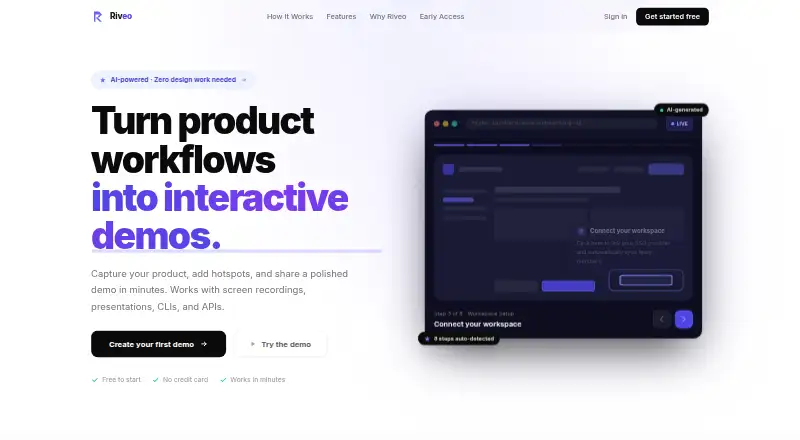
Riveo turns product workflows into interactive demos using recordings, presentations, command-line interfaces, and APIs. Its AI extracts frames, arranges them into steps, places hotspots, and drafts tooltip text; users can then change the steps, hotspot positions, tooltips, and order. It accepts MOV, MP4, and WebM recordings, as well as PPTX, Keynote, and PDF files. A Chrome extension captures screenshots and DOM element positions during an active, user-started recording. Riveo detects terminal, IDE, and API content and adjusts the demo style automatically. Demos are shared by link, and analytics track views, time per step, click-throughs, and drop-off. A configurable lead capture form can be added inside a demo. The free Early access plan includes unlimited demos and all features, with no credit card required. The homepage says founding users can lock in a future price of $29 per month; paid plans will be announced before charges and require explicit opt-in. Riveo says shared demos can be accessed by anyone with the link.
Who it suits
Riveo suits product teams that want to turn recorded sessions or presentation material into interactive walkthroughs. Its analytics and lead form may also fit teams sharing demos with prospective users.
What it does well
- Creates demos from recordings, presentations, CLIs, and APIs
- Users can edit generated steps and hotspots
- Analytics cover views, step time, clicks, and drop-off
- Free Early access includes unlimited demos and all features
- Extension runs only during user-started recordings
What to know first
- Shared demos are accessible to anyone with the link
- Paid plan details are not yet announced
- Founding-user price refers to a future $29 monthly price
Limits
The Early access plan is billed Free at 0.00 USD, with unlimited demos and all features. Shared demos can be viewed by anyone who has the link.
Plans
| Plan | Billed and limits | Price |
|---|---|---|
| Early access | Free during early access; no credit card required · Unlimited demos · all features | Free |
As getriveo.com lists them, read 9 Oct 2026. The maker's own page has the final word.
Getting started
- Open the Riveo website
- Use the web app or install its Chrome extension
- Upload a recording, presentation, or document, or start a Chrome capture
- Let Riveo generate steps, hotspots, and tooltip copy
- Edit the generated demo and share it by link
Verdict
Riveo combines demo generation and editing with link sharing, analytics, and an optional lead form. The Early access plan is free, but shared links are open to anyone who has them and future paid terms remain pending.
Questions
Is Riveo free?
Yes. Early access is billed Free at 0.00 USD, requires no credit card, and includes unlimited demos and all features.
What can Riveo upload?
It accepts MOV, MP4, and WebM screen recordings, plus PPTX, Keynote, and PDF files.
Which platforms does Riveo support?
Riveo is available as a web service and a browser extension, including a Chrome extension for capture.
What analytics are included?
Shared demos can track views, time per step, click-throughs, and drop-off.
Does Riveo capture audio or keystrokes?
Its extension policy says it does not record audio or video, capture keystrokes or form values, or run outside a user-started recording session.
Will Riveo charge for future plans?
Paid plans will be announced before charges and require explicit opt-in. The homepage says founding users can lock in a future price of $29 per month.
Facts from Riveo's own pages
- AI data handling
- The terms state AI-processed content is derived from demo content and is not used to train third-party models. · getriveo.com, 9 Oct 2026
- AI generation
- It extracts frames, groups them into steps, positions hotspots, and writes tooltip copy automatically. · getriveo.com, 9 Oct 2026
- Chrome capture
- The Chrome extension records a product session and captures screenshots and DOM element positions during an active recording. · getriveo.com, 9 Oct 2026
- Developer workflows
- Riveo detects terminal, IDE, and API content and adapts the demo style automatically. · getriveo.com, 9 Oct 2026
- Early access pricing
- The homepage says founding users can lock in a future price of $29 per month; the terms state paid plans will be announced before charges and require explicit opt-in. · getriveo.com, 9 Oct 2026
- Editing
- Users can edit demo steps, hotspot positions, tooltips, and step order after generation. · getriveo.com, 9 Oct 2026
- Extension privacy
- The extension policy says it does not record audio or video, capture keystrokes or form values, or run outside a user-started recording session. · getriveo.com, 9 Oct 2026
- Lead capture
- Riveo supports a configurable lead capture form within a demo. · getriveo.com, 9 Oct 2026
- Security
- The privacy policy states that data is encrypted in transit with TLS 1.2 or higher and at rest with AES-256, with infrastructure hosted on AWS in us-east-1. · getriveo.com, 9 Oct 2026
- Sharing and analytics
- Demos are shared by link, and analytics track views, time per step, click-throughs, and drop-off. · getriveo.com, 9 Oct 2026
- Sharing limit
- The terms say a shared demo is accessible to anyone with its link. · getriveo.com, 9 Oct 2026
- Support
- The privacy page says the privacy team responds within two business days. · getriveo.com, 9 Oct 2026
- Supported uploads
- It accepts screen recordings, including MOV, MP4, and WebM, plus PPTX, Keynote, and PDF files. · getriveo.com, 9 Oct 2026
- What it does
- Riveo turns product workflows into interactive demos from recordings, presentations, CLIs, and APIs. · getriveo.com, 9 Oct 2026
Where Riveo stands on Freedom251
- Product Demo Automation#13 of 24
- Interactive Product Demo Software#23 of 42