Freedom251 › Font Management Software

RightFont
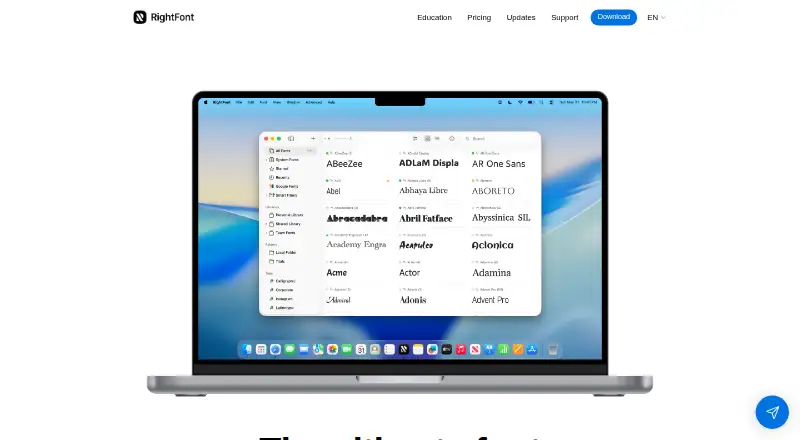
What RightFont is
RightFont is a Mac font manager for organizing, previewing, activating, and sharing typefaces. It combines local folders, Google Fonts, and team libraries in one workspace, with Unified Search, tags, font sets, and Smart Filters for organization. Preview presets, OpenType features, glyphs, and detailed font information help compare fonts. Missing-font auto-activation is listed for Adobe apps, Sketch, Affinity, QuarkXPress, and others, while supported applications such as Microsoft Office can change fonts with one click. Libraries can sync through Dropbox and Google Drive, and teams can share fonts and font lists through a portable Font Library folder. Supported formats include OTF, TTF, TTC, dfont, WOFF, and PostScript Type 1. The app requires macOS 11 or newer and supports Intel and Apple silicon Macs. It includes duplicate detection, a fully functional 15-day trial, and a one-time Single License purchase.
Who it suits
RightFont suits Mac users who manage personal or shared font libraries. It is also aimed at teams sharing fonts through cloud folders or a portable Font Library.
What it does well
- Combines local, Google, and team libraries
- Search, tags, sets, and Smart Filters
- Auto-activation for listed creative apps
- Supports multiple font formats
- Team font sharing and cloud sync
What to know first
- Made exclusively for Mac
- Requires macOS 11 or newer
- No free plan
- PostScript Type 1 cannot sync via Google Drive
Limits
The trial is fully functional for 15 days. The Single License covers one device and includes one year of updates and support; PostScript Type 1 fonts cannot sync through Google Drive.
Plans
| Plan | Billed and limits | Price |
|---|---|---|
| Volume License | One-time purchase; page shows $250.75, reduced from $295.00 · Device quantity is not visible on the page · 1 year of updates/support · 24/7 email support · 30-day money-back guarantee | $250.75, paid once |
| Single License | One-time purchase · 1 device · 1 year of updates/support · 24/7 email support · 30-day money-back guarantee | $59, paid once |
As rightfontapp.com lists them, read 2 Oct 2026. The maker's own page has the final word.
Getting started
- Open https://rightfontapp.com/
- Confirm the Mac runs macOS 11 or newer
- Start the fully functional 15-day trial
- Choose the Single License or Volume License
- Connect Dropbox or Google Drive for library syncing
- Create or access a portable Font Library folder for team sharing
Verdict
RightFont focuses on organizing and activating fonts across Mac workflows, with previews, cloud synchronization, and team sharing. A 15-day trial is available, followed by a one-time license starting at $59, paid once.
Questions
How much does RightFont cost?
The Single License costs $59, paid once as a one-time purchase. The Volume License is listed at $250.75, paid once.
Is there a free plan?
No. RightFont offers a fully functional 15-day free trial instead.
Which operating systems are supported?
RightFont is made exclusively for Mac and requires macOS 11 or newer. It supports Intel and Apple silicon Macs.
Which font formats are supported?
Supported formats include OTF, TTF, TTC, dfont, PostScript Type 1, and WOFF.
Can libraries sync to cloud storage?
Yes. Font libraries can sync through Dropbox and Google Drive, except PostScript Type 1 fonts cannot sync through Google Drive.
Can teams share fonts?
Yes. Teams can share fonts and font lists through a portable Font Library folder, including from Dropbox or Google Drive.
Facts from RightFont's own pages
- App integrations
- The site lists missing-font auto-activation for Adobe apps, Sketch, Affinity, QuarkXPress, and others, and one-click font changing for supported apps including Microsoft Office. · rightfontapp.com, 2 Oct 2026
- Cloud sync
- The FAQ says font libraries can sync through Dropbox and Google Drive, and notes PostScript Type 1 fonts are not supported for syncing via Google Drive. · rightfontapp.com, 2 Oct 2026
- Education discount
- Eligible students and educational institutions can request a 30% education offer. · rightfontapp.com, 2 Oct 2026
- Enterprise sharing
- The Enterprise page says teams can share fonts and font lists through a portable Font Library folder, including from Dropbox or Google Drive. · rightfontapp.com, 2 Oct 2026
- Font preview
- Users can compare fonts with preview presets, OpenType features, glyphs, and detailed font information. · rightfontapp.com, 2 Oct 2026
- Library management
- It brings local folders, Google Fonts, and team libraries into one workspace. · rightfontapp.com, 2 Oct 2026
- Privacy and security
- The privacy policy says RightFont takes reasonable measures to protect personal information but cannot guarantee absolute security. · rightfontapp.com, 2 Oct 2026
- Purpose
- RightFont is a font manager for Mac to organize, preview, activate, and share fonts. · rightfontapp.com, 2 Oct 2026
- Requirements
- The app is made exclusively for Mac and requires macOS 11 or newer; it supports Intel and Apple silicon Macs. · rightfontapp.com, 2 Oct 2026
- Search and organization
- Features include Unified Search, tags, font sets, and Smart Filters. · rightfontapp.com, 2 Oct 2026
- Support
- The About page says users can email the team and they will be contacted within 24 hours. · rightfontapp.com, 2 Oct 2026
- Supported formats
- Supported formats listed include OTF, TTF, TTC, dfont, WOFF, and PostScript Type 1. · rightfontapp.com, 2 Oct 2026
- Trial
- RightFont offers a fully functional 15-day free trial. · rightfontapp.com, 2 Oct 2026
Where RightFont stands on Freedom251
- Font Management Software#23 of 27