Retoucher Background Remover
What Retoucher Background Remover is
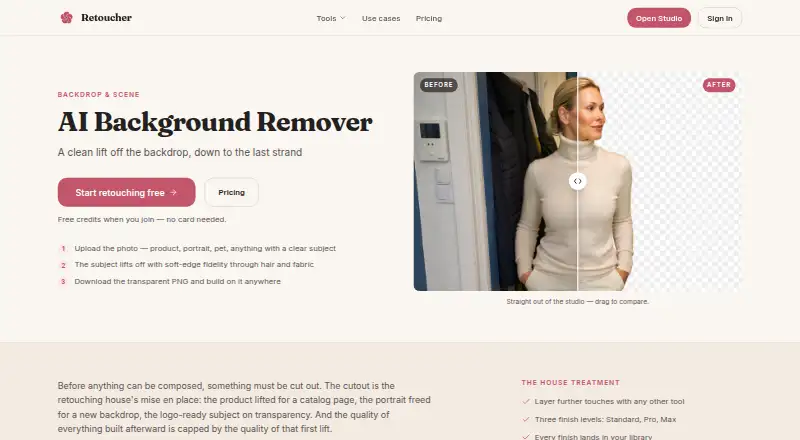
Retoucher Background Remover is a web-based AI tool that separates a subject from its background and returns a transparent PNG with an alpha channel. It supports partial transparency around hair, fur, lace, and shallow-focus blur. The page names people, products, pets, and plants as suitable subjects when they contrast reasonably with their surroundings. In busy scenes, it keeps the prominent foreground subject and recommends cropping to that subject first. Results can be placed on a flat color, sent to Backdrop Swap, or exported to a design tool. Standard, Pro, and Max finish levels are available, with results stored in a library. New accounts receive four credits without a card; one cutout uses one credit. The free plan is available, while monthly plans cost $15.00, $30.00, or $50.00 USD and provide 1,000, 2,500, or 5,000 credits respectively. Replacement backgrounds are not included.
Who it suits
It suits occasional photo editors, sellers, creators, studios, agents, and client-work users needing transparent PNG cutouts. It is designed for subjects with reasonable contrast and offers monthly credit plans for higher volume.
What it does well
- Exports transparent PNG files
- Handles soft-edge transparency
- Offers four starter credits
- Supports Backdrop Swap and design export
- Provides three monthly credit tiers
What to know first
- No replacement backgrounds
- Web access only
- Each cutout uses one credit
- No free trial
Plans
| Plan | Billed and limits | Price |
|---|---|---|
| Starter | $15/month · 1,000 credits monthly · around 250 Standard finishes · full treatment menu and Studio desk · print upscales and living photos | $15 a month |
| Pro | $30/month · 2,500 credits monthly · Pro finishes · full treatment menu and Studio desk | $30 a month |
| Studio | $50/month · 5,000 credits monthly · Max finishes and motion at volume · full treatment menu and Studio desk | $50 a month |
| Free credits | 4 credits on account creation · One Standard-quality pass · no card required | Free |
As retoucher.com lists them, read 15 Oct 2026. The maker's own page has the final word.
Verdict
Retoucher Background Remover focuses on isolating subjects and exporting transparent PNGs, with free credits and paid monthly allowances. Choose a plan according to image volume, and note that adding a replacement background is outside this tool.
Facts from Retoucher Background Remover's own pages
- Age requirement
- Users must be at least 13, and users under 18 need parental or guardian permission. · retoucher.com, 15 Oct 2026
- API and SDK availability
- The opened Retoucher product, pricing, privacy and terms pages provide no public API, SDK or developer-documentation details. · retoucher.com, 15 Oct 2026
- Background removal
- The Background Remover isolates a prominent subject and exports a transparent PNG with an alpha channel. · retoucher.com, 15 Oct 2026
- Broad content licence
- By using the service, users grant Retoucher a perpetual, worldwide, royalty-free, sublicensable licence over prompts, uploads and outputs. · retoucher.com, 15 Oct 2026
- Busy scenes
- When several items compete, the remover keeps the prominent foreground subject, and the page recommends cropping to the target first. · retoucher.com, 11 Oct 2026
- Content ownership
- The terms say users retain ownership of generated images and videos to the maximum extent allowed by law. · retoucher.com, 15 Oct 2026
- Credit model
- A Standard finish costs 4 credits, Pro costs 12, Max costs 44, background cutouts cost 1, print upscales start at 3, and motion costs from 1 credit per second. · retoucher.com, 15 Oct 2026
- Data retention
- The privacy policy says information is retained while an account is active or as needed for service, legal obligations, disputes, and agreement enforcement. · retoucher.com, 11 Oct 2026
- Edge handling
- The remover supports soft partial transparency around difficult details such as hair, glass, smoke and veils. · retoucher.com, 15 Oct 2026
- Export formats
- PNG · retoucher.com, 23 Sept 2026
- Finish levels
- Retoucher offers Standard, Pro and Max quality levels. · retoucher.com, 15 Oct 2026
- Finish options
- The remover offers Standard, Pro, and Max finish levels, and results land in the user's library. · retoucher.com, 11 Oct 2026
- Free credits
- New accounts receive 4 free credits, enough for one Standard-quality pass with this tool, without a card. · retoucher.com, 11 Oct 2026
- Free plan
- Yes · retoucher.com, 23 Sept 2026
- Independent feature coverage
- SpotSaaS records 9 of 29 tracked features, or 31% feature coverage, for Retoucher Online. · spotsaas.com, 15 Oct 2026
- Independent integrations finding
- SpotSaaS says it has no integration information for Retoucher Online. · spotsaas.com, 15 Oct 2026
- Independent pricing finding
- SpotSaaS classifies the product as freemium with a free plan and says no free trial is available in its listing. · spotsaas.com, 15 Oct 2026
- Independent security finding
- SpotSaaS lists global data residency and says Retoucher Online is not HIPAA certified. · spotsaas.com, 15 Oct 2026
- Integrations
- The product page describes sending cutouts to Backdrop Swap or exporting them into a design tool of the user's choice. · retoucher.com, 11 Oct 2026
- Intended users
- The plans describe use by occasional photo editors, sellers, creators, steady shooters, studios, agents, and client work. · retoucher.com, 11 Oct 2026
- International transfers
- The policy says information may be transferred to computers outside the user's country or jurisdiction. · retoucher.com, 15 Oct 2026
- Layered workflow
- Results can be sent directly into other Retoucher tools without exporting between steps. · retoucher.com, 15 Oct 2026
- Limit: complex images
- SpotSaaS warns that intricate image details may be difficult for the product to handle. · spotsaas.com, 15 Oct 2026
- Limit: connectivity
- SpotSaaS lists an internet connection requirement as a limitation. · spotsaas.com, 15 Oct 2026
Where Retoucher Background Remover stands on Freedom251
- AI Photo Editors#68 of 96
- Photo editors#73 of 96
- AI Background Removers#74 of 94
- Background removers#63 of 70