Freedom251 › AI PDF Assistants
Regeste
What Regeste is
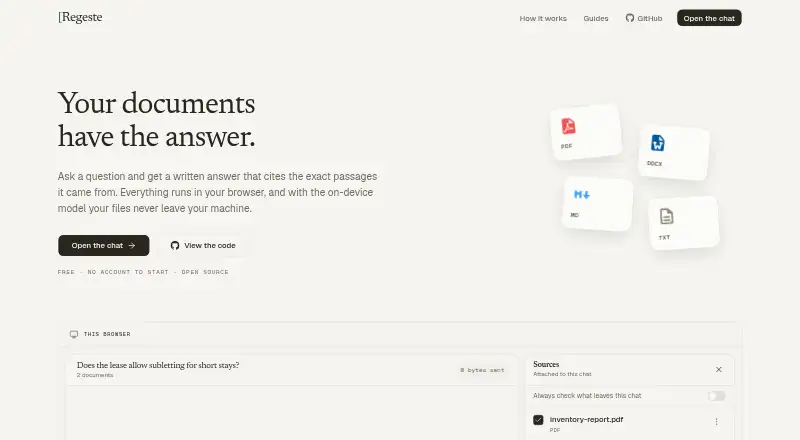
Regeste lets users ask questions about documents and receive answers tied to numbered citations. Documents are read, indexed, and searched in the browser; selecting a citation opens the document at the highlighted passage. Users can choose on-device answering, cloud answers, or an AI server they run themselves. In on-device mode, documents, index, chats, questions, and answers remain in the browser, and answering does not contact Regeste’s server. This option requires a model file downloaded once and kept in the browser. For cloud answers, the question and passages a user approves pass through the server to the model and are not stored in a database. Users can review the passages before sending and untick any they want to keep on their device. The user-server option supports AI endpoints such as Ollama and LM Studio; the project README also names vLLM and OpenAI-compatible APIs. Regeste is free, requires no account to start, and is available on the web or self-hosted on the user’s domain. Its code is public under the AGPL license. Cloud answer mode has a daily allowance, and documents cannot be added when browser storage is blocked; no fallback storage is identified.
Who it suits
Regeste suits people who want document answers linked to exact passages and want a choice of local, cloud, or self-run AI answering. It may appeal to users who prefer browser-based processing or self-hosting.
What it does well
- Numbered citations open highlighted source passages.
- No account is needed to start.
- On-device answering does not contact Regeste’s server.
- Cloud passages can be reviewed before sending.
- Can be self-hosted on the user's domain.
What to know first
- Cloud answer mode has a daily allowance.
- On-device answering requires a downloaded model file.
- Blocked browser storage prevents adding documents.
- Cloud mode sends approved passages through a server.
Limits
The free plan’s cloud answer mode has a daily allowance. On-device answering depends on browser storage for the documents and downloaded model.
Plans
| Plan | Billed and limits | Price |
|---|---|---|
| Free | No account to start · Cloud answer mode has a daily allowance | Free |
As regeste.com lists them, read 9 Oct 2026. The maker's own page has the final word.
Getting started
- Open Regeste in a web browser.
- Add documents for browser reading, indexing, and search.
- Choose on-device, cloud, or a self-run AI server answering.
- Download a model file for on-device answering.
- Connect a supported endpoint such as Ollama or LM Studio when using your own server.
Verdict
Regeste offers citation-linked document answers with several ways to handle answering and data. Check browser storage availability and the daily cloud allowance against your intended use.
Questions
Is Regeste free?
Yes. The Free plan costs nothing and has no account requirement to start.
Which platforms does Regeste support?
It is available on the web and can be self-hosted on your own domain.
Does Regeste provide source citations?
Yes. Answers include numbered citations that open the document at the highlighted passage.
Can documents stay on the device?
Yes. On-device mode keeps documents, indexes, chats, questions, and answers in the browser and does not contact Regeste’s server while answering.
Which self-run AI services can connect?
The user-server mode supports Ollama and LM Studio; the project README also names vLLM and OpenAI-compatible APIs.
Facts from Regeste's own pages
- Answer modes
- Users can choose an on-device model, a cloud answer, or an AI server they run themselves. · regeste.com, 9 Oct 2026
- Browser storage limitation
- The help page says documents cannot be added when browser storage is blocked, and identifies no fallback storage. · regeste.com, 9 Oct 2026
- Citations
- Answers include numbered citations that open the document at the highlighted passage. · regeste.com, 9 Oct 2026
- Cloud data handling
- For cloud answers, the question and passages approved by the user pass through the server to the model and are not stored in a database. · regeste.com, 9 Oct 2026
- Cloud review
- Before cloud mode sends content, users can review the passages and untick any they want to keep on their device. · regeste.com, 9 Oct 2026
- Document processing
- Documents are read, indexed and searched in the browser. · regeste.com, 9 Oct 2026
- Integrations
- The user-server mode supports AI endpoints such as Ollama and LM Studio; the project README also names vLLM and OpenAI-compatible APIs. · github.com, 9 Oct 2026
- Local model requirement
- On-device answering requires a model file that is downloaded once and kept in the browser. · regeste.com, 9 Oct 2026
- On-device privacy
- In on-device mode, documents, index, chats, questions and answers stay in the browser, and answering does not contact Regeste’s server. · regeste.com, 9 Oct 2026
- Purpose
- Regeste lets users ask questions about their documents and get answers citing the exact passages used. · regeste.com, 9 Oct 2026
- Self-hosting and license
- The code is public under AGPL and can be run on the user's own domain. · regeste.com, 9 Oct 2026
- Support
- The privacy page directs questions to [email protected]. · regeste.com, 9 Oct 2026
Where Regeste stands on Freedom251
- AI PDF Assistants#22 of 27