Freedom251 › Photo Editing Software
RapidRAW
by RapidRAW
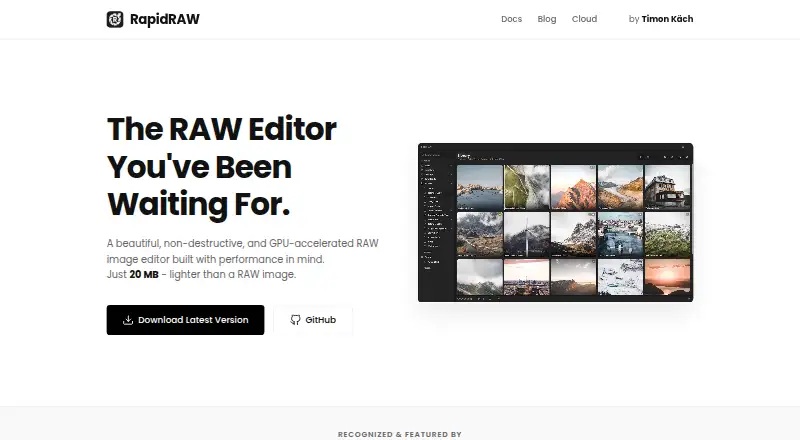
What RapidRAW is
RapidRAW is a non-destructive RAW image editor that processes image adjustments on the GPU for real-time feedback. It stores edits in sidecar files, leaving original images untouched. The editor includes an image library, presets, batch operations, tone curves, an HSL color mixer, detail enhancement, and effects. Built-in AI tools provide subject, sky, and foreground masking, automatic image tagging, and simple object removal. AI masks currently run on the CPU and may take a few seconds on a modern CPU. RapidRAW can connect to a user’s local ComfyUI server for generative edits using the user’s own hardware and models. Its desktop editing and local AI features run on the user’s computer, and the company says it does not receive photos or usage statistics from the desktop app. RapidRAW Cloud processes only a crop around a masked area, not the full RAW file; crops are handled in memory and discarded after the result returns. The free desktop editor includes standard RAW editing and local AI tools. Cloud costs $14 a month, tax included, for 200 cloud edits each month, without requiring a local dedicated GPU. The app is listed for Windows, macOS, and Linux, plus an experimental Android APK. Batch exports support JPEG, PNG, TIFF, WebP, JPEG XL, AVIF, and CUBE LUT.
Who it suits
RapidRAW suits photographers who want to edit RAW images with GPU-processed adjustments while keeping originals unchanged. Its free desktop editor and local AI tools suit users who can work on Windows, macOS, or Linux; the experimental Android APK is another option. Cloud users who want 200 remote edits each month can choose the paid plan.
What it does well
- Sidecar files preserve original images while storing edits separately.
- GPU processing provides real-time feedback for image adjustments.
- Built-in tools include masking, tagging, and simple object removal.
- Connects to a local ComfyUI server for generative edits.
- Batch export supports seven named image formats and CUBE LUT.
- Desktop editing and local AI run on the user's computer.
What to know first
- AI masks run on the CPU and may take a few seconds on a modern CPU.
- The Android build is experimental and distributed as an APK.
- Cloud plan is limited to 200 edits each month.
Limits
The free desktop plan includes standard RAW editing and local AI tools. RapidRAW Cloud costs $14 a month, tax included, and includes 200 cloud edits each month; AI masks run on the CPU and may take a few seconds on a modern CPU.
Plans
| Plan | Billed and limits | Price |
|---|---|---|
| RapidRAW desktop editor | Open-source desktop editor; standard RAW editing and local AI tools are free | Free |
| RapidRAW Cloud | Simple monthly billing, tax included · 200 cloud edits each month · no local dedicated GPU required | $14 a month |
As getrapidraw.com lists them, read 11 Oct 2026. The maker's own page has the final word.
Getting started
- Visit the RapidRAW website.
- Choose Windows, macOS, or Linux, or use the experimental Android APK.
- Use the free desktop editor for standard RAW editing and local AI tools.
- Connect to a local ComfyUI server if you want to use your own hardware and models for generative edits.
- Choose RapidRAW Cloud at $14 a month, tax included, for 200 cloud edits each month if needed.
Verdict
Choose RapidRAW if you want a free desktop RAW editor with sidecar edits, GPU adjustments, and local AI tools. Look elsewhere if you need AI masking to run on the GPU, or if the 200 monthly Cloud edits do not meet your needs.
Questions
How much does RapidRAW cost?
The RapidRAW desktop editor is free. RapidRAW Cloud costs $14 a month, tax included, for 200 cloud edits each month.
Which platforms does it support?
The installation guide lists Windows, macOS, and Linux, plus an experimental Android build distributed as an APK.
Does RapidRAW support RAW files and masking?
Yes. It is a RAW image editor and includes subject, sky, and foreground masking tools.
Does the desktop app send photos to the company?
The privacy policy says desktop editing and local AI run on the user's computer, and the company does not receive photos or usage statistics from the desktop app.
Does Cloud upload a full RAW file?
No. Cloud sends only a crop around the masked area for processing. The crop is processed in memory and discarded after the result is returned.
Can RapidRAW connect to ComfyUI?
Yes. It can connect to a user's local ComfyUI server for generative edits using their own hardware and models.
Facts from RapidRAW's own pages
- AI retouching
- Yes · getrapidraw.com, 22 Sept 2026
- AI tools
- Built-in AI features include subject, sky, and foreground masking, automatic image tagging, and simple object removal. · getrapidraw.com, 11 Oct 2026
- Batch editing
- Yes · getrapidraw.com, 22 Sept 2026
- Cloud data handling
- The privacy policy says Cloud crops are processed in memory, discarded after the result is returned, and not stored in the company’s database or logs. · getrapidraw.com, 11 Oct 2026
- Cloud processing
- RapidRAW Cloud sends only a crop around the masked area for processing; the full RAW file is not uploaded. · getrapidraw.com, 11 Oct 2026
- ComfyUI integration
- RapidRAW can connect to a user’s local ComfyUI server for self-hosted generative edits using their own hardware and models. · getrapidraw.com, 11 Oct 2026
- Editing workflow
- Edits are stored in sidecar files, leaving original images untouched. · getrapidraw.com, 11 Oct 2026
- Export formats
- Batch export supports JPEG, PNG, TIFF, WebP, JPEG XL, AVIF, and CUBE LUT. · getrapidraw.com, 11 Oct 2026
- Features
- The editor includes an image library, presets, batch operations, tone curves, an HSL color mixer, detail enhancement, and effects. · getrapidraw.com, 11 Oct 2026
- Free plan
- Yes · getrapidraw.com, 22 Sept 2026
- GPU processing
- The product page says image adjustments are processed on the GPU for real-time feedback. · getrapidraw.com, 11 Oct 2026
- Headquarters
- Kriens, Switzerland · getrapidraw.com, 28 Sept 2026
- Maker
- The maker’s site identifies Timon Käch as developer and photographer in Lucerne, Switzerland. · getrapidraw.com, 11 Oct 2026
- Masking tools
- Yes · getrapidraw.com, 22 Sept 2026
- Notable limitation
- AI masks currently run on the CPU and may take a few seconds on a modern CPU. · getrapidraw.com, 11 Oct 2026
- Platform
- multi-platform · getrapidraw.com, 22 Sept 2026
- Privacy
- The privacy policy says desktop editing and local AI features run on the user’s computer and that the company does not receive photos or usage statistics from the desktop app. · getrapidraw.com, 11 Oct 2026
- Product
- RapidRAW is a non-destructive, GPU-accelerated RAW image editor. · getrapidraw.com, 11 Oct 2026
- RAW photo support
- Yes · getrapidraw.com, 22 Sept 2026
- Support
- The documentation directs users to GitHub Discussions, Discord, and GitHub bug reports for help. · getrapidraw.com, 11 Oct 2026
- Supported platforms
- The installation guide lists Windows, macOS, Linux, and an experimental Android build distributed as an APK. · getrapidraw.com, 11 Oct 2026
Where RapidRAW stands on Freedom251
- Photo Editing Software#19 of 159