Freedom251 › Virtual Production Software
RadStudio
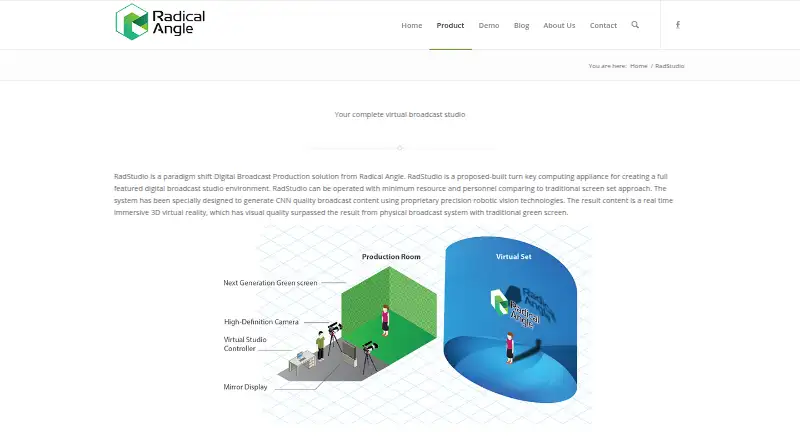
What RadStudio is
RadStudio is a turnkey digital broadcast production system for creating real-time 3D virtual studio content. It combines live camera, microphone, and audio-mixer feeds with prerecorded movies, sound clips, text, and graphs. Producers use drag and drop to arrange scenes with logos, 3D objects, video, images, audio, and overlays, and can change layered elements while a show is on air. Image-processing tracking supports full camera movement across six degrees of freedom; the feature list gives a delay of 7 frames and says special-purpose tracking sensors are not required. The system also offers automatic real-time chroma keying without dedicated chroma-keying hardware. Its DirectX renderer lists effects such as dynamic lighting, mapping, glow, HDR, fog, and reflection. The scene manager supports 3ds, DirectX Mesh, and Google SketchUp object formats; the maker names Blender, 3ds Max, Maya, and Lightwave for creating sets and 3D objects. Four configurations vary in production space, camera inputs, scenes, live insert, video adjustment, and redundancy. Pricing and model details require contacting the maker, which advertises training, 24×7 on-site service, and spare-parts support.
Who it suits
RadStudio is aimed at program producers and production set designers working in visual broadcasting. It may suit teams building virtual studio scenes that combine live inputs with prerecorded media and 3D content.
What it does well
- Composes live inputs with prerecorded media
- Layered scene elements can change during a show
- Camera tracking supports six degrees of freedom
- Real-time chroma keying without dedicated hardware
- Multiple configurations vary inputs and production space
What to know first
- Tracking delay is listed as 7 frames
- Pricing is available by contacting the maker
- Model details require contacting the maker
Limits
Model limits differ: Maverick includes eight scenes, Rebel Lite and Rebel include five, and GrandBroadcast includes 12. Live inputs, tracking inputs, LAN live insert, video adjustment, and redundancy vary by model; some options are optional or upgradable.
Plans
| Plan | Billed and limits | Price |
|---|---|---|
| Maverick | 3.6 × 3.6 sq-m production space · 2 tracking camera inputs · 2 live camera inputs, upgradable to 4 · 8 included scenes · LAN live insert · live video adjustment | On request |
| Rebel Lite | 2.4 sq-m production space · 2 live camera inputs · 5 included scenes · LAN live insert optional · live video adjustment optional | On request |
| Rebel | 2.4 × 2.4 sq-m production space · 2 live camera inputs, upgradable to 4 · 5 included scenes · tracking camera input upgradable to 1 · LAN live insert optional · live video adjustment optional | On request |
| GrandBroadcast | 6.0 × 6.0 sq-m production space · 4 tracking camera inputs · 4 live camera inputs · 12 included scenes · LAN live insert · live video adjustment · redundant production | On request |
As radangle.com lists them, read 10 Oct 2026. The maker's own page has the final word.
Getting started
- Visit https://www.radangle.com/radstudio/.
- Contact the maker for details about RadStudio models and pricing.
- Choose among Maverick, Rebel Lite, Rebel, and GrandBroadcast based on their listed configurations.
- Create virtual sets or objects with Blender, 3ds Max, Maya, or Lightwave, using supported object formats.
- Arrange scenes and combine live inputs with prerecorded media.
Verdict
RadStudio is built around live virtual-studio production, with tracking, chroma keying, and layered scene editing. Buyers need to contact the maker for pricing and details on its configurations.
Questions
What does RadStudio do?
It is a turnkey digital broadcast production system for creating real-time 3D virtual studio content.
How much does RadStudio cost?
Pricing is on request; the maker asks prospective buyers to contact it for model details.
Does it support greenscreen workflows?
Yes. The product describes automatic real-time chroma keying without dedicated chroma-keying hardware.
What rendering technology does it use?
Its CG renderer is DirectX based.
Which 3D formats are supported?
The scene manager lists 3ds, DirectX Mesh, and Google SketchUp object formats, as well as animated objects.
What service does the maker advertise?
Radical Angle’s homepage advertises training, 24×7 on-site service, and spare-parts support.
Facts from RadStudio's own pages
- 3D authoring tools
- The maker names Blender, 3ds Max, Maya, and Lightwave as software for creating virtual production sets or 3D objects. · radangle.com, 10 Oct 2026
- 3D formats
- The scene manager lists support for 3ds, DirectX Mesh, and Google SketchUp object formats, as well as animated objects. · radangle.com, 10 Oct 2026
- 3D formats and tools
- The page names Blender, 3ds Max, Maya, and Lightwave for creating virtual sets, and lists 3ds, DirectX Mesh, and Google SketchUp object formats. · radangle.com, 9 Oct 2026
- Camera tracking
- Its image-processing camera tracking supports six degrees of freedom, handheld cameras, and a tracking log, with a stated tracking delay of seven frames. · radangle.com, 10 Oct 2026
- Chroma keying
- The product provides automatic real-time chroma keying and the maker says dedicated chroma-keying hardware is not needed. · radangle.com, 10 Oct 2026
- Company
- The contact page says Radical Angle is now part of Wavify Inc. and lists its Sunnyvale, California address. · radangle.com, 10 Oct 2026
- Editing
- A drag-and-drop interface lets producers arrange scenes, logos, text, 3D objects, graphs, video, images, audio, and overlays in layers. · radangle.com, 10 Oct 2026
- Headquarters
- Sunnyvale, California, United States · radangle.com, 28 Sept 2026
- Intended users
- The maker presents RadStudio for program producers and production set designers working in visual broadcasting. · radangle.com, 10 Oct 2026
- Live editing
- The page says layered visual elements can be changed while a show is on air. · radangle.com, 9 Oct 2026
- Live inputs
- The product can compose live camera, microphone, and audio mixer inputs with prerecorded media. · radangle.com, 10 Oct 2026
- Media inputs
- RadStudio can compose live video from cameras, microphones, and audio mixers with prerecorded movies, sound clips, text, and graphs. · radangle.com, 9 Oct 2026
- Product
- RadStudio is a turnkey computing appliance for creating a digital broadcast studio environment. · radangle.com, 10 Oct 2026
- Purpose
- RadStudio is a turnkey digital broadcast production system for creating a virtual broadcast studio environment. · radangle.com, 9 Oct 2026
- Rendering
- The maker describes a DirectX-based scene renderer using GPU processing and lists dynamic lighting, multi-texturing, bump maps, environment maps, shadow maps, glow, HDR, fog, and reflections. · radangle.com, 10 Oct 2026
- Sales details
- The product page says to contact the maker for more details about the RadStudio models. · radangle.com, 9 Oct 2026
- Scene creation
- A drag-and-drop interface lets users arrange virtual scenes, logos, text, 3D objects, graphs, video, images, audio, and overlays. · radangle.com, 9 Oct 2026
- Service
- Radical Angle’s homepage advertises hands-on training, 24×7 on-site service, and spare parts support. · radangle.com, 10 Oct 2026
- Support
- The maker’s homepage advertises training, 7×24 on-site service, and spare-parts support. · radangle.com, 9 Oct 2026
- Tracking latency
- The features list states a tracking delay of 7 frames. · radangle.com, 9 Oct 2026
- Use case
- The maker describes it as a virtual broadcast production system designed to create real-time 3D studio content. · radangle.com, 10 Oct 2026
- Workflow
- RadStudio is described as able to mix results from existing production systems with 3D models and external or live video feeds. · radangle.com, 10 Oct 2026
Where RadStudio stands on Freedom251
- Virtual Production Software#21 of 28