Freedom251 › Audio Editing Software
Radium
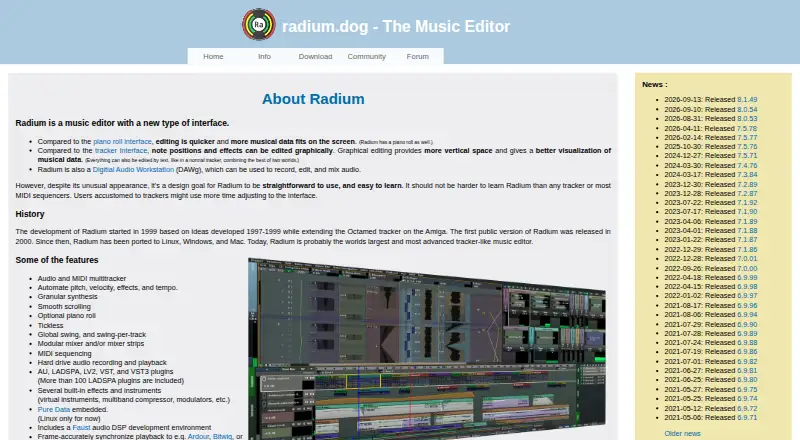
What Radium is
Radium is a music editor and digital audio workstation for recording, editing, and mixing audio. It combines audio and MIDI multitracking with MIDI sequencing and hard-drive audio recording and playback. Editing options include graphical control of note positions and effects, text editing, and an optional piano roll. For sound design, it includes granular synthesis, built-in instruments and effects, and an embedded Pure Data instrument on Linux. Its feature list names AU, LADSPA, LV2, VST, and VST3 plugins, though plugin-format support differs by operating system. Playback can synchronize frame-accurately with Ardour, Bitwig, or MASCHINE. Users can extend it with Python and Scheme scripts. Radium runs on Linux, Windows, and macOS and is described as open source. Demo versions are available, and the maker says an internet connection, copy protection, keyfile, or serial number is not required. Subscribers and buyers receive support. The listed subscription and purchase options have no stated prices; both include support and one year of updates, with the program continuing to work after the covered period.
Who it suits
Radium suits musicians who want audio and MIDI editing, sequencing, and mixing across Linux, Windows, or macOS. Its scripting, plugin, and synchronization options may also suit users building a more connected music workflow.
What it does well
- Combines audio and MIDI multitracking.
- Offers graphical, text, and piano-roll editing.
- Includes granular synthesis, instruments, and effects.
- Supports Python and Scheme scripting.
- No internet connection or serial number required.
What to know first
- Plugin-format support varies by operating system.
- No prices are listed for either plan.
- Embedded Pure Data instrument is Linux-only.
Plans
| Plan | Billed and limits | Price |
|---|---|---|
| Subscription | Download and upgrade access · Support · One year of updates | On request |
| Buy | One year of updates · Support · The program continues working after the update period | On request |
| Radium Subscription | Subscribe for a year; the page does not state a fixed price. · Download and upgrade access · Support · Radium keeps working after the subscription ends | On request |
| Radium purchase | One-time purchase; the page does not state a fixed price. · One year of updates · Support · Radium keeps working after the update year ends | On request |
As radium.dog lists them, read 20 Sept 2026. The maker's own page has the final word.
Getting started
- Visit the Radium website and download a demo version.
- Choose Linux, macOS, or Windows.
- Use the program without a subscription if preferred.
- Choose a subscription for download and upgrade access, or a one-time purchase for one year of updates.
Verdict
Radium brings recording, MIDI sequencing, editing, mixing, and sound-design tools into one music editor.
Questions
Which operating systems does Radium support?
Radium runs on Linux, macOS, and Windows.
Does Radium have a free plan?
A free plan is listed, and the download page links to demo versions. The maker says a subscription is not required to use the program.
Is Radium open source?
Yes. The maker describes Radium as open source and links to its Git repository.
What are the plan options?
The listed options include a subscription with download and upgrade access, support, and one year of updates, and a one-time purchase with support and one year of updates. Radium continues working after the subscription or update period ends.
What does Radium cost?
The listed plan details do not state a fixed price.
Which plugins and synchronization options are named?
The plugin list includes AU, LADSPA, LV2, VST, and VST3, with support varying by operating system. Playback can synchronize frame-accurately with Ardour, Bitwig, or MASCHINE.
Facts from Radium's own pages
- Audio and MIDI
- Radium is an audio and MIDI multitracker with MIDI sequencing and hard-drive audio recording and playback. · radium.dog, 11 Oct 2026
- Contact
- The site provides an email address for contact and support inquiries. · radium.dog, 11 Oct 2026
- Demo
- The download page links to demo versions, and says a subscription is not required to use the program. · radium.dog, 11 Oct 2026
- Editing
- The editor supports graphical editing of note positions and effects, text editing, and an optional piano roll. · radium.dog, 11 Oct 2026
- Extensions
- The product supports scripting in Python and Scheme. · radium.dog, 11 Oct 2026
- MIDI sequencing
- Yes · radium.dog, 20 Sept 2026
- Multitrack editing
- Yes · radium.dog, 20 Sept 2026
- Offline use and copy protection
- The maker says an internet connection is not needed, the program has no copy protection, and it uses no keyfile or serial number. · radium.dog, 11 Oct 2026
- Platforms
- The download page offers full versions for Linux, macOS, and Windows, with requirements of glibc 2.34 or newer, macOS 14 or newer, and Windows 8 or newer, respectively. · radium.dog, 11 Oct 2026
- Plugins
- The feature list names AU, LADSPA, LV2, VST, and VST3 plugins; the platform matrix shows that plugin-format support varies by operating system. · radium.dog, 11 Oct 2026
- Product
- Radium describes itself as a music editor with a new interface and a digital audio workstation for recording, editing, and mixing audio. · radium.dog, 11 Oct 2026
- Sound design
- Features include granular synthesis, built-in effects and instruments, and an embedded Pure Data instrument on Linux. · radium.dog, 11 Oct 2026
- Source code
- The maker describes Radium as open source and links to its Git repository. · radium.dog, 11 Oct 2026
- Support
- The maker says subscribers and buyers receive support and can suggest features; larger subscription amounts receive higher priority for feature requests. · radium.dog, 11 Oct 2026
- Supported platforms
- Linux, Windows, macOS · radium.dog, 20 Sept 2026
- Synchronization
- Radium says playback can synchronize frame-accurately with Ardour, Bitwig, or MASCHINE. · radium.dog, 11 Oct 2026
- Third-party plugins
- Yes · radium.dog, 20 Sept 2026
Where Radium stands on Freedom251
- Audio Editing Software#28 of 131
- Digital Audio Workstations#12 of 39