Freedom251 › Minecraft Launchers
QWERTZ Launcher
What QWERTZ Launcher is
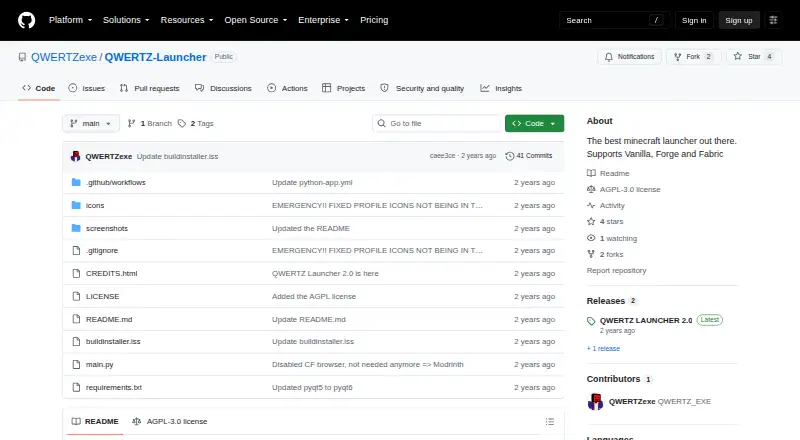
QWERTZ Launcher is a free Minecraft launcher for Linux, macOS, and Windows. It supports Vanilla, Forge, and Fabric, with a Qt6 graphical interface. Users can create separate instances for launching modpacks, and the launcher supports multiple mod loaders and Java runtime management. Its account manager accepts an unlimited number of Microsoft accounts, and Microsoft login is available. Offline accounts can be created, although downloading the game still requires a premium account. Users can choose when sessions refresh automatically. Windows users are directed to download the latest release, while the README directs users on other operating systems to download the source, install requirements with pip, and run main.py. The releases page lists QWERTZ Launcher 2.0 as the latest release. The public repository uses the AGPL-3.0 license, and the project states that it does not support piracy.
Who it suits
It suits Minecraft players who need separate modpack instances, multiple mod loaders, and Java runtime management. It is also suited to users on Linux, macOS, or Windows who can follow the platform-specific installation directions.
What it does well
- Free plan available
- Runs on Linux, macOS, and Windows
- Supports Vanilla, Forge, and Fabric
- Unlimited Microsoft accounts
- Includes Java runtime management
What to know first
- Game downloads require a premium account
- Non-Windows setup requires source installation
- No free trial listed
Verdict
QWERTZ Launcher provides free Minecraft launching across three desktop platforms, with separate instances, mod-loader support, and Microsoft account management. Offline accounts are available, but downloading the game still requires a premium account.
Facts from QWERTZ Launcher's own pages
- Account manager
- The account manager supports an unlimited number of Microsoft accounts. · github.com, 11 Oct 2026
- Accounts
- The account manager supports an unlimited number of Microsoft accounts. · github.com, 12 Oct 2026
- Free plan
- Yes · github.com, 22 Sept 2026
- Instances
- Users can create multiple instances to launch modpacks. · github.com, 12 Oct 2026
- Intended use
- The project describes itself as a Minecraft launcher and explicitly says it does not support piracy. · github.com, 12 Oct 2026
- Interface
- The launcher is written in Qt6 and describes its interface as a modern GUI. · github.com, 12 Oct 2026
- Java runtime management
- Yes · github.com, 22 Sept 2026
- License
- The repository lists the AGPL-3.0 license. · github.com, 12 Oct 2026
- Maker profile
- The maker’s GitHub profile links to qwertz.app and describes the maker as “Yet another coding guy.” · github.com, 11 Oct 2026
- Microsoft login
- The launcher supports signing in with Microsoft. · github.com, 12 Oct 2026
- Mod loader support
- multiple · github.com, 22 Sept 2026
- Offline accounts
- Users can create offline accounts, but a premium account is still needed to download the game. · github.com, 12 Oct 2026
- Other operating systems
- For other operating systems, the README instructs users to download the source, install requirements with pip, and run main.py. · github.com, 12 Oct 2026
- Product
- QWERTZ Launcher is a Minecraft launcher that supports Vanilla, Forge, and Fabric. · github.com, 12 Oct 2026
- Release
- The releases page lists QWERTZ Launcher 2.0 as the latest release. · github.com, 11 Oct 2026
- Release status
- The releases page lists QWERTZ Launcher 2.0 as the latest release. · github.com, 12 Oct 2026
- Separate instances
- Yes · github.com, 22 Sept 2026
- Session refresh
- Users can choose when to refresh sessions automatically. · github.com, 12 Oct 2026
- Windows download
- The README directs Windows users to download the latest release. · github.com, 12 Oct 2026
Where QWERTZ Launcher stands on Freedom251
- Minecraft Launchers#58 of 76