Freedom251 › Audio Visualizer Software
ProVisHD
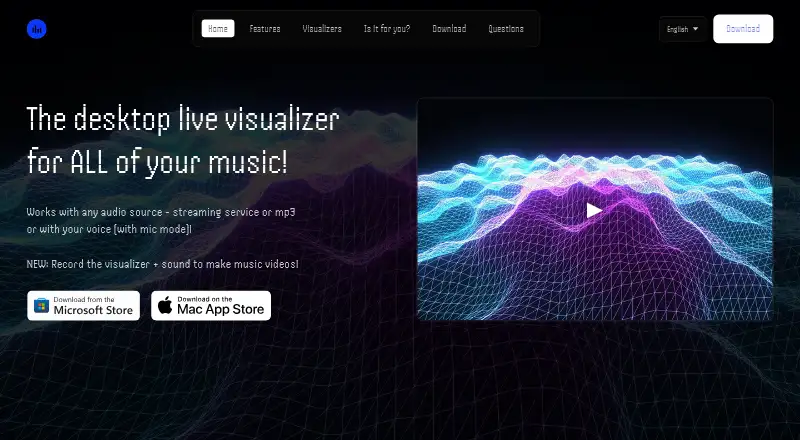
What ProVisHD is
ProVisHD is a paid desktop music visualizer for Windows and macOS. It reacts to audio playing on your computer or to microphone input, turning sound into animated visuals. The app includes 29 visualizers, each offering two modes, and supports waveform visuals. Audio sources include Spotify, YouTube, MP3 files, websites, and desktop applications. Microphone mode works with USB and Bluetooth microphones. Keyboard controls let you alter visual behavior, adjust bass sensitivity, and add a logo or text overlay. Record mode exports the visualizer and system audio as an MP4, with recordings limited to 15 minutes. Microphone audio is processed locally and is never recorded, stored, or transmitted; optional system-audio recordings stay on the device. Analytics use a random anonymous identifier without personally identifiable information. The maker describes ProVisHD as resource heavy and recommends a more performant desktop. Windows costs $14.99, paid once; Mac costs $17.99, paid once.
Who it suits
It suits music enthusiasts, podcast creators, streamers, VJs, and digital artists wanting desktop audio visuals. It is intended for Windows or compatible Macs with the stated requirements.
What it does well
- 29 visualizers with two modes each
- Supports Spotify, YouTube, MP3s, and desktop audio
- USB and Bluetooth microphone support
- MP4 export with waveform visuals
- Logo, text, and bass controls
What to know first
- No free plan
- Recordings limited to 15 minutes
- Resource-heavy according to the maker
- Mac requires macOS 12 and Apple M1 or later
Plans
| Plan | Billed and limits | Price |
|---|---|---|
| ProVisHD Music Visualizer (Windows) | Windows 10/11 · desktop app | $14.99, paid once |
| ProVisHD Music Visualizer (Mac) | Mac · macOS 12.0 or later · Apple M1 chip or later | $17.99, paid once |
As provishd.com lists them, read 9 Oct 2026. The maker's own page has the final word.
Verdict
ProVisHD combines many visualizer options with microphone and system-audio input, customization, and MP4 export. Its one-time pricing and desktop-only availability should be weighed against the recording limit and stated performance demands.
Facts from ProVisHD's own pages
- Audio handling
- Microphone input is processed locally and is not recorded, stored, or transmitted; optional system audio recordings are saved locally on the device. · provishd.com, 9 Oct 2026
- Audio sources
- It works with audio from Spotify, YouTube, MP3s, websites, and desktop apps; microphone mode supports USB or Bluetooth microphones. · provishd.com, 9 Oct 2026
- Customization
- Users can modify visuals with keyboard controls, adjust bass sensitivity, and overlay a logo or text. · provishd.com, 9 Oct 2026
- Intended users
- The maker identifies music enthusiasts, podcast creators, streamers, and VJs or digital artists as intended users. · provishd.com, 9 Oct 2026
- Mac requirements
- The Mac App Store listing requires macOS 12.0 or later and a Mac with an Apple M1 chip or later. · apps.apple.com, 9 Oct 2026
- Performance
- The maker says the app is resource heavy and recommends a more performant desktop. · provishd.com, 9 Oct 2026
- Privacy
- The privacy policy says app analytics are sent to the developer’s own server under a random anonymous identifier and do not include personally identifiable information. · provishd.com, 9 Oct 2026
- Product
- ProVisHD is a desktop music visualizer that reacts to audio playing on the computer or to microphone input. · provishd.com, 9 Oct 2026
- Recording limit
- The optional recording feature records system audio only; microphone audio is never recorded. · provishd.com, 9 Oct 2026
- Support
- The support page directs users to Discord for support. · provishd.com, 9 Oct 2026
- Video recording
- Record mode saves visualizer and system audio as an MP4, with video length limited to 15 minutes. · provishd.com, 9 Oct 2026
- Visualizers
- The app includes 29 visualizers, each with two modes. · provishd.com, 9 Oct 2026
Where ProVisHD stands on Freedom251
- Audio Visualizer Software#32 of 35