Freedom251 › Keyboard and Mouse Customization Software
PourInput
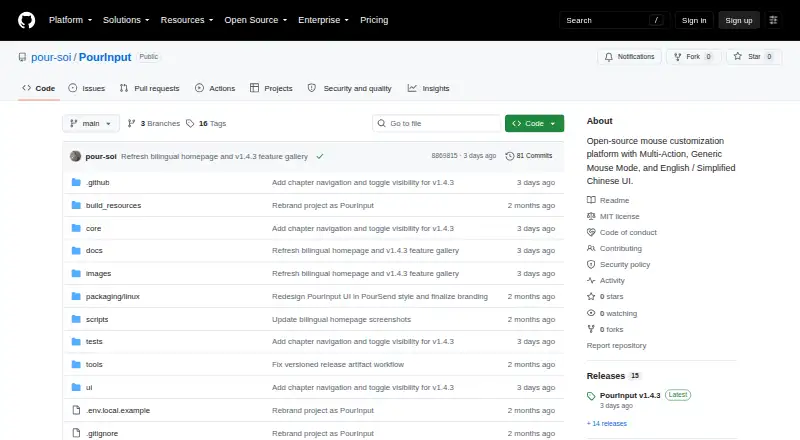
What PourInput is
PourInput is free, open-source software for customizing mouse controls on Windows and macOS. Supported buttons can run built-in commands or custom keyboard shortcuts, with separate actions for clicks and long presses. Per-app profiles change mappings according to the focused application, and sensitivity controls are available. On Windows, Generic Mouse Mode maps the standard middle button and two side buttons; support for MX enhancements depends on the mouse and firmware. Windows also includes Reading Mode, which imports local TXT or EPUB books into a floating panel with chapter navigation and adjustable automatic scrolling. Mouse mappings and reader data are stored separately on the device. The Windows v1.4.3 download is a ZIP containing an executable that needs no separate Python installation, but it is unsigned. macOS has a separate unsigned, unnotarized v1.3.4-macos.1 release without Reading Mode. Linux is validation-only, with no release listed. The project is maintained by pour-soi under the MIT license.
Who it suits
PourInput suits people who want application-specific mouse mappings, sensitivity controls, and custom button actions. Windows users who want local TXT or EPUB reading features have access to the additional Reading Mode.
What it does well
- Per-app profiles switch mappings automatically
- Click and long-press actions can differ
- Sensitivity controls are available
- Windows Reading Mode imports TXT and EPUB
- Free and open source under MIT license
What to know first
- No macro support
- Linux has no listed release
- Windows executable is unsigned
- macOS build is unsigned and unnotarized
Verdict
PourInput offers customizable mouse buttons, application profiles, and sensitivity settings on Windows and macOS. Windows adds a local reading panel, while platform, hardware, and signing limitations should be considered before use.
Facts from PourInput's own pages
- Application profiles
- Users can create profiles for applications and have mappings change with the focused application. · github.com, 12 Oct 2026
- App profiles
- Profiles can switch button mappings according to the focused application. · github.com, 12 Oct 2026
- Button actions
- Supported buttons can have separate click and long-press actions, including built-in commands and custom shortcuts. · github.com, 12 Oct 2026
- Hardware limits
- Hardware feature availability varies by mouse model and firmware, and Generic Mouse Mode does not distinguish multiple standard mice or offer general left/right-button remapping. · github.com, 12 Oct 2026
- Integrations
- The maker describes application-specific profiles and local TXT/EPUB import; it does not identify third-party service integrations on the project page. · github.com, 12 Oct 2026
- Intended users
- The maker presents PourInput for people who want to customize supported mouse controls and use different mappings across applications. · github.com, 12 Oct 2026
- License and maintenance
- The repository identifies PourInput as open source under the MIT license and says it is maintained by pour-soi. · github.com, 12 Oct 2026
- Linux status
- The project describes Linux as validation-only, with no Linux release listed. · github.com, 12 Oct 2026
- Local data
- The project page says mouse mappings and reader data are kept in separate local stores. · github.com, 12 Oct 2026
- Local settings
- Mouse mappings and reader data are kept in separate local stores. · github.com, 12 Oct 2026
- macOS edition
- A separate macOS v1.3.4-macos.1 edition is available, and its build is unsigned and unnotarized. · github.com, 12 Oct 2026
- macOS limits
- The separate macOS release is v1.3.4-macos.1 and does not include the Windows Reading Mode features; the macOS build is unsigned and unnotarized. · github.com, 12 Oct 2026
- Macro support
- No · github.com, 22 Sept 2026
- Mouse support
- Generic Mouse Mode maps the standard middle button and two side buttons on Windows; device and firmware support for MX enhancements varies. · github.com, 12 Oct 2026
- Per-app profiles
- Yes · github.com, 22 Sept 2026
- Platform limitation
- Generic Mouse Mode is Windows-only, the Windows Reading Mode features are not included in the macOS release, and Linux is described as validation-only. · github.com, 12 Oct 2026
- Purpose
- PourInput customizes mouse buttons to run actions such as copy, paste, tab switching, screenshots, and keyboard shortcuts. · github.com, 12 Oct 2026
- Reading limitations
- Suggested chapter titles may be incomplete or incorrect, require confirmation, and older book imports may need reimporting for accurate contents. · github.com, 12 Oct 2026
- Reading Mode
- The Windows app can import local TXT or EPUB books into a floating panel with chapter navigation and adjustable automatic scrolling. · github.com, 12 Oct 2026
- Security and downloads
- The Windows executable is unsigned, and the release provides a SHA-256 checksum and update manifest. · github.com, 12 Oct 2026
- Sensitivity controls
- Yes · github.com, 22 Sept 2026
- Support
- Users can submit device support requests with device information exported from the mouse page. · github.com, 12 Oct 2026
- Supported operating systems
- cross-platform · github.com, 22 Sept 2026
- Windows download
- The published Windows v1.4.3 download is a ZIP containing an executable that requires no separate Python installation; the executable is unsigned and the release provides a SHA-256 checksum and update manifest. · github.com, 12 Oct 2026
Where PourInput stands on Freedom251
- Keyboard and Mouse Customization Software#105 of 105