Freedom251 › Image Compression Software
PNGOUT
What PNGOUT is
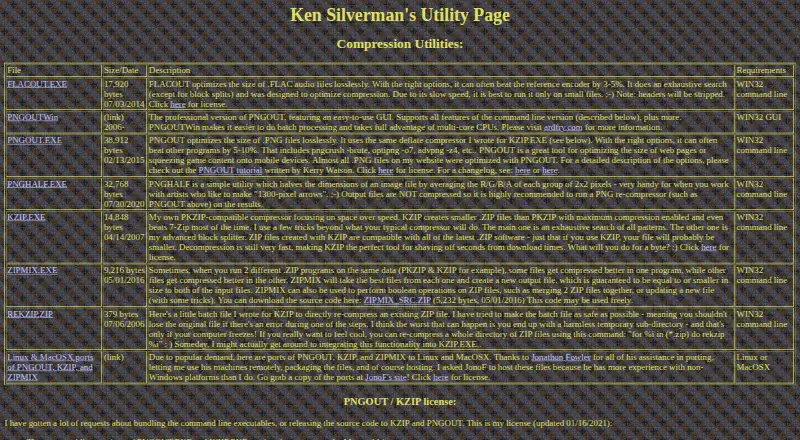
PNGOUT is a free utility for losslessly optimizing PNG files created by other programs. It uses the maker’s deflate compressor and may reduce file size by 5–10% with suitable options. The command-line tool runs from Windows Run or a command prompt, and you choose compression settings because it does not automate trials. Listed inputs include PNG, GIF, uncompressed BMP, JPG, TGA, and 8- or 24-bit PCX files. Metadata controls are available. The command-line version does not provide batch processing, does not support 16-bit PNG color depths, and converts interlaced output to non-interlaced images. PNGOUTWin is the Windows graphical edition, adding batch processing and multi-core support; it can convert TIFF, GIF, BMP, and other images to PNG or optimize existing PNG files. Command-line use is free, while PNGOUTWin Personal Edition is $14.95, paid once and Corporate Edition is $29.95, paid once. PNGOUTWin also has a free 30-day trial.
Who it suits
It suits users comfortable selecting compression options in a command-line utility. PNGOUTWin is the Windows GUI alternative for batch processing and multi-core work.
What it does well
- Lossless PNG optimization
- Supports six listed input image types
- Provides metadata controls
- PNGOUTWin adds batch and multi-core support
- Free command-line use
What to know first
- Command-line version has no batch processing
- 16-bit PNG color depths are unsupported
- Interlaced output becomes non-interlaced
- Command-line users choose options manually
Plans
| Plan | Billed and limits | Price |
|---|---|---|
| PNGOUT command-line | Lossless PNG optimization · Command-line utility · Free for use | On request |
| Command-line PNGOUT | Free command-line use; commercial bundling requires contacting the maker’s business partner | Free |
| PNGOUTWin Personal Edition | $14.95 for a limited time; page also lists $19.95 · Single-user license for non-corporate, non-government, non-business use | $14.95, paid once |
| PNGOUTWin Corporate Edition | $29.95 for a limited time; page also lists $50.00 · Single-user license for corporate, government, or business use | $29.95, paid once |
As advsys.net lists them, read 24 Sept 2026. The maker's own page has the final word.
Verdict
PNGOUT offers focused, lossless image optimization with a free command-line version. Users needing a graphical interface, batch jobs, or multi-core processing should consider PNGOUTWin instead.
Facts from PNGOUT's own pages
- Batch processing
- No · advsys.net, 24 Sept 2026
- Command line
- The command-line tool runs from Windows Run or a command prompt, and users must choose compression options themselves because it does not automate trials. · advsys.net, 11 Oct 2026
- Compression
- The maker says PNGOUT can often beat other programs by 5–10% with the right options. · advsys.net, 11 Oct 2026
- Compression method
- PNGOUT uses the maker’s deflate compressor, also used in KZIP. · advsys.net, 11 Oct 2026
- Compression modes
- lossless · advsys.net, 24 Sept 2026
- Free plan
- Yes · advsys.net, 24 Sept 2026
- Input formats
- The tutorial lists PNG, GIF, uncompressed BMP, JPG, TGA, and 8- or 24-bit PCX as supported inputs. · advsys.net, 11 Oct 2026
- Integrations
- The maker lists PNGGauntlet as a .NET-based Windows wrapper for PNGOUT; the tutorial also documents a Windows clipboard input option. · advsys.net, 11 Oct 2026
- License
- The command-line versions and Mac and Linux ports are free to use; bundling the executable in a commercial product requires contacting the maker’s business partner. · advsys.net, 11 Oct 2026
- Limits
- The command-line version does not support 16-bit PNG color depths or batch processing, and outputs interlaced images as non-interlaced. · advsys.net, 11 Oct 2026
- Metadata controls
- Yes · advsys.net, 24 Sept 2026
- Platforms
- The maker lists Windows for the command-line executable and links to Linux and Mac OS X ports hosted by Jonathon Fowler. · advsys.net, 11 Oct 2026
- PNGOUTWin
- The maker describes PNGOUTWin as a Windows GUI version with batch processing and multi-core support. · advsys.net, 11 Oct 2026
- PNGOUTWin conversion
- PNGOUTWin can convert and compress images to PNG from TIFF, GIF, BMP, and other formats, or optimize existing PNG files. · ardfry.com, 11 Oct 2026
- PNGOUTWin trial
- The maker offers a free 30-day PNGOUTWin trial and downloadable 32-bit and 64-bit application ZIPs. · ardfry.com, 11 Oct 2026
- Purpose
- PNGOUT losslessly optimizes PNG files created by other programs. · advsys.net, 11 Oct 2026
- Refund terms
- PNGOUTWin’s purchase page offers a 30-day satisfaction guarantee subject to emailing the order number and confirming the software was uninstalled. · ardfry.com, 11 Oct 2026
- Support and upgrades
- PNGOUTWin purchases include free support and minor version upgrades, with discounts on major upgrades. · ardfry.com, 11 Oct 2026
- Supported formats
- PNG,GIF,BMP,JPG,TGA,PCX · advsys.net, 24 Sept 2026
Where PNGOUT stands on Freedom251
- Image Compression Software#46 of 85