Freedom251 › Lesson Planning Software

PlanbookEdu
What PlanbookEdu is
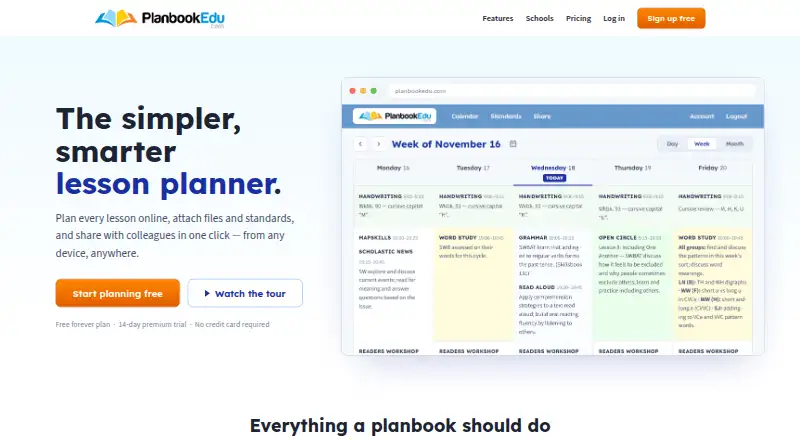
PlanbookEdu is an online lesson planner for teachers to create plans, attach files and standards, and share work with colleagues. The Free plan includes unlimited weekly plans, A/B day and rotation schedules, and word-processor editing. Lessons can be tagged with Common Core, state and custom standards. Teachers can print plans in a browser or export them to Word and PDF. Premium adds file attachments, standards, collaboration, search and spell check. School and district administrators can manage teacher accounts centrally, review submitted plans and leave comments; school accounts support Google Workspace for Education single sign-on. The service is available on the web, Android and iOS, though mobile access is listed as web-only. A free plan is available, while Premium costs $30 a year. A 14-day trial is listed. The company says it started in 2004 and was built by a teacher and a developer. PlanbookEdu says it will not rent or sell personally identifying information and limits access to service providers who need it and agree not to disclose it. Its terms say the website is for people aged 13 or older and accounts are for the sole use of the individual subscriber.
Who it suits
PlanbookEdu suits teachers who want to plan lessons, align them with standards and share plans with colleagues. School and district administrators can use its central account management and plan review features.
What it does well
- Free plan includes unlimited weekly plans.
- Supports A/B day and rotation schedules.
- Lessons can use Common Core, state or custom standards.
- Exports plans to Word and PDF.
- Administrators can review plans and leave comments.
What to know first
- Mobile access is listed as web-only.
- Accounts may not be shared.
- Website is for individuals aged 13 or older.
Limits
The Free plan includes unlimited weekly plans, A/B day and rotation schedules, and word-processor editing. File attachments, sharing and collaboration, Common Core and state standards, search, spell check, and Word or PDF export are listed with Premium at $30 a year.
Plans
| Plan | Billed and limits | Price |
|---|---|---|
| Free | free forever · Unlimited weekly plans · A/B day and rotation schedules · Word-processor editing · iPad and phone access | Free |
| Premium | $30/year · File attachments · Common Core and state standards · Sharing and collaboration · Print, Word and PDF export · Search and spell check | $30 a year |
As planbookedu.com lists them, read 15 Oct 2026. The maker's own page has the final word.
Getting started
- Visit https://www.planbookedu.com/
- Start with the Free plan or use the listed 14-day trial
- Use PlanbookEdu on the web, Android, or iOS; mobile access is web-only
- For a school account, use Google Workspace for Education single sign-on if applicable
Overview
PlanbookEdu is a lesson-planning service built around organizing teaching schedules and connecting plans to standards. It is strongest for teachers who want a flexible weekly planner and for schools that need administrators to review teachers’ work. Its central trade-off is that the tools for sharing, attachments, and exporting sit behind Premium.
Key features
The free editor supports unlimited weekly plans, including A/B-day and rotation schedules. That is useful for teachers planning across a school year or working on timetables that do not fit a standard week. A calendar view adds another way to organize plans.
Premium adds file attachments, Common Core and state standards, collaboration, printing, Word and PDF export, search, and spell check. Standards tagging helps teachers connect lessons to required frameworks, while export supports sharing or keeping copies outside the service. These additions matter most when plans need to move between colleagues or be submitted for review; teachers planning only for themselves may find the free tools sufficient.
School and district administrators can manage teacher accounts centrally, review submitted plans, and leave comments. School accounts also work with Google Workspace for Education single sign-on, making the service more practical for coordinated school use. Individual subscriber accounts are for the subscriber alone and may not be shared.
PlanbookEdu is available on Android, iOS, and the web. The company says it was started in 2004 by a teacher and a developer and is used by teachers in all 50 states and many countries. The privacy policy says it will not rent or sell personally identifying information and restricts service-provider access to providers who need it and agree not to disclose it. The terms limit use to people aged 13 or older. Support is available by email, and the Help Center says it usually responds the same school day.
Pricing
The Free plan costs nothing, billed free forever. It includes unlimited weekly plans, A/B-day and rotation schedules, word-processor editing, and use on iPad and phone. It is a substantial starting point for individual teachers, but it omits attachments, standards tagging, collaboration, and Word or PDF export.
Premium costs $30 a year, billed $30/year. It includes everything in Free plus attachments, Common Core and state standards, sharing and collaboration, printing, Word and PDF export, search, and spell check. Choose it when those workflow tools justify an annual fee; the free tier remains the better fit for teachers who only need to create and organize plans. A 14-day trial is offered.
Platforms
PlanbookEdu supports Android, iOS, and web access. Its plans include phone and iPad use, though the stated mobile access is web-only rather than a separate native-app feature.
Who it's for
PlanbookEdu suits teachers who need recurring weekly plans, flexible schedules, and standards alignment, particularly when colleagues or administrators need to review or discuss plans. School and district teams can use centralized account management and comments to support oversight. It is less compelling for a teacher who does not need standards, sharing, or exports, or for anyone seeking a shared individual account, which the terms prohibit.
Pros and cons
- Pros: Unlimited weekly plans and A/B-day or rotation scheduling leave room for a full year of planning without a plan-count ceiling.
- Pros: Premium combines standards tagging, collaboration, and portable exports, supporting both classroom planning and plan submission.
- Pros: Central administration, review, and comments give schools a way to coordinate teacher plans.
- Cons: Attachments, standards, collaboration, and export are not part of the free plan, so teachers who need those capabilities must pay for Premium.
- Cons: Individual subscriber accounts cannot be shared, limiting the usefulness of one account for multiple people.
Alternatives
Lesson Planning Software is a broader category to explore when you want to compare planners beyond this service.
Choose Planboard if you want a free digital lesson-planning option with Android, iOS, and web access. SchEDU may suit teachers seeking automated term planning, with a free tier capped at two lifetime lesson plans and a Pro plan at $4.99 a month. Common Planner is another free option, with AI-assisted planning and Google Classroom posting among its listed tools.
Lesson Maker Pro is worth considering if monthly allowances for generated lessons, unit plans, materials, and assistant messages match your needs. Lessonly, TeacherHero, and Ignite are other options to compare. Planbook is another freemium planner to consider, with individual-teacher and school or district plans.
Verdict
PlanbookEdu is a sound choice for teachers who need schedule flexibility and for schools that want centralized plan review, especially when standards tagging and exports justify Premium. Its unlimited free planning is the clearest reason to start here; look elsewhere if your priority is a different planning workflow or if the paid collaboration and export tools are not worth the annual cost.
Verdict
PlanbookEdu covers lesson planning, standards alignment and plan sharing, with administrative tools for schools and districts. Its free plan includes unlimited weekly plans; Premium adds attachments and collaboration.
Questions
Does PlanbookEdu have a free plan?
Yes. Free costs nothing and is billed free forever. It includes unlimited weekly plans, A/B day and rotation schedules, and word-processor editing.
How much does Premium cost?
Premium costs $30 a year, billed at $30/year. A 14-day trial is listed.
Which platforms can I use?
PlanbookEdu lists Android, iOS, and web. Mobile access is listed as web-only.
Can I export lesson plans?
Yes. Plans can be printed from a browser or exported to Word and PDF; Premium includes printing and those export formats.
Does it support Google Workspace for Education?
School accounts work with Google Workspace for Education single sign-on.
Who makes PlanbookEdu?
PlanbookEdu LLC says it started in 2004 and was built by a teacher and a developer.
Facts from PlanbookEdu's own pages
- Account restriction
- The Terms of Service state that an account is for the sole use of the individual subscriber and may not be shared. · planbookedu.com, 2 Oct 2026
- Age limit
- The Terms of Service say the website is available only to individuals at least 13 years old. · planbookedu.com, 2 Oct 2026
- Android app status
- The Android listing says the app works with the browser-based planner and was last updated on September 17, 2020. · play.google.com, 15 Oct 2026
- API and SDKs
- The published Help Center documents user features and workflows but provides no public API, SDK or developer documentation section. · help.planbookedu.com, 15 Oct 2026
- Audience
- The company describes PlanbookEdu as built for teachers and says it is used by teachers in all 50 states and many countries. · planbookedu.com, 2 Oct 2026
- Cloud access
- Plans are stored in the cloud and can be opened from computers, tablets or phones without installing software. · planbookedu.com, 15 Oct 2026
- Collaboration
- Premium collaborators can read and write plans in real time, but they must already have PlanbookEdu accounts and cannot change planbook settings. · help.planbookedu.com, 15 Oct 2026
- Company
- PlanbookEdu LLC says it started in 2004 and was built by a teacher and a developer. · planbookedu.com, 2 Oct 2026
- Company founding
- The company’s About page says the product began in 2004, while LinkedIn lists the company as founded in 2005. · planbookedu.com, 15 Oct 2026
- Company legal name
- The terms and privacy policy identify the operator as PlanbookEdu LLC. · planbookedu.com, 15 Oct 2026
- Company size
- LinkedIn lists PlanbookEdu as a privately held company with 2–10 employees. · linkedin.com, 15 Oct 2026
- Developer address
- Google Play identifies the developer as PLANBOOKEDU, LLC at 710 Market St 14, Chapel Hill, North Carolina 27516, United States. · play.google.com, 15 Oct 2026
- Export
- Users can print from a browser or export plans to Word and PDF. · planbookedu.com, 2 Oct 2026
- Exports
- Premium users can print plans or export them to Word and PDF with attached worksheets included. · planbookedu.com, 15 Oct 2026
- File attachments
- A lesson can hold up to five attached files, with each file limited to 50 MB. · help.planbookedu.com, 15 Oct 2026
- Founded
- 2004 · planbookedu.com, 28 Sept 2026
- Founders
- The About page identifies Erika Curry, an educator, and Matt Curry, a computer-science graduate and web-software developer, as founders. · planbookedu.com, 15 Oct 2026
- Google Calendar integration
- Plans can be pushed to Google Calendar, but later edits in PlanbookEdu require another push because the calendar copy is not live. · help.planbookedu.com, 15 Oct 2026
- Google Drive integration
- Users can link Google Drive files to lessons; the attachment remains a Drive link rather than a copied file. · help.planbookedu.com, 15 Oct 2026
- Help documentation
- The Help Center organizes guidance into sections including setup, plan building, lesson writing, views, files, standards, sharing, billing and group administration. · help.planbookedu.com, 15 Oct 2026
- Integration
- The site says school accounts work with Google Workspace for Education single sign-on. · planbookedu.com, 2 Oct 2026
- Lesson editing
- Users can write plans with a word-processor editor, repeat lessons and reuse templates. · linkedin.com, 15 Oct 2026
- Licence
- PlanbookEdu is proprietary web software owned and operated by PlanbookEdu LLC; its terms identify PlanbookEdu trademarks and provide no open-source licence. · planbookedu.com, 15 Oct 2026
- Limit: calendar orientation
- A Software Advice reviewer says it took time to get used to the calendar running across the top. · softwareadvice.com, 15 Oct 2026
Where PlanbookEdu stands on Freedom251
- Lesson Planning Software#9 of 23