Freedom251 › Capital Planning Software
Plan-It CIP
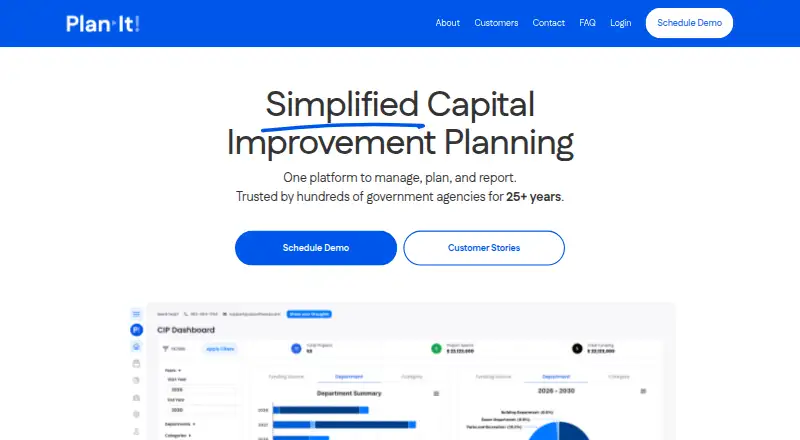
What Plan-It CIP is
Plan-It CIP is web software for planning infrastructure projects, equipment purchases, and capital improvement plans. Developed for local governments, it is also described as useful for utilities, park districts, school districts, universities, and libraries. The software supports multi-year forecasts, cash-flow analysis, asset replacement planning, scenario planning, and inflation adjustments. Users can enter projected five- or ten-year fund revenues to generate cash-flow reports, and import financial-system information through Excel spreadsheets for Budget vs. Actual reporting. More than 140 automatic reports summarize projects, expenditures, and funding sources. Project details can be version-controlled, documents stored centrally, and access managed by role. Add-ons cover PDF budget books, interactive CIP websites with project maps, and asset replacement plans. The maker says the database runs in a private network, data is encrypted in transit and at rest, and optional user-level permissions are available. It also describes daily backups, restoration to any point in the previous seven days, and automated failover. Reports are designed to support WCAG 2.1 Level AA compliance. Plan-It was developed in 1998 and had its first municipal installations in 1999.
Who it suits
Plan-It CIP is aimed at local governments planning capital projects and equipment purchases. Its stated user groups also include utilities, educational institutions, park districts, and libraries.
What it does well
- Includes over 140 automatic reports.
- Supports five- and ten-year revenue forecasts.
- Imports financial information through Excel spreadsheets.
- Offers scenario planning and inflation adjustments.
- Daily backups can be restored within seven days.
What to know first
- No free plan is listed.
- Financial-system imports rely on Excel spreadsheets.
- Programming support may incur a charge.
Getting started
- Open the Plan-It CIP website
- Use the web application for capital planning
- Enter projected five-year or ten-year fund revenues
- Import financial-system information through an Excel spreadsheet
- Configure project information, documents, and role-based access
- Add PDF, web transparency, or replacement-plan tools as needed
Verdict
Plan-It CIP brings multi-year capital planning, financial reporting, and project records into one web product. Organizations should note that it is paid software and that programming support may carry a charge.
Questions
Who is Plan-It CIP designed for?
It is developed for local governments and is also described as useful for utilities, park districts, school districts, universities, and libraries.
Does Plan-It have a free plan?
No. Plan-It CIP is listed as paid and has no free plan.
What financial data can it import?
It can import information from any financial system through an Excel spreadsheet to create Budget versus Actual reports.
How many reports are included?
The FAQ says Plan-It includes more than 140 automatic reports covering project information, expenditures, and funding sources.
How is data protected?
The maker says the database runs in a private network, data is encrypted in transit and at rest, and optional user-level permissions are available. Daily backups, seven-day point restoration, and automated failover are also described.
What add-ons are available?
Add-ons include a PDF transparency tool for capital budget books, a web transparency tool for interactive CIP sites and maps, and a replacement plan manager.
Facts from Plan-It CIP's own pages
- Accessibility
- Plan-It is designed to produce PDF and digital reports that support WCAG 2.1 Level AA compliance. · cipsoftware.com, 8 Oct 2026
- Add-ons
- Add-ons include a PDF transparency tool for capital budget books, a web transparency tool for interactive CIP sites and maps, and a replacement plan manager. · cipsoftware.com, 8 Oct 2026
- Backups and availability
- The FAQ describes automatic daily backups restorable to any point in the previous seven days, DDoS protection, and automated failover. · cipsoftware.com, 8 Oct 2026
- Collaboration
- The product supports version-controlled project information, centralized document storage, and role-based access. · cipsoftware.com, 8 Oct 2026
- Company history
- Plan-It was developed in 1998 and had its first municipal installations in 1999. · cipsoftware.com, 8 Oct 2026
- Financial integration
- Plan-It can import information from a financial system through an Excel spreadsheet to create Budget vs. Actual reports. · cipsoftware.com, 7 Oct 2026
- Financial system import
- Plan-It can import information from any financial system via Excel spreadsheets to create Budget vs. Actual reports. · cipsoftware.com, 8 Oct 2026
- Forecasting
- Users can enter projected 5-year or 10-year fund revenues to generate cash-flow reports. · cipsoftware.com, 7 Oct 2026
- Founded
- 1998 · cipsoftware.com, 28 Sept 2026
- Intended users
- The maker describes Plan-It as designed for small and mid-size municipalities and also identifies municipal governments, utilities, park districts, schools, universities, and libraries as potential users. · cipsoftware.com, 8 Oct 2026
- Planning
- Features include multi-year forecasting, cash flow analysis, asset replacement planning, scenario planning, and inflation adjustments. · cipsoftware.com, 8 Oct 2026
- Public-facing tools
- The maker describes add-ons for creating PDF budget books, interactive CIP websites with project maps, and asset replacement plans. · cipsoftware.com, 7 Oct 2026
- Purpose
- Plan-It helps governments plan infrastructure projects and equipment purchases and produce capital improvement plans. · cipsoftware.com, 8 Oct 2026
- Reporting
- It offers automated PDF generation, visual dashboards, customizable reports, and multi-format exports. · cipsoftware.com, 8 Oct 2026
- Reports
- The FAQ says Plan-It has over 140 automatic reports summarizing project information, expenditures, and funding sources. · cipsoftware.com, 8 Oct 2026
- Security
- The FAQ says its database runs in a private network and data is encrypted in transit and at rest, with optional user-level permissions. · cipsoftware.com, 8 Oct 2026
- Setup
- The FAQ says setup takes 30 minutes to one hour for cities of 5,000–50,000 people and one to two hours for cities of 50,000–150,000 people. · cipsoftware.com, 8 Oct 2026
- Support
- The home page says support is included in the plan; the FAQ says most technical support is free and programming support may incur a charge. · cipsoftware.com, 8 Oct 2026
Where Plan-It CIP stands on Freedom251
- Capital Planning Software#22 of 26