Freedom251 › Mind mapping tools
PixLab Mind Map
What PixLab Mind Map is
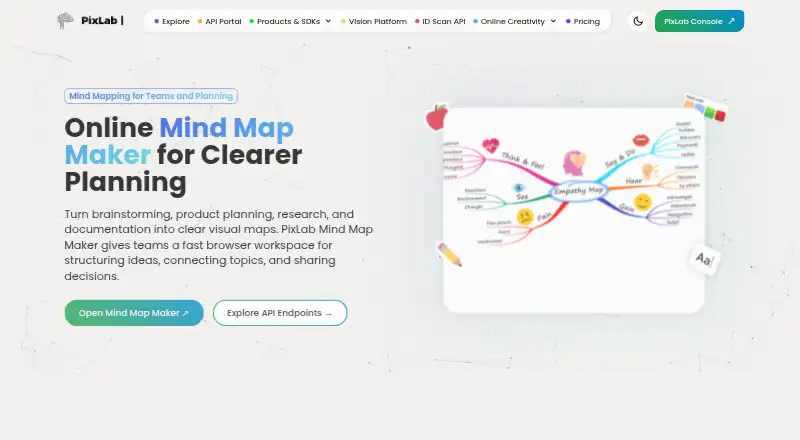
PixLab Mind Map is a web app for brainstorming, arranging ideas, planning projects, and teaching. Its drag-and-drop editor lets users create ideas and connect them into maps, with ready-made templates for planning, study workflows, workshops, and brainstorming. Colors, backgrounds, node shapes, layouts, and notes can be customized. Product teams, educators, and creators are among its intended users, with examples including sprint planning, lesson design, workshops, and storyboarding. Shared maps support simultaneous editing by multiple users, and users can begin without signing up. The Free plan costs nothing and includes core features. The product page lists PNG, PDF, and SVG exports, though its FAQ says the current workflow supports PNG output. The product page describes automatic cloud saving, while the app page says project data is stored in the browser and files are removed after a defined retention period. Temporary stored files are described as encrypted and automatically deleted after 24 hours.
Who it suits
It suits product teams planning sprints, educators designing lessons, and creators outlining ideas or storyboards. It is also suited to people who want to start a shared map in a browser without signing up.
What it does well
- Free plan includes core features.
- No sign-up required to start creating maps.
- Multiple users can edit a shared map simultaneously.
- Templates cover brainstorming, planning, study workflows, and workshops.
- Exports are listed as PNG, PDF, and SVG.
What to know first
- FAQ describes the current export workflow as PNG output.
- Project data storage descriptions differ between product and app pages.
Plans
| Plan | Billed and limits | Price |
|---|---|---|
| Free | Core features; no sign-up required | Free |
As pixlab.io lists them, read 12 Oct 2026. The maker's own page has the final word.
Verdict
PixLab Mind Map combines idea mapping, templates, customization, and real-time collaboration in a web app with a free plan. Check the export workflow and data-storage details if those are central to your choice.
Facts from PixLab Mind Map's own pages
- Account requirement
- The product page says users can start creating mind maps without signing up. · pixlab.io, 12 Oct 2026
- Audience
- The product is presented for product teams, educators, and creators, with use cases including sprint planning, lesson design, workshops, and storyboarding. · pixlab.io, 12 Oct 2026
- Autosave
- The product page says changes are saved automatically while users work. · pixlab.io, 12 Oct 2026
- Autosave and storage
- The product page says changes save automatically to the cloud; the app page says project data is stored locally in the browser and files are purged after a defined retention period. · pixlab.io, 11 Oct 2026
- Collaboration
- The product page says teams can collaborate on shared maps in real time. · pixlab.io, 12 Oct 2026
- Company
- PixLab’s site identifies Symisc Systems, SUARL as the company; Symisc says its SaaS business started in 2017. · symisc.net, 11 Oct 2026
- Customization
- Maps can be customized with colors, backgrounds, labels, notes, and node shapes. · pixlab.io, 12 Oct 2026
- Editing
- Users can create branches, connect ideas, and reorganize maps with a drag-and-drop interface. · pixlab.io, 12 Oct 2026
- Export
- The product page lists PNG, PDF, and SVG exports, while its FAQ says the current workflow supports PNG output. · mindmap.pixlab.io, 11 Oct 2026
- Export formats
- PNG,PDF,SVG · pixlab.io, 20 Sept 2026
- Exports
- The product page lists PNG, SVG, and PDF exports, while its FAQ specifically mentions PNG output. · pixlab.io, 12 Oct 2026
- Free plan
- Yes · pixlab.io, 20 Sept 2026
- Free tier
- The maker’s app page says it offers a free plan with basic features; the product page says its core features are free to use. · mindmap.pixlab.io, 11 Oct 2026
- Integrations
- The product page describes using Mind Map alongside PixLab Photo Editor and Vision Workspace in a broader visual workflow. · pixlab.io, 12 Oct 2026
- Intended users
- The maker page identifies product teams, educators, and creators as intended users, with use cases including sprint planning, lesson design, workshops, and creative outlining. · pixlab.io, 11 Oct 2026
- No signup
- The product page says users can start creating maps without signing up. · pixlab.io, 11 Oct 2026
- Supported platforms
- web · pixlab.io, 20 Sept 2026
- Privacy
- The app page says project data is stored locally in the user's browser and files are purged after a defined retention period. · mindmap.pixlab.io, 12 Oct 2026
- Purpose
- PixLab Mind Map is a browser-based tool for brainstorming, project planning, research, and documentation. · pixlab.io, 12 Oct 2026
- Real-time collaboration
- Yes · pixlab.io, 20 Sept 2026
- Security
- The product page says files are encrypted when temporary storage is used and removed automatically after 24 hours. · pixlab.io, 12 Oct 2026
- Templates
- Ready-made layouts are available for brainstorming, planning, study notes, and workshops. · pixlab.io, 12 Oct 2026
Where PixLab Mind Map stands on Freedom251
- Mind mapping tools#54 of 72
- Mind Mapping Software#55 of 72