Freedom251 › Pixel Art Software
Pixel Edit
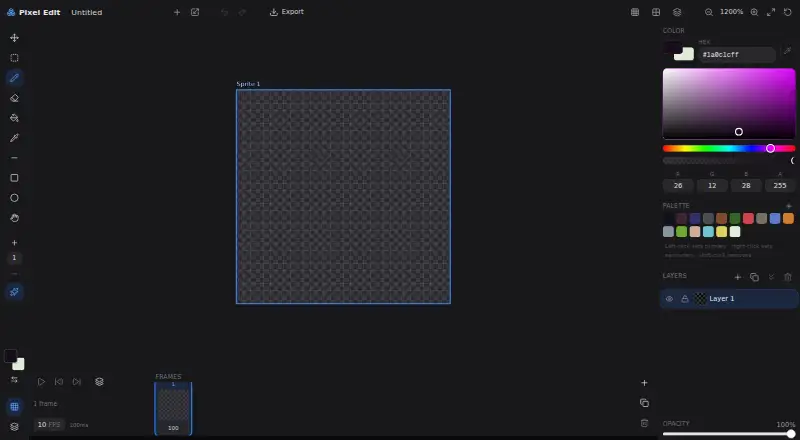
What Pixel Edit is
Pixel Edit is a free, open-source pixel art and sprite animation editor that runs in a web browser. Its workspace combines drawing and animation controls for creating pixel-based artwork and animated sprites. Layer controls let you work with separate layers and adjust opacity. Colors can be entered through Hex or RGBA fields, while the palette provides controls for setting primary and secondary colors and removing a palette color. A zoom control changes the editor view. For animation, Pixel Edit includes a timeline, a Frames control, and a displayed frame count. Timing controls show frames per second and frame duration in milliseconds, allowing the animation pace to be set directly. The interface also includes an Export control for output. Pixel Edit is listed as free, with open source given as its pricing note. The supported platform is web, so the editor is accessed online rather than through a listed desktop or mobile application. Its controls are focused on pixel editing, palette and layer handling, frame organization, timing, zoom, and export. Visit https://pixeledit.net/ to open the editor.
Who it suits
Pixel Edit suits artists making pixel art or sprite animations who want a browser-based workspace. It is also suitable for users seeking a free, open-source editor with layers, palette controls, frame timing, and export.
What it does well
- Free and open-source
- Runs in a web browser
- Layer opacity control
- Hex and RGBA color entry
- Timeline with frame and FPS controls
- Export control included
What to know first
- Requires web access to use the editor
- Animation is organized around frames, FPS, and milliseconds
Limits
Pixel Edit is centered on frame-based pixel art and sprite animation in a web editor. Its animation controls use frames, FPS, and frame duration in milliseconds.
Getting started
- Open https://pixeledit.net/ in a web browser
- Use the pixel editing workspace
- Set colors through Hex or RGBA inputs
- Adjust layers, opacity, palette, and zoom
- Create frames and set FPS or frame duration
- Export the finished work
Verdict
Choose Pixel Edit for browser-based pixel art and sprite animation with open-source availability, layers, palettes, and frame timing. Look elsewhere if you need a native application or workflows beyond the editor’s listed pixel and sprite tools.
Questions
Is Pixel Edit free?
Yes. Pixel Edit is listed as free, with open source as its pricing note.
Which platforms support Pixel Edit?
Pixel Edit is available on the web.
Can Pixel Edit make sprite animations?
Yes. It is described as a pixel art and sprite animation editor with a timeline, Frames control, frame count, FPS setting, and frame duration in milliseconds.
What color controls does Pixel Edit provide?
The editor accepts Hex and RGBA color inputs and includes a palette for primary and secondary colors, including removing a palette color.
Does Pixel Edit support layers?
Yes. The interface includes layer controls and an opacity setting.
Can work be exported from Pixel Edit?
Yes. The editor interface includes an Export control.
Facts from Pixel Edit's own pages
- Animation
- The editor displays a frame count, a Frames control, an FPS setting, and frame duration in milliseconds. · pixeledit.net, 9 Oct 2026
- Animation timing
- The interface displays an FPS setting and frame duration in milliseconds. · pixeledit.net, 5 Oct 2026
- Browser editor
- The site provides a pixel editing workspace with an Export control. · pixeledit.net, 9 Oct 2026
- Color controls
- The editor provides Hex and RGBA color inputs. · pixeledit.net, 9 Oct 2026
- Color input
- The interface provides Hex and RGBA color inputs. · pixeledit.net, 5 Oct 2026
- Export
- The editor interface includes an Export control. · pixeledit.net, 5 Oct 2026
- Frames
- The interface displays a frame count and a Frames control. · pixeledit.net, 5 Oct 2026
- Integrations
- The opened maker page does not state any integrations. · pixeledit.net, 9 Oct 2026
- Layers
- The editor includes a layer control and an opacity setting. · pixeledit.net, 9 Oct 2026
- Palette
- The palette instructions say left-click sets the primary color, right-click sets the secondary color, and shift-click removes a color. · pixeledit.net, 9 Oct 2026
- Pricing
- The opened maker page does not state a price or subscription plan. · pixeledit.net, 9 Oct 2026
- Product
- Pixel Edit is described as an open-source pixel art and sprite animation editor. · pixeledit.net, 9 Oct 2026
- Security
- The opened maker page does not state security or compliance details. · pixeledit.net, 9 Oct 2026
- Zoom
- The editor includes a zoom control displayed at 1200%. · pixeledit.net, 9 Oct 2026
Where Pixel Edit stands on Freedom251
- Pixel Art Software#68 of 70
- 2D Game Animation Software#25 of 25