Freedom251 › Photo Printing Software

Picaboo
What Picaboo is
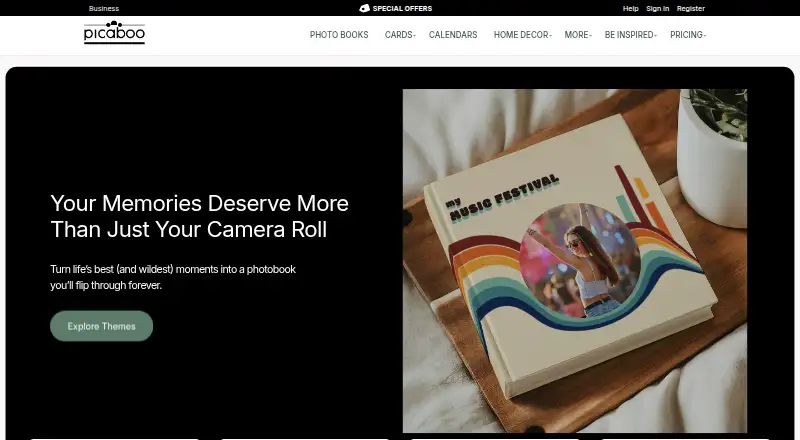
Picaboo turns photos into printed photo books and other personalized photo products. Book choices include classic hardcover, seamless lay-flat, and softcover keepsake styles, with themes for weddings, travel, family, and everyday occasions. Its workflow offers automatic layouts, captions, and stickers. Photos can come from a device, earlier Picaboo projects, Facebook, Google Photos, Dropbox, or Flickr, and the service accepts JPG, PNG, and HEIC files. Picaboo is available on the web, Android, and iOS; projects can be opened in a mobile browser and photos uploaded from a device library. The company recommends using a computer for the best view while editing. Classic books list up to 160 pages for several sizes, while seamless lay-flat books list up to 100 pages. The starting price is $9.99 one-time, with no free plan. Example listings include a 20-page glossy softcover at $9.99, paid once, a glossy hardcover at $37.99, paid once, a lay-flat hardcover at $55.99, paid once, and a seamless lay-flat hardcover at $79.99, paid once. Picaboo was founded in 2002 and is headquartered in New Jersey, USA.
Who it suits
Picaboo suits people who want to create and order personalized photo books, using automatic layouts or themes for occasions such as weddings and travel. Businesses can also consider its volume pricing for look books, events, portfolios, and employee gifts.
What it does well
- Automatic layouts, captions, and stickers
- Imports from several photo sources
- Web, Android, and iOS access
- Classic books list up to 160 pages
What to know first
- No free plan
- Computer recommended for the best editing view
- Books and related content are not warranted fully protected
Limits
Classic books list up to 160 pages for several sizes, while seamless lay-flat books list up to 100 pages. The service has no free plan; the listed starting price is $9.99, paid once.
Plans
| Plan | Billed and limits | Price |
|---|---|---|
| Classic Photo Books — Glossy Hardcover (20 pages), 8 x 8 | 20 pages · 8 x 8 | $37.99, paid once |
| Classic Photo Books — Hardcover (with 20 lay-flat pages), 8 x 8 | 20 lay-flat pages · 8 x 8 | $55.99, paid once |
| Seamless Lay-Flat Photo Books — Hardcover (20 pages), 8 x 8 | 20 pages · 8 x 8 · up to 100 pages | $79.99, paid once |
| Classic Photo Books — Glossy Softcover (20 pages), 8 x 6 | 20 pages · 8 x 6 | $9.99, paid once |
As picaboo.com lists them, read 8 Oct 2026. The maker's own page has the final word.
Getting started
- Open Picaboo's photo books website
- Use the web app on a computer or mobile browser
- Import photos from a device, project, Facebook, Google Photos, Dropbox, or Flickr
- Choose a book style and theme
- Apply layouts, captions, and stickers
- Order the printed photo book
Verdict
Picaboo offers several book styles and photo-import options, with listed prices starting at $9.99 one-time. Consider the page limits and its recommendation to edit on a computer when choosing a book.
Questions
How much does Picaboo cost?
The listed starting price is $9.99, paid once. A 20-page 8 x 6 glossy softcover is listed at $9.99, paid once.
Is there a free plan?
No. Picaboo is a paid service.
Which images can I upload?
Picaboo accepts JPG, PNG, and HEIC files. Photos can come from a device, earlier Picaboo projects, Facebook, Google Photos, Dropbox, or Flickr.
Can I edit Picaboo books on a phone?
Projects can be accessed in a mobile browser and photos uploaded from a device library. Picaboo recommends using a computer for the best editing view.
What book styles are available?
Options include classic hardcover, seamless lay-flat, and softcover keepsake books, with wedding, travel, family, and everyday themes.
Does Picaboo support business orders?
Yes. It offers volume pricing for uses such as product look books, corporate events, portfolios, and employee gifts.
Facts from Picaboo's own pages
- Book styles
- Photo book options include classic hardcover, seamless lay-flat, and softcover keepsake books. · picaboo.com, 8 Oct 2026
- Business use
- Picaboo offers businesses volume pricing and describes use cases including product look books, corporate events, portfolios, and employee gifts. · picaboo.com, 8 Oct 2026
- Company history
- Picaboo says it was founded in 2002 by Howard Field and Kevin McCurdy and that its headquarters moved to New Jersey in 2025. · picaboo.com, 8 Oct 2026
- Editing
- The photo book workflow includes automatic layouts, captions, and stickers. · picaboo.com, 8 Oct 2026
- File formats
- Picaboo accepts JPG, PNG, and HEIC image files. · customercare.picaboo.com, 8 Oct 2026
- Founded
- 2002 · picaboo.com, 28 Sept 2026
- Headquarters
- New Jersey, USA · picaboo.com, 28 Sept 2026
- Mobile access
- Picaboo projects can be accessed in a mobile browser, and users can upload photos from their device photo library. · customercare.picaboo.com, 8 Oct 2026
- Mobile editing caveat
- Picaboo recommends using a computer for the best view when editing a project. · customercare.picaboo.com, 8 Oct 2026
- Photo book page limits
- Classic books list up to 160 pages for several sizes, while seamless lay-flat books list up to 100 pages. · picaboo.com, 8 Oct 2026
- Photo sources
- The help center says photos can be imported from a device, earlier Picaboo projects, Facebook, Google Photos, Dropbox, and Flickr. · customercare.picaboo.com, 8 Oct 2026
- Privacy
- The privacy policy says books and related content are viewable only by the user unless explicitly shared, and says Picaboo does not warrant that content is fully protected. · picaboo.com, 8 Oct 2026
- Product
- Picaboo turns photos into printed photo books and other personalized photo products. · picaboo.com, 8 Oct 2026
- Support
- Picaboo's customer care page lists email support at [email protected] and weekday hours of 9:00 AM to 9:00 PM EST. · picaboo.com, 8 Oct 2026
- Themes
- The site highlights wedding, travel, family, and everyday photo book themes. · picaboo.com, 8 Oct 2026
Where Picaboo stands on Freedom251
- Photo Printing Software#23 of 30
- Photo Book Software#26 of 32