Freedom251 › Photo Restoration Software

PhotoGlory
What PhotoGlory is
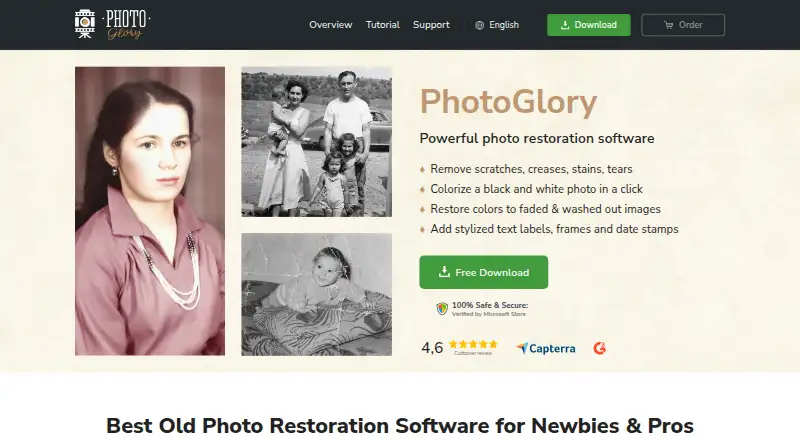
PhotoGlory is a Windows program for repairing and colorizing old photographs. It can address scratches, creases, stains, tears, and faded colors, and add color to black-and-white images either automatically or manually. Batch mode handles restoration and colorization for dozens of photos. The program also offers photo scanning, red-eye correction, cropping, and 100 built-in effects; the PRO version includes 100+ filter effects or 3D LUTs. PhotoGlory works offline, with photos staying on the user's device. The maker describes it as suitable for beginners and professionals restoring photographs. Supported systems include Windows 11, 10, 8, and 7; stated minimum requirements are a 1 GHz or faster Intel or AMD CPU, 4 GB RAM, and 500 MB disk space. A purchase provides lifetime use of the purchased version, repairs for unlimited photos, and free future-version downloads for 12 months. The full version includes free technical support. Standard costs $19.25, paid once, Deluxe $29.40, paid once, and PRO $39.20, paid once.
Who it suits
PhotoGlory suits people restoring family or archival photographs, from beginners to professionals. It is for Windows users who want offline editing and batch processing.
What it does well
- Repairs scratches, creases, stains, tears, and fading
- Colorizes black-and-white photos automatically or manually
- Batch mode restores and colorizes dozens of photos
- Works offline with photos kept on the device
- Lifetime use and 12 months of future-version downloads
What to know first
- Windows only
- No free plan
- Minimum requirements include 4 GB RAM and 500 MB disk space
Limits
There is no free plan. Purchased versions provide lifetime use and unlimited photo fixes, while free future-version downloads last 12 months after purchase.
Plans
| Plan | Billed and limits | Price |
|---|---|---|
| Standard | $19.25 (regular price $27.50) · One-time purchase · lifetime use of purchased version · updates free for 12 months | $19.25, paid once |
| Deluxe | $29.40 (regular price $42.00) · One-time purchase · lifetime use of purchased version · updates free for 12 months | $29.40, paid once |
| PRO | $39.20 (regular price $56.00) · One-time purchase · lifetime use of purchased version · updates free for 12 months | $39.20, paid once |
As photoglory.net lists them, read 7 Oct 2026. The maker's own page has the final word.
Getting started
- Open the PhotoGlory website
- Download and install the Windows application
- Confirm the computer meets the listed requirements
- Choose a one-time Standard, Deluxe, or PRO purchase
- Scan or open photographs in the program
- Restore, colorize, crop, or apply effects
Verdict
PhotoGlory brings restoration, colorization, scanning, and basic photo corrections into one Windows program, with offline use and batch processing. Its one-time plans include lifetime use of the purchased version, while free future-version downloads are limited to 12 months.
Questions
Which Windows versions does PhotoGlory support?
It supports Windows 11, 10, 8, and 7.
What are the minimum system requirements?
The maker lists a 1 GHz or faster Intel or AMD CPU, at least 4 GB RAM, and at least 500 MB disk space.
How much do the plans cost?
Standard is $19.25, paid once, Deluxe is $29.40, paid once, and PRO is $39.20, paid once.
Does PhotoGlory work offline?
Yes. The maker says it works entirely offline and keeps photos on the user’s device.
What does the PRO version add?
PRO includes more than 100 filter effects or 3D LUTs.
How long do purchased versions last?
A purchased version can be used for a lifetime, fixes unlimited photos, and receives free future-version downloads for 12 months after purchase.
Facts from PhotoGlory's own pages
- Additional tools
- The overview lists scanning photos within the program, red-eye correction, cropping, and 100 built-in effects. · photoglory.net, 7 Oct 2026
- Batch editing
- The overview says PhotoGlory can restore and colorize dozens of photos in batch mode. · photoglory.net, 7 Oct 2026
- Colorization
- It can colorize black-and-white photos automatically or manually. · photoglory.net, 7 Oct 2026
- Company origin
- The About page says AMS Software began in 2003 as a small team of university graduates experimenting with software development. · photoglory.net, 7 Oct 2026
- Intended users
- The maker describes PhotoGlory as designed for beginners and says it can also serve professionals restoring photos. · photoglory.net, 7 Oct 2026
- License and updates
- The purchased version can be used for a lifetime, fixes unlimited photos, and receives free future-version downloads for 12 months after purchase. · photoglory.net, 7 Oct 2026
- Offline use
- The maker says PhotoGlory works entirely offline and that photos stay on the user's device. · photoglory.net, 7 Oct 2026
- Photo restoration
- PhotoGlory repairs scratches, creases, stains, tears, and faded colors in old photographs. · photoglory.net, 7 Oct 2026
- Platform
- The maker lists Windows 11, 10, 8, and 7 as supported operating systems. · photoglory.net, 7 Oct 2026
- PRO features
- The PRO version includes 100+ filter effects or 3D LUTs. · photoglory.net, 7 Oct 2026
- Security
- The privacy policy says the company maintains administrative and technical safeguards for personal information. · photoglory.net, 7 Oct 2026
- Support
- The full version includes free technical support, and the support page links to a support center. · photoglory.net, 7 Oct 2026
- System requirements
- The overview lists a 1 GHz or faster Intel or AMD CPU, at least 4 GB RAM, and at least 500 MB disk space. · photoglory.net, 7 Oct 2026
Where PhotoGlory stands on Freedom251
- Photo Restoration Software#19 of 26
- AI Image Restoration Software#27 of 30