Freedom251 › Photo Mosaic Software
Photo Mosaic Maker
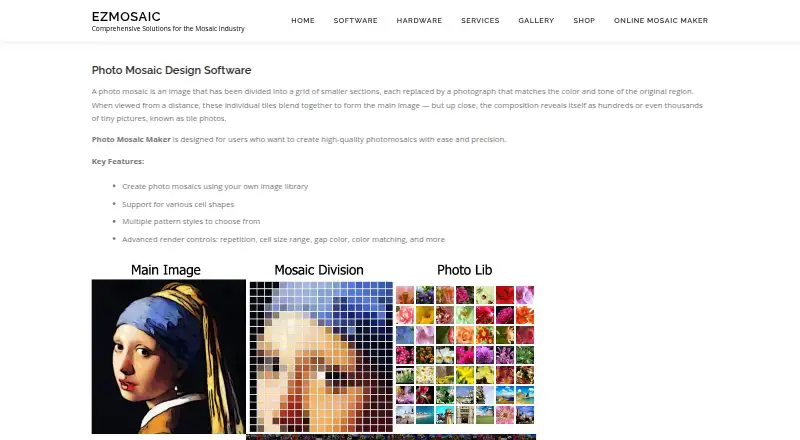
What Photo Mosaic Maker is
Photo Mosaic Maker is paid desktop software for creating photomosaics from a main image and a personal library of smaller tile photos. Its workflow lets you select and crop the main image, choose a cell shape and pattern, load a collection, adjust render settings, and render the result. Controls include tile repetition, cell-size range, gap color, and color matching. Both editions provide five cell shapes. The Standard edition supports up to 2,000 library images and 10,000 cells, with normal and cross patterns. PRO supports up to 10,000 library images and 40,000 cells, adding concentric circles. The maker suggests about 200 photos for good quality and about 1,000 for excellent quality, while collections above 2,000 may slow processing. Finished mosaics can be printed or shared online. The software runs on Windows and macOS, offers a Windows trial download, and direct purchases include both systems. Standard costs 24.95 USD once; PRO costs 99.95 USD once.
Who it suits
Photo Mosaic Maker suits Windows and macOS users who want to turn a personal photo collection into a printable or shareable mosaic. It fits projects needing custom tile libraries, reuse controls, and selectable patterns.
What it does well
- Uses your own photo library
- Supports tile reuse controls
- Up to 40,000 cells in PRO
- Five cell shapes in both editions
- Windows trial download available
What to know first
- No free plan
- Desktop-only Windows and macOS software
- Collections above 2,000 may slow processing
- PRO costs 99.95 USD once
Limits
The cheapest edition, X9 Standard at $24.95 one time, supports up to 2,000 library images and 10,000 cells, with normal and cross patterns. Collections above 2,000 photos may slow processing; the Windows trial is available as a download.
Plans
| Plan | Billed and limits | Price |
|---|---|---|
| Photo Mosaic Maker X9 Standard | Up to 2,000 library images · 10,000 cells · 5 cell shapes · normal and cross patterns | $24.95, paid once |
| Photo Mosaic Maker X9 PRO | Up to 10,000 library images · 40,000 cells · 5 cell shapes · normal, cross, and concentric circles patterns | $99.95, paid once |
As ezmosaic.com lists them, read 7 Oct 2026. The maker's own page has the final word.
Getting started
- Visit https://www.ezmosaic.com/photo-mosasic-maker/.
- Download the Windows trial, or choose a direct purchase for Windows and Mac.
- Select and crop a main image.
- Choose a cell shape and pattern, then load a photo collection.
- Adjust render options and render the mosaic.
Verdict
Photo Mosaic Maker focuses on controlled photomosaic creation with personal tile libraries and adjustable rendering. The Standard and PRO limits make the choice depend on collection size, cell count, and pattern needs.
Questions
How much does Photo Mosaic Maker cost?
X9 Standard costs $24.95 one time. X9 PRO costs $99.95 one time.
Is there a free plan or trial?
There is no free plan. A free trial download is offered for Windows.
Which platforms does it support?
It is listed for Windows and Mac. Mac downloads include Mac OS X M1–M4 and older Mac OS X, and direct purchases include Windows and Mac versions.
What are the differences between Standard and PRO?
Standard supports up to 2,000 library images and 10,000 cells, with normal and cross patterns. PRO supports up to 10,000 images and 40,000 cells and adds concentric circles.
How do I get help?
EzMosaic lists email support at [email protected]. For a problem report, it asks users to include the steps and operating system.
Facts from Photo Mosaic Maker's own pages
- Cell shapes and patterns
- It supports multiple cell shapes and patterns, with five shapes listed for both editions. · ezmosaic.com, 7 Oct 2026
- Edition differences
- Standard supports up to 2,000 library images and 10,000 cells, while PRO supports up to 10,000 images and 40,000 cells. · ezmosaic.com, 7 Oct 2026
- Founded
- 1998 · ezmosaic.com, 28 Sept 2026
- Image library
- The software uses the user's own image library to create mosaics. · ezmosaic.com, 7 Oct 2026
- Integrations
- The product page links to purchase through the Microsoft Store and refers to an Apple Store purchase option. · ezmosaic.com, 7 Oct 2026
- Mac availability
- The page lists Mac OS X M1–M4 and older Mac OS X under downloads, and says direct purchases include Windows and Mac versions. · ezmosaic.com, 7 Oct 2026
- Maker background
- EzMosaic says it has been dedicated to mosaic software development since 1996. · ezmosaic.com, 7 Oct 2026
- Output
- The guide says completed mosaics can be printed or shared online. · ezmosaic.com, 7 Oct 2026
- Photo collection guidance
- The maker recommends about 200 photos for good quality and about 1,000 for excellent quality, and says more than 2,000 may slow processing. · ezmosaic.com, 7 Oct 2026
- Purpose
- Photo Mosaic Maker creates photomosaics from a main image and a library of smaller tile photos. · ezmosaic.com, 7 Oct 2026
- Render controls
- Render controls include repetition, cell size range, gap color, and color matching. · ezmosaic.com, 7 Oct 2026
- Security and compliance
- The product pages opened do not state security or compliance certifications. · ezmosaic.com, 7 Oct 2026
- Support
- EzMosaic lists support by email at [email protected] and asks users reporting problems to include the steps and operating system. · ezmosaic.com, 7 Oct 2026
- Trial download
- The product page offers a free trial download for Windows. · ezmosaic.com, 7 Oct 2026
- Workflow
- The guide describes selecting and cropping a main image, choosing a cell shape and pattern, loading a photo collection, adjusting render options, and rendering. · ezmosaic.com, 7 Oct 2026
Where Photo Mosaic Maker stands on Freedom251
- Photo Mosaic Software#18 of 24