PDFluent
by PDFluent
What PDFluent is
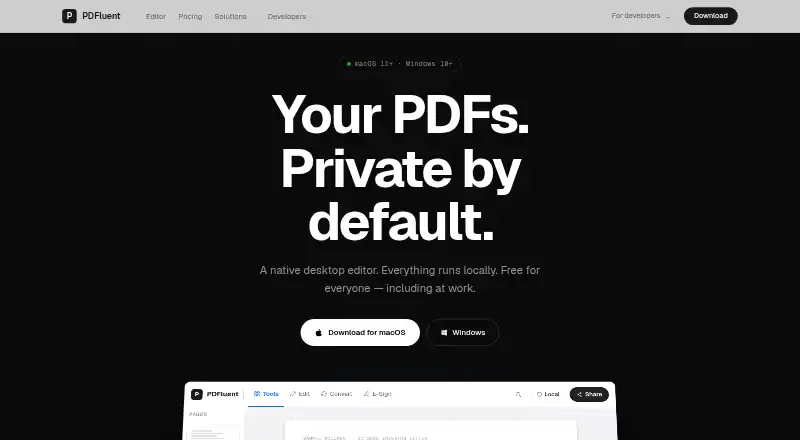
PDFluent is a desktop PDF editor for macOS and Windows that runs locally and works offline. Its free Editor includes viewing, text editing, annotation, merging, splitting, compression, OCR, PDF/A conversion, redaction, password protection, watermarking, forms, and signing. It does not require an account, subscription, internet connection, or background service, and the maker says documents are not stored or sent to cloud storage. The free app has no watermarks or page limits and allows commercial use. AcroForm PDFs are supported, while XFA form support is experimental and may not open, render, or save correctly. The editor does not capture from scanners or cameras, offer a searchable library across documents, support collaboration, or create PDFs from Word files. A separately licensed PDF SDK is available with bindings for several programming languages. PDFluent is made by Innovation Trigger BV, which identifies the Netherlands as its base.
Who it suits
It suits people who want local PDF editing on macOS or Windows without an account or subscription. Developers can also consider the separately licensed SDK and its language bindings.
What it does well
- Free desktop app includes commercial use.
- Processes files locally and works offline.
- Includes OCR, redaction, signing, and PDF/A conversion.
- No watermarks or page limits.
- AcroForm PDFs are supported.
What to know first
- Available on macOS and Windows only.
- XFA form support is experimental.
- Does not support collaboration.
- Cannot create PDFs from Word files.
Limits
The free Editor plan has no watermarks, page limits, file-size limits, or time limit. It does not include PDF form creation, collaboration, scanner or camera capture, cross-document search, or Word-to-PDF creation.
Plans
| Plan | Billed and limits | Price |
|---|---|---|
| Editor | Free for everyone, including commercial use · Full desktop app · Personal and commercial use · No account or subscription · No watermarks or page limits · Local processing | Free |
| SDK Free | Complete SDK under AGPL · commercial production use allowed · source-sharing obligations apply under AGPL | Free |
| PDFluent Editor | Full desktop app · commercial use included · no account or subscription · no watermarks, page or file-size limits, or time limit · macOS and Windows | Free |
| SDK OEM Startup | Yearly, per product; for organisations under €1M revenue · Redistribution or offering PDF functionality as a service · one named product | €2,499 a year |
| Priority support add-on | Yearly, on top of any paid licence · Reply within 1 working day | €4,999 a year |
| SDK Commercial | Yearly, per organisation · Closed-source use · unlimited developers, locations, and internal projects | €999 a year |
| SDK OEM | Yearly, per product · Redistribution or offering PDF functionality as a service · one named product | €9,999 a year |
As pdfluent.com lists them, read 20 Sept 2026. The maker's own page has the final word.
Getting started
- Open the PDFluent website
- Download the desktop app for macOS or Windows
- Install and launch PDFluent
- Use the Editor plan without creating an account
- Open a PDF to edit, annotate, convert, or sign it
Verdict
PDFluent offers a broad set of local PDF tools at no charge, including commercial use. Its limits around collaboration, Word-to-PDF creation, and experimental XFA support matter for some workflows.
Questions
How much does PDFluent Editor cost?
The Editor plan costs nothing and is free for everyone, including commercial use.
Does PDFluent require an account or internet connection?
No. The desktop editor runs offline and requires no account, subscription, or background service.
Which platforms does PDFluent support?
The editor supports macOS and Windows.
Can PDFluent create PDF forms?
No. Form creation is not available, although AcroForm PDFs are fully supported.
Is there an SDK for developers?
Yes. A separately licensed SDK provides Rust, Python, Node.js, Java, C, and WebAssembly bindings.
Facts from PDFluent's own pages
- Annotation tools
- Yes · pdfluent.com, 20 Sept 2026
- Company
- The site identifies Innovation Trigger BV and describes PDFluent as made in the Netherlands. · pdfluent.com, 11 Oct 2026
- Form creation
- No · pdfluent.com, 20 Sept 2026
- Forms
- AcroForm PDFs are fully supported, while XFA form support is experimental and may not open, render, or save correctly. · pdfluent.com, 11 Oct 2026
- Free plan
- Yes · pdfluent.com, 20 Sept 2026
- Headquarters
- Netherlands · pdfluent.com, 19 Oct 2026
- Integration formats
- The SDK is published through crates.io, PyPI, npm, NuGet, and Maven Central. · pdfluent.com, 11 Oct 2026
- Limits
- The editor does not store documents, capture from scanners or cameras, provide a searchable library across documents, support collaboration, or create PDFs from Word files. · pdfluent.com, 11 Oct 2026
- Maker
- PDFluent says it is built by Jasper de Winter, a Rust engineer based in the Netherlands. · pdfluent.com, 11 Oct 2026
- OCR
- Yes · pdfluent.com, 20 Sept 2026
- Offline use
- The editor runs fully offline and requires no internet connection, account, or background service. · pdfluent.com, 11 Oct 2026
- PDF conversion
- Yes · pdfluent.com, 20 Sept 2026
- PDF tools
- The editor supports viewing, editing, annotating, merging, splitting, compressing, OCR, PDF/A conversion, redaction, password protection, watermarking, forms, and signing. · pdfluent.com, 11 Oct 2026
- Platforms
- The desktop app supports macOS 11 or later on Intel and Apple Silicon, plus Windows 10 or 11 64-bit. · pdfluent.com, 11 Oct 2026
- Privacy
- The editor runs locally without an account, cloud storage, or telemetry unless crash reports are switched on. · pdfluent.com, 11 Oct 2026
- Product
- PDFluent is a native desktop PDF editor that runs locally on macOS and Windows. · pdfluent.com, 11 Oct 2026
- SDK
- A separately licensed PDF SDK is available with bindings for Rust, Python, Node.js, Java, C, and WebAssembly. · pdfluent.com, 11 Oct 2026
- Security design
- The maker says the PDF engine is written in memory-safe Rust and does not execute document JavaScript or automatic PDF actions. · pdfluent.com, 11 Oct 2026
- Support
- For licensing questions, the maker says to email [email protected] and states it responds within one business day. · pdfluent.com, 11 Oct 2026
- Supported platforms
- macOS,Windows · pdfluent.com, 20 Sept 2026
- Text editing
- Yes · pdfluent.com, 20 Sept 2026
Where PDFluent stands on Freedom251
- PDF editors#32 of 104