PDFeitor
by PDFeitor
What PDFeitor is
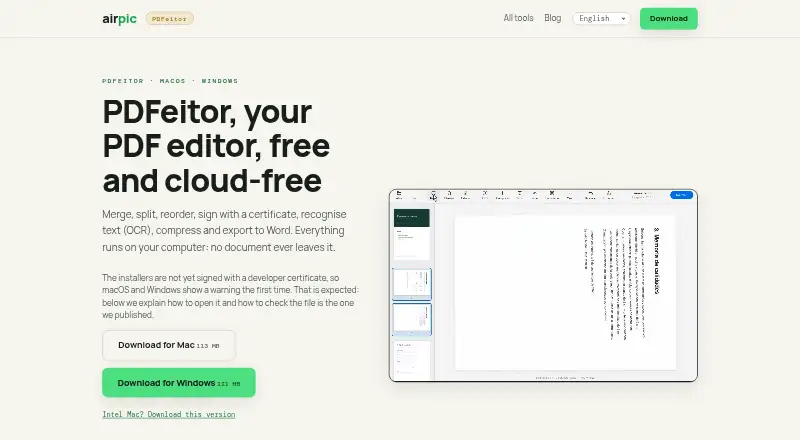
PDFeitor is a free PDF application for macOS 12 or later and Windows 10/11 64-bit. It can merge, split, extract, reorder and rotate pages, convert JPG, PNG and HEIC images to PDF, and export PDFs to text, images or Word. Annotation, OCR, form filling, watermarks, page numbers, compression and password protection are included; protection uses 256-bit AES encryption. PDF-to-Word conversion works with text PDFs, while scanned PDFs need OCR first. Signatures can be drawn on a phone reached through a QR code or applied with a .p12 or .pfx certificate. The app runs locally and sends nothing to the internet. Phone signing uses a temporary tunnel for the signature page while the document stays local. No account is required and there are no ads. The page-organization tool provides up to eight undo steps. Installers are not yet developer-signed, but SHA-256 fingerprints are published.
Who it suits
PDFeitor suits people who need local PDF editing, conversion, OCR and signing on supported Mac or Windows computers. It also fits users who prefer no account and no advertising.
What it does well
- Free plan with no account
- Local processing keeps documents on the computer
- OCR and annotation tools included
- Supports phone and certificate signatures
- 256-bit AES PDF protection
What to know first
- Scanned PDFs need OCR before Word conversion
- Installers are not developer-signed
- Windows policies may block unsigned installers
- Supports only listed macOS and Windows versions
Plans
| Plan | Billed and limits | Price |
|---|---|---|
| Free | No account · macOS 12 or later · Windows 10/11 (64-bit) | Free |
As airpic.app lists them, read 12 Oct 2026. The maker's own page has the final word.
Verdict
PDFeitor covers common PDF organization, conversion, security and signing tasks without sending documents online. Verify operating-system support and installer policies before installing.
Facts from PDFeitor's own pages
- Account and ads
- The app requires no account and has no ads. · airpic.app, 12 Oct 2026
- Annotation tools
- Yes · airpic.app, 20 Sept 2026
- Free plan
- Yes · airpic.app, 20 Sept 2026
- Headquarters
- Dubai, United Arab Emirates · airpic.app, 28 Sept 2026
- Installer signing
- The installers are not yet developer-signed; the maker publishes SHA-256 fingerprints so downloads can be checked. · airpic.app, 12 Oct 2026
- Integrations and libraries
- The maker says PDFeitor is built with PyMuPDF, pyHanko and RapidOCR. · airpic.app, 12 Oct 2026
- Maker
- Airpic identifies PDFeitor as free desktop software and a product of Alar LLC-FZ in Dubai, UAE. · airpic.app, 12 Oct 2026
- OCR
- It adds a searchable text layer to scans using Vision on Mac and PP-OCR on Windows. · airpic.app, 12 Oct 2026
- Offline privacy
- PDFeitor runs on the computer and sends nothing to the internet; for phone signing over another network, it creates a temporary tunnel for the signature page, while the document stays local. · airpic.app, 12 Oct 2026
- Other tools
- It can fill forms, add watermarks and page numbers, password-protect PDFs, compress files, and export to text, images or Word. · airpic.app, 12 Oct 2026
- Password protection
- The product page says PDF protection uses 256-bit AES encryption. · airpic.app, 12 Oct 2026
- PDF conversion
- Yes · airpic.app, 20 Sept 2026
- PDF editing
- PDFeitor merges, splits, extracts, reorders and rotates pages, and converts JPG, PNG or HEIC images to PDF. · airpic.app, 12 Oct 2026
- PDF to Word limit
- PDF-to-Word works with text PDFs; scanned PDFs need OCR first. · airpic.app, 12 Oct 2026
- Signatures
- It supports handwritten signatures drawn on a phone via QR code and digital signatures using a .p12 or .pfx certificate. · airpic.app, 12 Oct 2026
- Supported platforms
- macOS 12 or later; Windows 10/11 (64-bit) · airpic.app, 20 Sept 2026
- Supported systems
- The listed requirements are macOS 12 or later and Windows 10/11 (64-bit). · airpic.app, 12 Oct 2026
- Undo
- The page organization tool provides up to eight undo steps. · airpic.app, 12 Oct 2026
- Windows installation
- The Windows installer needs no administrator rights, but company policies may block unsigned installers and require administrator help. · airpic.app, 12 Oct 2026
Where PDFeitor stands on Freedom251
- PDF editors#68 of 102