Freedom251 › Passport Photo Maker Software
Passport Xpress
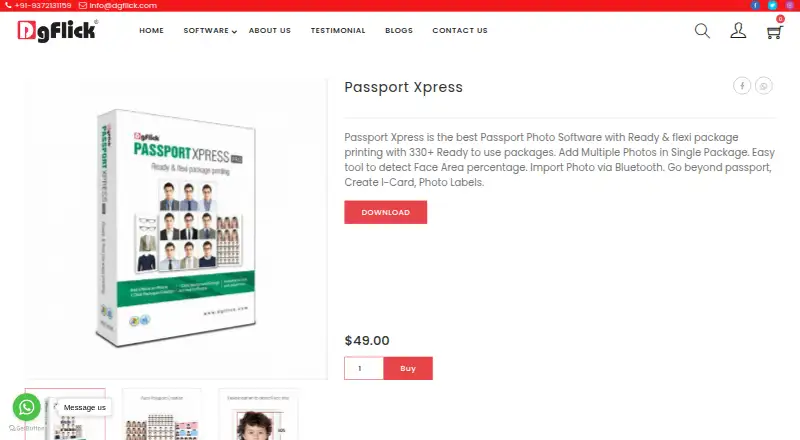
What Passport Xpress is
Passport Xpress is desktop software for creating and printing passport photo packages on Windows and macOS. Its library contains more than 300 ready-to-use packages in General, ID, Mix, Passport, Stamp, and Visa categories. You can define page and photo sizes, choose row and column grids, and combine different photo sizes in one package. A face-area guide can be shown or hidden, with configurable percentage and color settings to help position photos. Editing tools include touch-up, single-color background replacement, RGB correction, brightness, contrast, curves, and levels. Props include coats, blazers, shirts, ties, and spectacles, and you can import additional PNG or JPG props. Photos can arrive through Bluetooth. Finished work can be exported as JPEG with color-profile support or printed directly. The software also creates I-Cards and photo labels. Activation supports online or offline registration. The listed Passport Xpress plan is priced on request.
Who it suits
It suits photographers, print shops, and organizations preparing passport, visa, ID-card, or label layouts on Windows or macOS.
What it does well
- More than 300 ready-to-use package designs
- Custom grids and mixed photo sizes
- Face-area guide with percentage and color controls
- JPEG export and direct printing
- Bluetooth import and included photo props
What to know first
- Paid software with no free plan
- Advanced Filters unavailable on Mac
- Requires online or offline activation
Limits
The listed plan is paid on request. On Mac, Advanced Filters are unavailable.
Plans
| Plan | Billed and limits | Price |
|---|---|---|
| Passport Xpress | Ready and flexible package printing · Windows and Mac | $49 |
As dgflick.com lists them, read 9 Oct 2026. The maker's own page has the final word.
Getting started
- Open the Passport Xpress website
- Install it on Windows or macOS
- Register online or offline to activate all features
- Import photos through Bluetooth
- Choose a ready-made package or define a custom layout
- Edit photos, add props, then export JPEGs or print
Verdict
Passport Xpress focuses on preparing standardized photo packages while allowing custom layouts and basic image adjustments. Mac users should note that Advanced Filters are unavailable, and the software requires activation.
Questions
What does Passport Xpress cost?
The listed Passport Xpress plan is priced on request and covers ready, flexible package printing for Windows and Mac.
Is there a free plan?
No. Passport Xpress is listed as paid.
Which platforms are supported?
It supports Windows and macOS. Requirements list Windows 7 or later and Mac OS X 10.6X Leopard or later.
Can it export photos?
Yes. It exports JPEG files with color-profile support and can print directly.
Can I make layouts myself?
Yes. You can set page and photo sizes, row and column grids, and combine different photo sizes.
How is the software activated?
Registration can be completed online or offline to activate all software features.
Facts from Passport Xpress's own pages
- Activation
- The page describes online and offline registration to activate all software features. · dgflick.com, 9 Oct 2026
- Bluetooth import
- The product description says photos can be imported via Bluetooth. · dgflick.com, 9 Oct 2026
- Custom layouts
- Users can define page and photo sizes, set row and column grids, and combine different photo sizes in one package. · dgflick.com, 9 Oct 2026
- Face area guide
- A show or hide face-area option indicates the face area as a configurable percentage and color to help position photos. · dgflick.com, 9 Oct 2026
- Headquarters
- Mumbai, Maharashtra, India · dgflick.com, 28 Sept 2026
- Mac limitation
- The page says the Advanced Filters option is not available on Mac. · dgflick.com, 9 Oct 2026
- Other uses
- The product description says users can create I-Cards and photo labels in addition to passport photos. · dgflick.com, 9 Oct 2026
- Output
- The page lists JPEG export and direct printing, with color profile support for exported JPEGs. · dgflick.com, 9 Oct 2026
- Package library
- The page describes more than 300 ready-to-use packages, including General, ID, Mix, Passport, Stamp, and Visa categories. · dgflick.com, 9 Oct 2026
- Photo editing
- The listed editing tools include touch-up, single-color background replacement, RGB correction, brightness and contrast controls, curves, and levels. · dgflick.com, 9 Oct 2026
- Platform requirements
- The system requirements list Microsoft Windows 7 and above and Mac OS X 10.6X Leopard and above. · dgflick.com, 9 Oct 2026
- Props
- The software includes photo props such as coats, blazers, shirts, ties, and spectacles, and supports importing user props in PNG and JPG formats. · dgflick.com, 9 Oct 2026
- Purpose
- Passport Xpress is desktop passport photo software for creating and printing passport photo packages. · dgflick.com, 9 Oct 2026
- Support contact
- The page lists [email protected] and +91-9372131159 as contact details. · dgflick.com, 9 Oct 2026
Where Passport Xpress stands on Freedom251
- Passport Photo Maker Software#26 of 29