Freedom251 › File transfer services
PairDrop
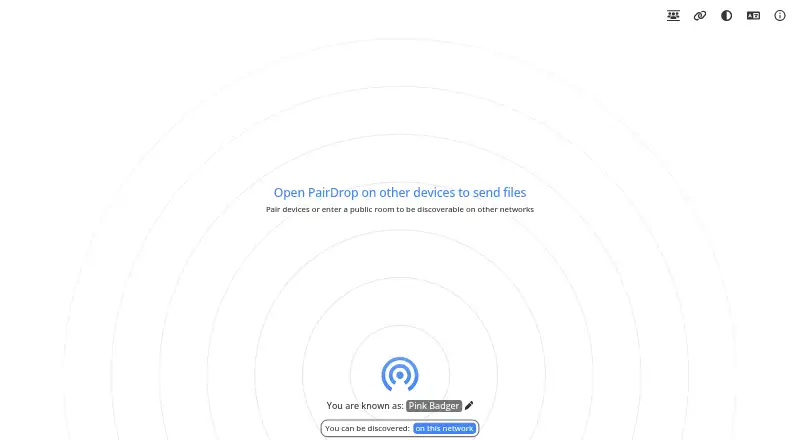
What PairDrop is
PairDrop is a free browser-based app for sending images, documents, and text between devices. Devices on the same local network can transfer files peer to peer; for internet transfers, users can pair devices or use temporary public rooms. Pairing works with a six-digit code or QR code and persists when PairDrop is reopened. Public rooms use a five-letter code or QR code, and closing PairDrop leaves the room. Multiple files can be transferred together, with multiple downloads packaged as a ZIP. Android and iOS users can download, share, or save received files to the gallery through the Share menu. Files can also be sent from Windows’ context menu, mobile share menus, or a command-line interface. PairDrop is available on the web and can be self-hosted with Docker or Node.js. Its FAQ says WebRTC encrypts files in transit and same-network files are not sent to a server. For paired devices behind a NAT, the PairDrop TURN server may route traffic, reducing speed. The FAQ also says users still need to trust the PairDrop server.
Who it suits
PairDrop suits people who want to send files between devices through a browser, including across a local network or over the internet. It also offers self-hosting for users who want to run their own instance.
What it does well
- Transfers images, documents, and text
- Local-network transfers can be peer to peer
- Pairing persists after reopening
- Supports multiple files and ZIP downloads
- Can be self-hosted with Docker or Node.js
What to know first
- TURN routing can reduce transfer speed
- Users still have to trust the PairDrop server
- Closing PairDrop leaves a public room
Limits
PairDrop is offered as a free plan. Transfers using the PairDrop TURN server can be slower, and closing PairDrop leaves the public room.
Plans
| Plan | Billed and limits | Price |
|---|---|---|
| Free | Libre software · local-network and internet file sharing | Free |
As pairdrop.app lists them, read 5 Oct 2026. The maker's own page has the final word.
Getting started
- Open https://pairdrop.app/ in a browser
- Open PairDrop on the devices you want to connect
- Pair devices with a six-digit code or QR code
- Use a five-letter room code or QR code for a temporary public room
- Send files from the browser, share menus, Windows context menu, or command line
- Self-host with Docker or Node.js and configure STUN/TURN servers if needed
Verdict
PairDrop offers several ways to move files between devices, with persistent pairing and temporary public rooms for internet transfers. Readers should note its server trust caveat and the possible speed reduction when traffic uses TURN.
Questions
Is PairDrop free?
Yes. PairDrop has a Free plan priced at $0 and is described as libre software.
Which platforms does PairDrop support?
PairDrop runs on the web and can be self-hosted. It also supports sending through Windows, iOS, Android, and command-line share interfaces.
How are devices paired?
Devices can pair with a six-digit code or QR code, and that pairing persists when PairDrop is reopened.
Are local transfers sent through a server?
The FAQ says same-network files are not sent to a server. WebRTC encrypts files in transit, while a TURN server may relay traffic for paired devices behind NAT.
Can I host PairDrop myself?
Yes. You can host an instance with Docker or Node.js and configure your own STUN/TURN servers.
Facts from PairDrop's own pages
- Connection caveat
- For paired devices behind a NAT, the PairDrop TURN server may route files and messages; the FAQ says transfer speed decreases when traffic uses TURN. · github.com, 5 Oct 2026
- File handling
- Multiple files can be transferred at once, and multiple downloads are packaged as a ZIP file. · github.com, 5 Oct 2026
- Free plan
- Yes · pairdrop.app, 23 Sept 2026
- Integrations
- The FAQ says files can be sent directly from Windows’ context menu, iOS and Android share menus, and a command-line interface. · github.com, 5 Oct 2026
- Intended use
- The FAQ says the project focuses narrowly on instant file transfer and may decline feature requests to preserve simplicity. · github.com, 5 Oct 2026
- Internet transfers
- Users can transfer files between paired devices or through temporary public rooms. · github.com, 5 Oct 2026
- Local transfers
- Devices on the same local network can send files peer to peer. · github.com, 5 Oct 2026
- Mobile sharing
- On Android and iOS, users can download, share, or save received files to the gallery through the Share menu. · github.com, 5 Oct 2026
- Pairing
- Devices can be paired using a six-digit code or QR code, and pairing persists when PairDrop is reopened. · github.com, 5 Oct 2026
- Public rooms
- Public rooms are joined with a five-letter code or QR code, and closing PairDrop leaves the room. · github.com, 5 Oct 2026
- Security caveat
- The FAQ says users still have to trust the PairDrop server and describes zero-trust signaling and verification as a planned improvement. · github.com, 5 Oct 2026
- Self-hosting
- Users can host their own instance with Docker or Node.js and configure their own STUN/TURN servers. · github.com, 5 Oct 2026
- Support
- The project invites bug reports and feature requests through GitHub issues and says users can support it with donations. · github.com, 5 Oct 2026
- Transfer privacy
- The FAQ says same-network files are not sent to a server, PairDrop does not use a database, and WebRTC encrypts files in transit. · github.com, 5 Oct 2026
- What it does
- PairDrop is a browser-based file-sharing app for sending images, documents, and text between devices. · github.com, 5 Oct 2026
Where PairDrop stands on Freedom251
- File transfer services#34 of 105