Freedom251 › Network Testing Software
PacketCheck
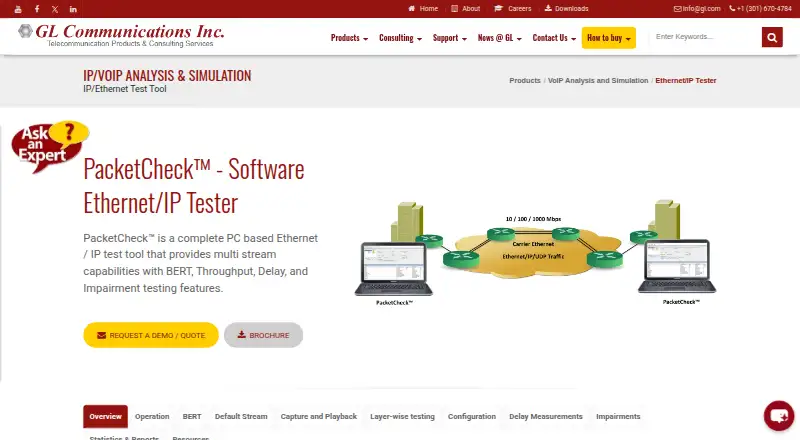
What PacketCheck is
PacketCheck is a paid Windows desktop tool for generating and analyzing multi-stream Ethernet and IP traffic. It performs bit-error-rate, throughput, delay, and impairment testing across Layer 1, Ethernet Layer 2, stacked VLAN/MPLS Layer 2.5, IPv4 Layer 3, and UDP, TCP, and ICMP Layer 4 traffic. Throughput and impairment testing are supported up to 500 Mbps across 10 Mbps, 100 Mbps, and 1 Gbps LANs and WANs. Users configure stream addresses, VLAN/MPLS headers, frame sizes, rates, and protocol parameters. The software measures packet loss, out-of-sequence and errored packets, throughput, and one-way or round-trip delay. It records and replays PCAP, PCAPNG, NTAR, and GL proprietary HDL files, introduces byte or bit errors, and creates PDF or XML reports. PacketCheck runs on a standard Windows PC with a network interface card. Licenses are node-locked or floating, with pricing on request.
Who it suits
PacketCheck suits network engineers and test teams that need configurable Ethernet/IP traffic generation, impairment testing, measurements, and reports on Windows.
What it does well
- Supports multiple protocol layers
- Traffic testing up to 500 Mbps
- PCAP and PCAPNG capture playback
- PDF and XML reporting
- Node-locked or floating licenses
What to know first
- Windows desktop only
- Pricing available on request
- Higher-rate accuracy recommends Intel Ethernet hardware
- Some GTP simulation integrations need extra licenses
Limits
Throughput and impairment testing are supported up to 500 Mbps. Correct one-way delay measurement requires one PC with two NICs running PacketCheck on each; round-trip delay requires the remote device to use loopback.
Plans
| Plan | Billed and limits | Price |
|---|---|---|
| PacketCheck™ (ETH100) | Node-locked or floating licenses; listed as ETH100 | On request |
As gl.com lists them, read 9 Oct 2026. The maker's own page has the final word.
Getting started
- Open the PacketCheck product website
- Obtain a node-locked or floating license
- Use a standard Windows PC with a network interface card
- Connect the network interfaces and configure traffic streams
- Run measurements or impairment tests
- Generate PDF or XML reports
Verdict
PacketCheck provides broad Ethernet/IP test configuration, measurements, impairment controls, and report output for Windows users. Its license pricing is not published, and some advanced accuracy or simulator scenarios have additional requirements.
Questions
Which operating system does PacketCheck support?
PacketCheck is a Windows desktop product.
What hardware is required?
A standard Windows PC and network interface card are sufficient. GL recommends a high-performance Intel Ethernet adapter for better accuracy and stability at higher rates.
What license types are available?
The product is offered with node-locked or floating licenses.
What traffic can PacketCheck test?
It tests Ethernet, IPv4, UDP, TCP, ICMP, VLAN, MPLS, and GTP-related traffic across the listed protocol layers.
Can it simulate GTP traffic?
GL describes using PacketCheck with its MAPS UMTS/LTE simulators for GTP traffic simulation; additional licenses are required.
Facts from PacketCheck's own pages
- Capacity
- The product page states that traffic throughput and impairment testing are supported up to 500 Mbps across 10 Mbps, 100 Mbps, and 1 Gbps LANs and WANs. · gl.com, 9 Oct 2026
- Capture and playback
- The product records and replays traffic in PCAP, PCAPNG, NTAR, and GL proprietary HDL formats. · gl.com, 9 Oct 2026
- Delay measurement limit
- One-way delay is described as correctly measurable on one PC with two NICs running PacketCheck on each, using one license; round-trip delay requires the remote device to be configured for loopback. · gl.com, 9 Oct 2026
- Founded
- 1986 · gl.com, 28 Sept 2026
- Hardware and OS
- The FAQ says no special hardware is required beyond a standard Windows PC and network interface card; it recommends a high-performance Intel Ethernet adapter for better accuracy and stability at higher rates. · gl.com, 9 Oct 2026
- Headquarters
- Gaithersburg, Maryland, USA · gl.com, 28 Sept 2026
- Impairment testing
- It can introduce byte insertion or deletion and bit or logical-operation errors to test network robustness. · gl.com, 9 Oct 2026
- Integrations
- The maker describes using PacketCheck with GL’s MAPS UMTS/LTE simulators for GTP traffic simulation, which requires additional licenses. · gl.com, 9 Oct 2026
- License options
- The FAQ states that PacketCheck is available under node-locked or floating licenses. · gl.com, 9 Oct 2026
- Maker founding
- GL Communications says it was formed on October 22, 1986. · gl.com, 9 Oct 2026
- Maker headquarters
- GL Communications lists its headquarters at 818 West Diamond Avenue, Third Floor, Gaithersburg, Maryland 20878, USA. · gl.com, 9 Oct 2026
- Metrics
- It measures bit error rate, packet loss, out-of-sequence and errored packets, throughput, round-trip delay, and one-way delay. · gl.com, 9 Oct 2026
- Protocol layers
- It supports testing across Layer 1, Ethernet Layer 2, stacked VLAN/MPLS Layer 2.5, IPv4 Layer 3, and UDP, TCP, and ICMP Layer 4 traffic. · gl.com, 9 Oct 2026
- Purpose
- PacketCheck is a PC-based Ethernet/IP test tool for generating and analyzing multi-stream traffic with BERT, throughput, delay, and impairment testing. · gl.com, 9 Oct 2026
- Reporting
- The product page describes PDF and XML reports with test statistics and configuration details, including the option to generate periodic reports. · gl.com, 9 Oct 2026
- Traffic configuration
- Users can configure multiple streams and set per-stream addresses, VLAN/MPLS headers, frame size, rate, and protocol parameters. · gl.com, 9 Oct 2026
Where PacketCheck stands on Freedom251
- Network Testing Software#31 of 33