Freedom251 › Bandwidth Monitoring Software
OphanimFlow
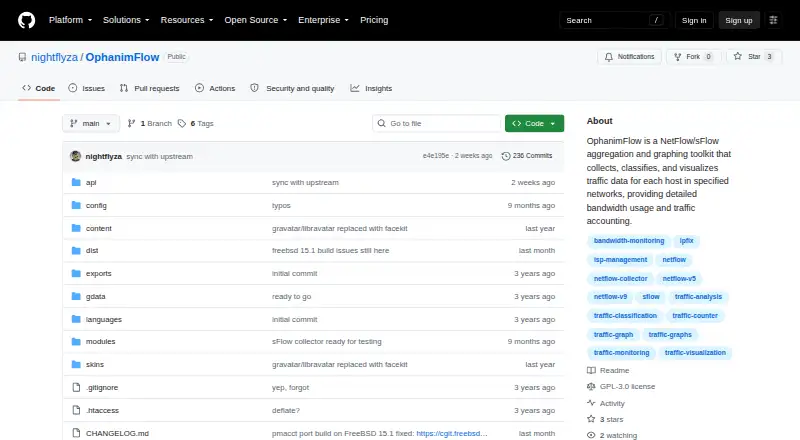
What OphanimFlow is
OphanimFlow is a free, open-source toolkit for collecting, classifying, and preprocessing NetFlow, IPFIX, and sFlow data. It graphs bandwidth by host and provides traffic accounting for network monitoring and analysis. NetFlow/IPFIX and sFlow collectors can run simultaneously while sharing network configuration and database tables. A web interface is used to configure networks and start the system. Its REST API can return traffic graphs as PNG images with selectable IP address, direction, time period, and dimensions. A traffic-summary endpoint reports upload and download totals for all hosts or a specified IP, with optional year and month parameters. Processed data and graphs can also be supplied to external applications. Setup instructions cover FreeBSD 14.4, 15.0, and 15.1, plus Debian 13.0 trixie. API endpoints require no authorization by default; ENDPOINTS_HOSTS can restrict receiving host IPs. The project is GPL-3.0 licensed.
Who it suits
It suits ISPs and network teams needing self-hosted bandwidth monitoring, traffic analysis, visualization, and API data for external applications.
What it does well
- Collects NetFlow, IPFIX, and sFlow
- Runs NetFlow/IPFIX and sFlow collectors together
- Provides PNG traffic graphs through REST
- Reports upload and download totals by host
- Supports FreeBSD and Debian setup
What to know first
- API endpoints are accessible without authorization
- Initial credentials are admin and demo
- Default storage reserve is 10%
- Requires changing the initial password
Limits
OphanimFlow rotates and flushes old data automatically to reserve storage space, with 10% reserved by default. API endpoints are accessible without authorization unless host access is restricted with ENDPOINTS_HOSTS.
Getting started
- Open the OphanimFlow GitHub repository
- Run the batch setup for FreeBSD 14.4, 15.0, 15.1, or Debian 13.0 trixie
- Open the web interface and configure networks
- Sign in with admin and demo
- Change the password in user profile settings
- Configure collectors using the documented ports and sampling rate
Verdict
OphanimFlow offers flow collection, host-level bandwidth graphs, traffic accounting, and API access in a self-hosted package. Teams should review its unauthenticated API defaults and setup requirements before deployment.
Questions
What does OphanimFlow cost?
It is free and open source, licensed under GPL-3.0.
Which flow protocols does it support?
It supports NetFlow, IPFIX, and sFlow.
Which systems have setup instructions?
The README provides batch instructions for FreeBSD 14.4, 15.0, and 15.1, and Debian 13.0 trixie.
What are the default login details?
The initial login is admin with password demo; the setup instructions advise changing the password in profile settings.
Can other applications use its data?
Yes. The REST API provides processed data, traffic summaries, and graph images for external applications.
How does it manage stored data?
Since release 0.0.5, it automatically rotates and flushes old data to reserve storage space, set to 10% by default.
Facts from OphanimFlow's own pages
- API access
- The README says API endpoints are accessible without authorization and describes an ENDPOINTS_HOSTS option to restrict which host IPs can access them. · github.com, 11 Oct 2026
- Collector defaults
- The documented default NetFlow UDP port is 42112, the sFlow port is 6343, and the sampling rate is 100. · github.com, 4 Oct 2026
- Collectors
- NetFlow/IPFIX and sFlow collectors can run simultaneously and share network configuration and database tables. · github.com, 11 Oct 2026
- Data retention
- Since release 0.0.5, OphanimFlow automatically rotates and flushes old data, reserving 10% of total storage by default. · github.com, 11 Oct 2026
- External use
- The README says the REST API can provide preprocessed data and graphs for use in external apps. · github.com, 4 Oct 2026
- Graph API
- The REST API can return traffic graphs as PNG images, with options for IP address, direction, time period and image dimensions. · github.com, 4 Oct 2026
- Initial credentials
- The setup instructions give the default login as admin and password as demo, and advise changing the password in user profile settings. · github.com, 4 Oct 2026
- Installation
- The README provides batch setup instructions for FreeBSD 14.4/15.0/15.1 and Debian 13.0 trixie. · github.com, 11 Oct 2026
- Intended use
- The README describes OphanimFlow as a replacement for bandwidthd and Stargazer cap_nf for network traffic collection and visualization. · github.com, 11 Oct 2026
- License
- The repository identifies the project as GPL-3.0 licensed. · github.com, 11 Oct 2026
- Purpose
- OphanimFlow collects, classifies, and visualizes NetFlow, IPFIX, and sFlow traffic for hosts on specified networks. · github.com, 11 Oct 2026
- REST API
- The REST API provides graph images and traffic-summary data for use in external applications. · github.com, 11 Oct 2026
- Supported setup systems
- The README provides batch setup instructions for FreeBSD 14.4/15.0/15.1 and Debian 13.0 trixie. · github.com, 4 Oct 2026
- Traffic accounting
- The toolkit provides bandwidth graphs and basic traffic accounting for each host. · github.com, 11 Oct 2026
- Traffic summary API
- The gettraff endpoint returns upload and download byte totals for all hosts or a specified IP, with optional year and month parameters. · github.com, 4 Oct 2026
- Web interface
- After setup, a web interface lets users specify networks and make minimum settings; the README says to change the default admin password in profile settings. · github.com, 11 Oct 2026
Where OphanimFlow stands on Freedom251
- Bandwidth Monitoring Software#30 of 33