
Opera Neon
What Opera Neon is
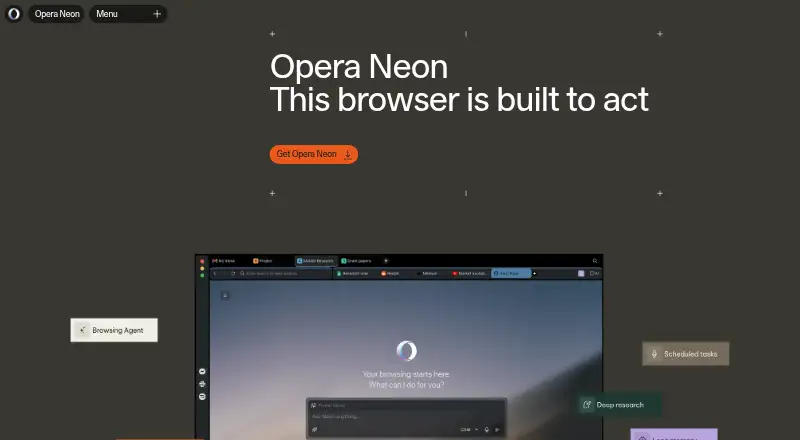
Opera Neon is an AI-powered browser for macOS and Windows, built on Chromium. It can work with webpages, research topics, fill forms, and create content. Neon Chat uses pages open in the browser as context and supports image and video generation, photo-to-video generation, and web app creation. Neon Do can handle tasks involving the current page and tabs, schedule tasks, and connect with Google tools. Research options include Deep Research, One-Minute Research, and Local Research agents. Neon Cards let users save instructions for reuse across Chat, Do, and Research Agents. The browser also supports MCP connections, including Claude Code, Lovable, and n8n. These connections are read-only by default; actions such as clicking or filling forms require permission. Users can pause, stop, or take over Neon Do. Neon Do runs in the browser while using cloud LLMs; Neon Chat and most Research Agents run in the cloud. Opera says chats and workflows are stored on its servers for 365 days, can be deleted by users, and are not used to train AI models. An Opera account is required. The free plan includes basic AI chat, ad blocking, a free VPN, Browser CLI, and MCP Connector. The Standard Plan is $19.90 a month.
Who it suits
Opera Neon suits people who want browser-based AI tools for research, content creation, and page tasks. It may also suit users who want reusable task instructions and MCP connections, provided macOS or Windows and an Opera account are available.
What it does well
- Neon Chat uses open pages as context.
- Neon Do can manage tabs and schedule tasks.
- Research agents include Deep Research and Local Research.
- Neon Cards save reusable task instructions.
- Built-in ad blocking and a free VPN are included.
What to know first
- An Opera account is required.
- Neon is available for macOS and Windows.
- Chats and workflows are stored on Opera servers for 365 days.
Limits
The free plan includes basic AI chat, ad blocking, a free VPN, Browser CLI, and MCP Connector. Neon AI agents, deep research, image and video generation, code and deploy options, scheduled tasks, long memory, leading AI models, and Google Connectors are listed with the Standard Plan at $19.90 a month.
Plans
| Plan | Billed and limits | Price |
|---|---|---|
| Start | Browser for Windows or macOS · built-in ad blocker and free VPN · Browser CLI and MCP Connector · basic AI chat | Free |
| Standard Plan | Month to month flexible subscription · Everything in Free · Neon AI agents · deep research, image and video generation, code and deploy options · scheduled tasks and long memory · leading AI models · Google Connectors | $19.90 a month |
As operaneon.com lists them, read 8 Oct 2026. The maker's own page has the final word.
Getting started
- Open https://operaneon.com/.
- Use a macOS or Windows device.
- Create or use an Opera account to access Neon.
- Start with the free plan, or choose the Standard Plan for $19.90 a month.
Verdict
Choose Opera Neon if you want AI chat, research, and browser task agents in one browser, with a free plan for basic AI chat and built-in tools. Look elsewhere if you need a browser for a platform other than macOS or Windows, or if you do not want an Opera account.
Questions
Is Opera Neon free?
Yes. The Start plan costs nothing and includes basic AI chat, ad blocking, a free VPN, Browser CLI, and MCP Connector.
What does the Standard Plan cost?
It costs $19.90 a month, billed month to month.
Which platforms does Opera Neon support?
Opera Neon is available for macOS and Windows.
Does Neon connect to other tools?
It supports MCP connections; the FAQ names Claude Code, Lovable, and n8n as tools that currently work with Neon via MCP.
How does Neon handle chats and workflows?
Opera says they are stored on its servers for 365 days, can be deleted by users, and are not used to train AI models.
Facts from Opera Neon's own pages
- Account requirement
- An Opera account is required to use Opera Neon. · operaneon.com, 8 Oct 2026
- Availability
- Opera Neon is currently available for macOS and Windows, and its interface is available in approximately 40 languages. · operaneon.com, 8 Oct 2026
- Browser agent
- Neon Do can work with the current page, manage tabs, run scheduled tasks, and connect with Google tools. · operaneon.com, 8 Oct 2026
- Built-in browser tools
- Opera Neon includes built-in ad blocking and a free VPN. · operaneon.com, 8 Oct 2026
- Chat and creation
- Neon Chat uses open pages as context and supports image generation, video generation, photo-to-video generation, and creating web apps. · operaneon.com, 8 Oct 2026
- Cloud processing
- Neon Do runs locally in the browser while using cloud LLMs, whereas Neon Chat and most Research Agents run in the cloud. · operaneon.com, 8 Oct 2026
- Founded
- 1995 · operaneon.com, 28 Sept 2026
- Headquarters
- Oslo, Norway · operaneon.com, 28 Sept 2026
- Integrations
- The browser supports MCP connections, and the FAQ names Claude Code, Lovable, and n8n as tools that currently work with Neon via MCP. · operaneon.com, 8 Oct 2026
- Purpose
- Opera Neon is an AI-powered browser that can open pages, research, fill in forms, and create content on a user's behalf. · operaneon.com, 8 Oct 2026
- Research
- Opera Neon includes Deep Research, One-Minute Research, and Local Research agents. · operaneon.com, 8 Oct 2026
- Retention and training
- Opera says Neon chats and workflows are stored on its servers for 365 days, can be deleted by the user, and are not used to train AI models. · operaneon.com, 8 Oct 2026
- Reusable workflows
- Neon Cards save task instructions into reusable cards that work across Neon Chat, Neon Do, and Research Agents. · operaneon.com, 8 Oct 2026
- Sensitive data
- The FAQ says login credentials and payment details stay in the browser session and are not sent to Opera or third-party servers. · operaneon.com, 8 Oct 2026
- User control
- MCP connections are read-only by default; clicking or filling forms requires explicit permission, and users can pause, stop, or take over Neon Do. · operaneon.com, 8 Oct 2026
Where Opera Neon stands on Freedom251
- AI Browsers#14 of 23
- AI Browser Agents#14 of 22
- Web browsers#139 of 154