Freedom251 › Homework Help Software

OpenTutor
What OpenTutor is
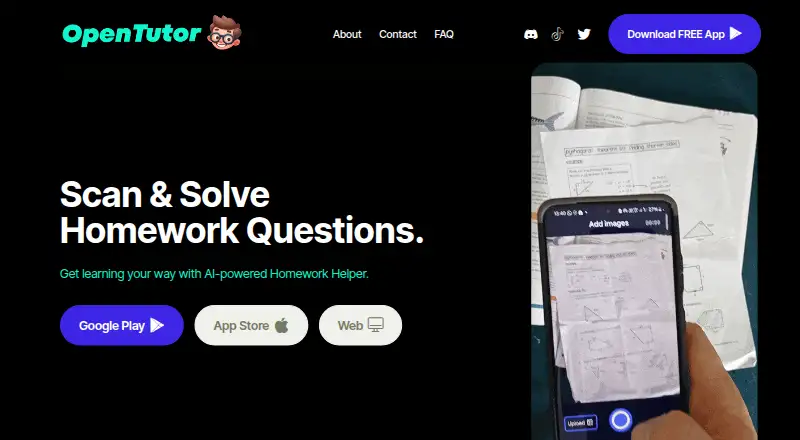
OpenTutor is a homework helper that analyzes a photo of a question and returns an answer with a step-by-step solution and explanation. Its Scan and Solve feature is described for economics, chemistry, and math, and the maker says the app works in every language. The FAQ says anyone with a smartphone and homework can use it. Downloading and using OpenTutor costs nothing; the maker also mentions an optional paid version without ads, but lists no price or terms for that version. The listed platforms are Android, iOS, and web, although the FAQ labels the web version as coming soon. The Android listing also describes expert subject tutors, study notes, guides, Q&As, saved materials, and tailored reminders. It identifies the app as containing ads and in-app purchases. Google Play reports that it may collect location and financial information among other data types, encrypts data in transit, and allows deletion requests. For support, the maker lists Discord, email, and Twitter. Google Play names Coffee & Chapters - Press as the developer and identifies Wojciech Augustynowicz in its developer details.
Who it suits
OpenTutor suits people with a smartphone who want photo-based homework answers and worked explanations. Android users also have access to the listed study materials and reminders.
What it does well
- Free to download and use.
- Returns step-by-step solutions and explanations.
- Scan and Solve covers economics, chemistry, and math.
- Android listing includes saved materials and tailored reminders.
- Support options include Discord, email, and Twitter.
What to know first
- The optional ad-free version has no listed price or terms.
- The FAQ labels the web version as coming soon.
- The Android listing says it contains ads and in-app purchases.
- Google Play reports possible collection of location and financial information.
Limits
Downloading and use are free. An optional paid version without ads is mentioned, but its price and terms are not given; the FAQ describes web as coming soon.
Plans
| Plan | Billed and limits | Price |
|---|---|---|
| Open Tutor | Downloading and use are free; paid version without ads is mentioned, but no price or terms are stated | Free |
As opentutor.app lists them, read 7 Oct 2026. The maker's own page has the final word.
Getting started
- Visit https://www.opentutor.app/
- Download the Android or iOS app, or use the web app when available
- Photograph a homework question to receive an answer and explanation
Overview
OpenTutor turns a photo of a homework question into a solution with a step-by-step explanation, with subject coverage that includes math, chemistry, and economics. It is best suited to students who want mobile homework help without an upfront cost. The main trade-off is that its advertised web access is not clearly ready, while the Android app includes ads and in-app purchases.
Key features
Photo input is the central convenience: it avoids typing out a problem and returns both an answer and an explanation. That makes OpenTutor more useful for following a method than a tool that supplies only a result, though the maker does not describe any limits on image quality, question volume, or response time. Subject coverage is described broadly, with economics, chemistry, and math among the examples; the maker also says the app works in every language. That breadth may suit students with varied coursework, but it is not a guarantee of equal depth across subjects or languages.
Android adds a wider set of study materials: subject tutors, notes, guides, question-and-answer content, saved materials, and tailored reminders. Those features make the Android app more than a one-question scanner, especially for students organizing revision. The same Android listing identifies ads and in-app purchases, so users seeking an uninterrupted free experience may prefer a different option. Google Play also reports possible collection of location and financial information among other data types; it says data is encrypted in transit and deletion requests are available.
Pricing
The Open Tutor plan costs nothing, and downloading and using the app costs nothing. That is a strong starting point for occasional help, with no stated free-use quota. The maker mentions an optional ad-free paid version, but gives no price or terms, so frequent users cannot weigh its cost or conditions against the free option. On Android, in-app purchases are also identified, without further terms.
Platforms
OpenTutor is identified for Android, iOS, and web, but the maker's FAQ calls the web version “coming soon.” Students who need browser access now should not rely on it as their primary option; Android and iOS are the clearer choices. The maker lists Discord, email, and Twitter as contact channels.
Who it's for
OpenTutor is a reasonable fit for students who want to photograph questions, see the reasoning, and try a homework helper without paying. Its stated language range and broad subject coverage may also appeal to learners outside a single curriculum or language. It is less compelling for people who require a ready web app, want to avoid ads, or need clear paid-plan terms before committing.
Pros and cons
- Pro: Photo questions receive worked, step-by-step explanations, which can help users follow a solution rather than copy an answer.
- Pro: Free downloading and use lower the barrier for occasional homework support.
- Pro: Android includes notes, guides, saved materials, and reminders for study beyond individual questions.
- Con: The web version is described as coming soon, limiting its reliability as a browser-based choice.
- Con: Android includes ads and in-app purchases, while the optional ad-free version has no stated price or terms.
- Con: Google Play reports potential collection of location and financial information, which privacy-conscious users may want to consider.
Alternatives
Course Hero suits learners who prefer browsing study documents and can use pay-per-question homework help, or earn unlocks by contributing materials. Its Basic membership is free, but it does not offer a free trial.
Gionth is another free Android, iOS, and web option.
StudyBru is a free option while in beta, with no credit card required.
AI Homework Help: Scan & Solve is an iOS alternative that is free to start without signup, with an annual in-app plan priced at $29.99 a year.
SnapSolve may suit Android users who want a stated free allowance of 20 solves per day, with photo, text, and voice input across 7+ subjects, but without history, saved sessions, or priority AI processing on its free plan.
Sophia Educate offers web-based explanations, including one guest explanation and two daily explanations for verified free accounts.
Answer Space is a web alternative with a shared pool of 1,000 free daily answers and a limit of three free answers per person each day.
Browse more options in Homework Help Software or AI Homework Helpers.
Verdict
Choose OpenTutor if you want a no-cost way to turn homework photos into explained solutions, especially on a phone. Its free access and Android study materials are the clearest reasons to choose it; look elsewhere if you need dependable web access now, want an ad-free experience without uncertain paid terms, or are uncomfortable with the Android app's reported data collection.
Verdict
OpenTutor focuses on turning homework photos into explained solutions, with a free-to-use option and additional Android study tools. The maker mentions an ad-free paid version but does not state its price or terms.
Questions
Does OpenTutor have a free plan?
Yes. Downloading and using the app costs nothing.
What does the optional paid version cost?
The maker mentions a paid version without ads but gives no price or terms.
Which platforms are listed?
Android, iOS, and web are listed. The FAQ describes web as coming soon.
What homework subjects does it cover?
Scan and Solve is described for economics, chemistry, and math. The maker says the app works in every language.
Who develops the Android app?
Google Play names Coffee & Chapters - Press as the developer and identifies Wojciech Augustynowicz in its developer details.
What data safety details are reported?
Google Play says the app may collect location and financial information among other data types, encrypts data in transit, and allows deletion requests.
Facts from OpenTutor's own pages
- Android availability
- The Google Play listing identifies the app as containing ads and in-app purchases. · play.google.com, 7 Oct 2026
- Android features
- The Google Play listing describes expert subject tutors, study notes, guides, Q&As, saved materials, and tailored reminders. · play.google.com, 7 Oct 2026
- Audience
- The FAQ says anyone with a smartphone and homework can use the app. · opentutor.app, 7 Oct 2026
- Data safety
- Google Play reports that the app may collect location and financial information among other data types, encrypts data in transit, and allows deletion requests. · play.google.com, 7 Oct 2026
- Free use
- The FAQ says downloading and using Open Tutor costs nothing, and mentions an optional paid version without ads. · opentutor.app, 7 Oct 2026
- How it works
- The app analyzes a photo of homework and provides step-by-step solutions and explanations. · opentutor.app, 7 Oct 2026
- Languages
- The maker says the app works in every language. · opentutor.app, 7 Oct 2026
- Maker identity
- Google Play names Coffee & Chapters - Press as the developer and identifies Wojciech Augustynowicz in its developer details. · play.google.com, 7 Oct 2026
- Platform status
- The contact page lists Android, iOS, and web apps, while the FAQ labels web as coming soon. · opentutor.app, 7 Oct 2026
- Purpose
- Open Tutor is a homework helper that lets users photograph a homework question and get an answer. · opentutor.app, 7 Oct 2026
- Subjects
- The maker describes Scan and Solve for subjects including economics, chemistry, and math. · opentutor.app, 7 Oct 2026
- Support
- The maker's contact page lists Discord, email, and Twitter as contact options. · opentutor.app, 7 Oct 2026
Where OpenTutor stands on Freedom251
- Homework Help Software#9 of 29
- AI Homework Helpers#11 of 30