Freedom251 › Browser Automation Tools
OpenTabs
What OpenTabs is
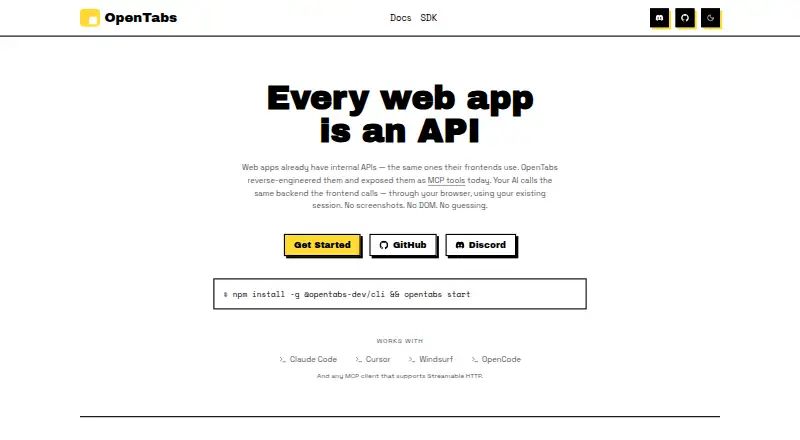
OpenTabs lets AI agents use web applications through the browser session where you are already logged in. It exposes internal web-app APIs as MCP tools: an MCP server routes each call to the matching browser tab, and a Chrome extension runs it there. The site lists more than 100 plugins and about 2,000 tools, with examples for Slack, Discord, GitHub, Jira, Notion, Figma, AWS, and Stripe. Built-in browser tools cover tab management, screenshots, DOM interaction, network capture, cookies, and console logs. OpenTabs supports Full MCP, Gateway MCP, and CLI modes. Documented clients include Claude Code, Cursor, Windsurf, and OpenCode, while any MCP client supporting Streamable HTTP can connect. It runs locally with no cloud execution and is open source under MIT. Plugin tools are disabled by default, permissions can be Off, confirmation-based, or automatic, and every call is logged. Setup requires Node.js 22 or later and Chrome or Chromium, with manual Developer-mode extension loading. Each supported site needs a plugin, and site API changes can affect it.
Who it suits
OpenTabs suits people using existing plugins, developers building plugins, and contributors to the platform. It is relevant to AI-agent workflows that need authenticated browser access to web apps.
What it does well
- Connects AI agents through logged-in browser sessions
- Lists over 100 plugins
- Supports Full MCP, Gateway MCP, and CLI
- Runs locally without cloud execution
- Logs every tool call
What to know first
- Requires Node.js 22 or later
- Requires Chrome or Chromium
- Extension must be loaded manually
- Each site needs its own plugin
Verdict
OpenTabs provides a local MCP bridge between AI agents and authenticated web apps. Its plugin model and manual setup offer control, but supported sites require maintained adapters.
Facts from OpenTabs's own pages
- AI clients
- The site names Claude Code, Cursor, Windsurf, and OpenCode, and says OpenTabs works with any MCP client supporting Streamable HTTP. · opentabs.dev, 11 Oct 2026
- Audit log
- The server keeps a tool invocation audit log, with the documentation describing a 500-entry in-memory history and a persistent local log file. · opentabs.dev, 11 Oct 2026
- Browser tools
- Built-in browser tools can work with any tab, and the maker lists screenshots, clicking, typing, and network capture among their capabilities. · github.com, 11 Oct 2026
- Connection modes
- The MCP server documentation describes Full MCP, Gateway MCP, CLI mode, and auto-start via stdio. · opentabs.dev, 11 Oct 2026
- Extension installation
- Users must manually load the Chrome extension in Developer mode because the maker says Chrome does not permit distributing this localhost-server extension through the Chrome Web Store. · opentabs.dev, 11 Oct 2026
- How it works
- An MCP server routes tool calls to the matching browser tab, where a Chrome extension runs them on the web app. · opentabs.dev, 5 Oct 2026
- Intended users
- The documentation describes paths for people using existing plugins, building plugins, and contributing to the platform. · opentabs.dev, 5 Oct 2026
- License and support
- OpenTabs is open source under the MIT license, and the maker links to a community Discord for support and discussion. · opentabs.dev, 11 Oct 2026
- Local operation
- The MCP server runs locally and bridges AI clients with the browser extension; the maker says there is no cloud, relay, or account requirement. · opentabs.dev, 11 Oct 2026
- Permissions
- Tools are disabled until enabled, and permissions can be set to Off, Ask for confirmation, or Auto per plugin or tool. · github.com, 11 Oct 2026
- Plugin development
- Users can scaffold their own plugins, build them, and register them locally; the maker also says plugins can be published to npm. · opentabs.dev, 11 Oct 2026
- Plugin limitation
- The site notes that OpenTabs requires a plugin for each site and that a site’s internal APIs can change. · opentabs.dev, 5 Oct 2026
- Plugin review
- The maker says users can have AI review plugin adapter source code before enabling it, and permissions reset when a plugin is updated. · opentabs.dev, 11 Oct 2026
- Plugins
- The site advertises 100+ plugins and about 2,000 tools, including integrations for Slack, Discord, GitHub, Jira, Notion, Figma, AWS, and Stripe. · opentabs.dev, 11 Oct 2026
- Purpose
- OpenTabs exposes web apps’ internal APIs as MCP tools that AI agents can use through the user’s logged-in browser session. · opentabs.dev, 5 Oct 2026
- Security defaults
- Plugin tools are disabled by default, and the site says users can have an AI review plugin source before enabling it; plugin updates reset permissions. · opentabs.dev, 5 Oct 2026
- Setup limitation
- The installation guide instructs users to manually load the Chrome extension in Developer mode using “Load unpacked.” · opentabs.dev, 5 Oct 2026
- Setup requirements
- The installation guide requires Node.js 22 or later and Google Chrome or a Chromium-based browser. · opentabs.dev, 5 Oct 2026
- Support
- The quick start directs users who remain stuck to open an issue. · opentabs.dev, 5 Oct 2026
- System requirements
- The installation guide requires Node.js 22 or later and Google Chrome or a Chromium-based browser. · opentabs.dev, 11 Oct 2026
- Telemetry
- Anonymous telemetry is enabled by default; the documentation says it excludes plugin names and tool calls and can be disabled through the CLI, environment variables, or config. · opentabs.dev, 11 Oct 2026
- What it does
- OpenTabs exposes web apps’ internal APIs as MCP tools that AI agents can call through the user’s authenticated browser session. · opentabs.dev, 11 Oct 2026
Where OpenTabs stands on Freedom251
- Browser Automation Tools#30 of 62