
OpenSCAD
What OpenSCAD is
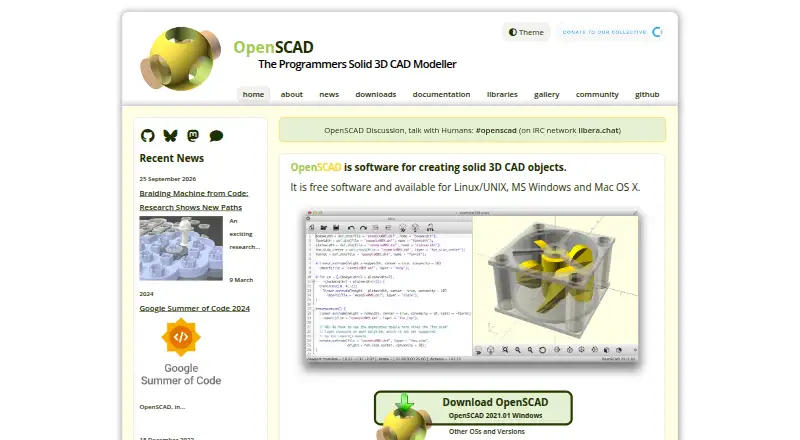
OpenSCAD is desktop software for building solid 3D CAD models through scripts. A script describes the objects and their parameters; OpenSCAD reads it and renders a model that can be adjusted by changing those values. Its approach centers on computer-aided design rather than artistic modeling, with constructive solid geometry and extrusion of 2D outlines among its modeling techniques. The software can use DXF outlines and parameters, and read or create 3D models in STL and OFF formats. A built-in render engine, animation tools and 3D print export are included; sculpting tools are not. OpenSCAD runs on Linux, macOS and Windows, and is free software under the GNU General Public License version 2. Community libraries provide resources for shapes, mechanical parts, electronics enclosures and 3D-printing workflows. Installation routes include MacPorts, Homebrew, WinGet, Linux distribution package managers and Docker images. An experimental browser build is also available, though it runs slowly and lacks preview, fonts and a built-in graphical interface. The project offers documentation, tutorials, a user manual and community discussion on IRC. It names Marius Kintel as maintainer, and releases are signed with GnuPG.
Who it suits
OpenSCAD suits people designing machine parts and other configurable objects who are comfortable describing designs with scripts. Its CAD focus and 3D print export also make it relevant to users preparing models for 3D printing.
What it does well
- Free software under the GNU General Public License version 2
- Parametric modeling supports configurable designs
- Reads and creates STL and OFF models
- Exports models for 3D printing
- Runs on Linux, macOS and Windows
- Community libraries cover mechanical parts and 3D-printing workflows
What to know first
- It does not include sculpting tools
- The experimental browser build is slow and lacks preview, fonts and a GUI
- Modeling is script based rather than focused on artistic modeling
Limits
The software is free under the GNU General Public License version 2. Its experimental WebAssembly build runs slowly and lacks preview, fonts and a built-in GUI.
Plans
| Plan | Billed and limits | Price |
|---|---|---|
| OpenSCAD | Free software · desktop applications · source code available · Docker images available | Free |
As openscad.org lists them, read 14 Oct 2026. The maker's own page has the final word.
Getting started
- Visit the OpenSCAD website.
- Choose a desktop installation route for Linux, macOS or Windows.
- Install through a listed package manager or use a Docker image.
- Describe objects and parameters in a script file, then render the model.
- Use DXF outlines or parameters as needed, and export models in supported formats.
Verdict
Choose OpenSCAD for script-driven, parameterized CAD work, particularly designs such as machine parts. Look elsewhere if sculpting tools or an artistic modeling focus are central to your work; its experimental browser build also has substantial limitations.
Questions
How much does OpenSCAD cost?
OpenSCAD is free software, listed as free.
Which operating systems does it support?
The desktop application runs on Linux, macOS and Windows.
What file formats can it use?
It can use DXF outlines and parameters, and read or create 3D models in STL and OFF formats.
Is OpenSCAD open source?
It is free software released under the GNU General Public License version 2.
Can I use it in a browser?
An experimental WebAssembly build runs in a browser, but it is slow and lacks preview, fonts and a built-in GUI.
Where can I get help?
The project directs users to documentation, tutorials, a user manual and community discussion on IRC.
Facts from OpenSCAD's own pages
- Animation tools
- Yes · openscad.org, 21 Sept 2026
- Boolean modeling
- The language documents union, difference and intersection operations for combining solids. · files.openscad.org, 14 Oct 2026
- Capterra pricing status
- Capterra lists no vendor starting price and says a free trial is unavailable. · capterra.com, 14 Oct 2026
- Command-line use
- The manual documents running OpenSCAD in command-line environments, and the FAQ identifies an --info command for technical details. · files.openscad.org, 14 Oct 2026
- Company identity
- LinkedIn describes OpenSCAD as a self-owned software-development organization with one employee and a 2009 founding year. · linkedin.com, 14 Oct 2026
- Company positioning
- LinkedIn says OpenSCAD uses a plain-text design language, targets 3D printing, supports version-control workflows and enforces manifold solids. · linkedin.com, 14 Oct 2026
- Customizer
- The documentation includes a Customizer interface for exposing model parameters to users. · openscad.org, 14 Oct 2026
- Developer language integration
- The FAQ names Python, Ruby, C++, Haskell and Clojure tools that generate OpenSCAD code, plus JavaScript interfaces in related projects. · files.openscad.org, 14 Oct 2026
- Development requirements
- Current development snapshots require macOS 11 or newer for universal Intel/Apple Silicon builds and Windows 11 64-bit Intel/AMD systems; Windows ARM is unsupported. · openscad.org, 14 Oct 2026
- Docker integration
- Official Docker images are published for linux/amd64 and linux/arm64, including stable and development variants. · openscad.org, 14 Oct 2026
- Documentation depth
- Official documentation spans tutorials, a user manual, language reference, cheat sheet, books, videos, examples, FAQ, libraries, command-line guidance and source-building instructions. · openscad.org, 14 Oct 2026
- External editors
- Automatic reload lets users edit files in another editor, including a documented Vim workflow, while OpenSCAD previews the result. · files.openscad.org, 14 Oct 2026
- File formats
- It can use DXF outlines and parameters, and read and create 3D models in STL and OFF formats. · openscad.org, 7 Oct 2026
- Free plan
- Yes · openscad.org, 21 Sept 2026
- GUI and geometry libraries
- The application uses Qt for its interface, CGAL for CSG evaluation, OpenCSG and OpenGL for previews, plus Boost, Eigen and GLEW. · openscad.org, 14 Oct 2026
- Import and export
- The manual lists import support for STL, OFF, DXF and SVG and export support for STL, 3MF, OFF, AMF, DXF, SVG, PNG and CSG. · files.openscad.org, 14 Oct 2026
- Independent file limitation
- 3D Printer World states that OpenSCAD exports STL and 3MF meshes but has no native STEP export for editable solid CAD exchange. · 3dprinterworld.com, 14 Oct 2026
- Independent platform assessment
- 3D Printer World lists Windows, macOS and Linux desktop support and notes that the browser port is limited. · 3dprinterworld.com, 14 Oct 2026
- Independent workflow assessment
- 3D Printer World recommends OpenSCAD for adjustable rule-driven parts but says it is less suitable for mouse-driven edge editing, sculpting and editable STEP handoffs. · 3dprinterworld.com, 14 Oct 2026
- Integration listing
- Capterra states that OpenSCAD integrates with Ultimaker Cura Enterprise for preparing models for 3D printing. · capterra.com, 14 Oct 2026
- Integrations
- The download page lists installation through MacPorts, Homebrew, WinGet and Linux distribution package managers, and provides Docker images. · openscad.org, 7 Oct 2026
- Iteration and mathematics
- The language supports loops, conditional expressions, list comprehensions, mathematical functions, string functions and type tests. · files.openscad.org, 14 Oct 2026
- Language primitives
- The documented language includes 2D and 3D primitives such as squares, circles, polygons, cubes, spheres, cylinders and polyhedra. · files.openscad.org, 14 Oct 2026
- Libraries
- The site lists community libraries, including tools for shapes, mechanical parts, electronics enclosures and 3D-printing workflows. · openscad.org, 7 Oct 2026
Where OpenSCAD stands on Freedom251
- 3D CAD Software#1 of 79
- 3D modeling software#3 of 147
- CAD software#1 of 31
- Engineering Design Software#1 of 24
- 3D Design Software#2 of 26