Freedom251 › Online Exam Software
OpenDidac
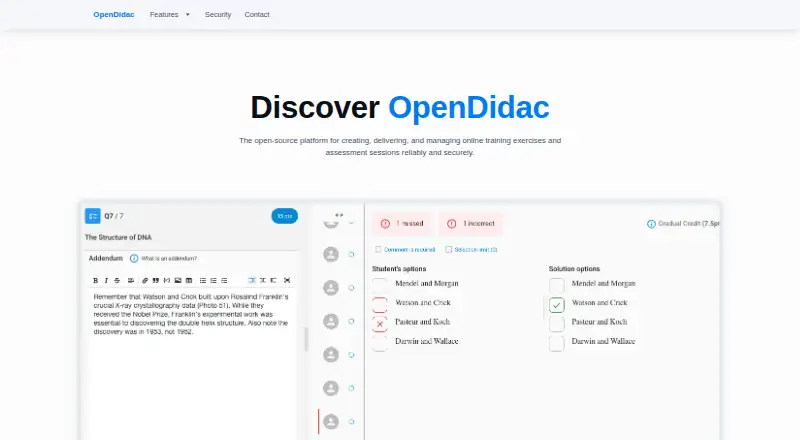
What OpenDidac is
OpenDidac is an open-source educational platform for creating and managing training exercises and exams, including software engineering assessments. Educators can build multiple-choice, true/false, essay, code-writing, code-reading, database, and web questions. In code-writing tasks, students edit code and run automated tests; supported languages include JavaScript, Python, Java, C, C++, and Go. Database questions use SQL against PostgreSQL, while web questions combine HTML, CSS, and JavaScript with a live preview.
Educators can sort questions by type and tags, then assemble evaluations by assigning points and coefficients. Settings accommodate extended training with solutions or strict exams with time limits and restricted access. The platform monitors student progress in real time and automates grading for code-writing and database questions, while allowing manual review. Educators can also give feedback, export grades and reports, and purge data. The maker describes an optional desktop app, IP-range restrictions, and session-change detection as safeguards for assessments. OpenDidac is available on the web and Linux, macOS, and Windows. It is free and open source.
Who it suits
OpenDidac suits educators who manage practice exercises and exams, particularly in software engineering, and need several question formats with grading and progress monitoring. Institutions can contact the maker about integration, and contributors can participate through GitHub.
What it does well
- Supports seven formats, including code, SQL, and web questions.
- Automated tests support code-writing questions in six listed languages.
- Question bank supports tags, points, and coefficients.
- Real-time progress monitoring and automated grading are available.
- Grades and reports can be exported; educators can provide feedback.
What to know first
- Identity verification is not included.
- Desktop authentication requires Switch edu-ID credentials and an authenticator app.
Getting started
- Visit https://www.opendidac.com/ to access the platform.
- Use the web version or choose Linux, macOS, or Windows.
- For controlled desktop evaluations or consultations, use the cross-platform desktop app.
- Desktop app users need a Switch edu-ID username and password and access to an authenticator app.
- Contact the maker to discuss institutional integration, or contribute on GitHub.
Verdict
Choose OpenDidac for free, open-source exercise and exam management with varied question types and automated grading for code and database work. Its exam controls include an optional desktop app, IP-range restrictions, and session-change detection, but identity verification is not part of the offering described here.
Questions
Is OpenDidac free?
Yes. It is free and open source.
What platforms does OpenDidac support?
It is listed for Linux, macOS, web, and Windows.
What types of questions can educators create?
Multiple choice, true/false, essay, code writing, code reading, database, and web questions.
Does it include exam security controls?
The maker describes an optional desktop app, IP-range restrictions, and session-change detection as measures to help protect assessment integrity.
Does OpenDidac verify student identity?
No; identity verification is not included.
How does desktop app authentication work?
The instructions require a Switch edu-ID username and password and access to an authenticator app.
Facts from OpenDidac's own pages
- Assessment modes
- Educators can create evaluations ranging from long-lasting training with solutions to strict exams with time limits and restricted access. · github.com, 9 Oct 2026
- Audience
- OpenDidac is described as an educational platform for educators managing training exercises and exams, including software engineering education. · github.com, 9 Oct 2026
- Availability and support
- The maker invites users to contact it to discuss integrating OpenDidac in an institution or organization and to contribute on GitHub. · opendidac.com, 9 Oct 2026
- Code writing
- Code-writing questions let students edit code and run automated tests; listed languages include JavaScript, Python, Java, C, C++, and Go. · github.com, 9 Oct 2026
- Database questions
- Database questions let students write SQL queries against PostgreSQL and validate the results. · github.com, 9 Oct 2026
- Desktop app
- The desktop app is for evaluations and consultations, and the maker provides downloads for Windows, macOS, and Linux. · github.com, 9 Oct 2026
- Desktop authentication
- The desktop app instructions say users need their Switch edu-ID username and password and access to an authenticator app. · github.com, 9 Oct 2026
- Evaluation modes
- Evaluation settings support long-lasting training with access to solutions and strict exams with time limits and restricted access. · github.com, 9 Oct 2026
- Exam security
- The maker describes a native desktop application, IP-range protection, and session-change detection as measures to help maintain assessment integrity. · opendidac.com, 9 Oct 2026
- Headquarters
- Yverdon-les-Bains, Switzerland · opendidac.com, 28 Sept 2026
- Monitoring and grading
- The platform offers real-time student progress monitoring and automated grading for code-writing and database questions, with manual review options. · github.com, 9 Oct 2026
- Purpose
- OpenDidac is an open-source educational platform for creating and managing training exercises and exams, including in software engineering. · github.com, 9 Oct 2026
- Question bank
- Its question bank can be filtered by tags, question type, coding language, and last usage. · , 9 Oct 2026
- Question types
- It supports multiple choice, true/false, essay, code writing, code reading, database, and web questions. · github.com, 9 Oct 2026
- Results
- Educators can export grades and reports, provide feedback, and purge data. · github.com, 9 Oct 2026
- Security controls
- The maker describes an optional desktop app for controlled exams, IP range restrictions, and session-change notifications as AI-mitigation measures. · , 9 Oct 2026
- Support
- The desktop app repository directs users to contact their professor for questions or support. · github.com, 9 Oct 2026
- Web questions
- Web questions let students write HTML, CSS, and JavaScript with a live preview. · github.com, 9 Oct 2026
Where OpenDidac stands on Freedom251
- Online Exam Software#28 of 35