Freedom251 › Packaging Design Software
open-dieline
What open-dieline is
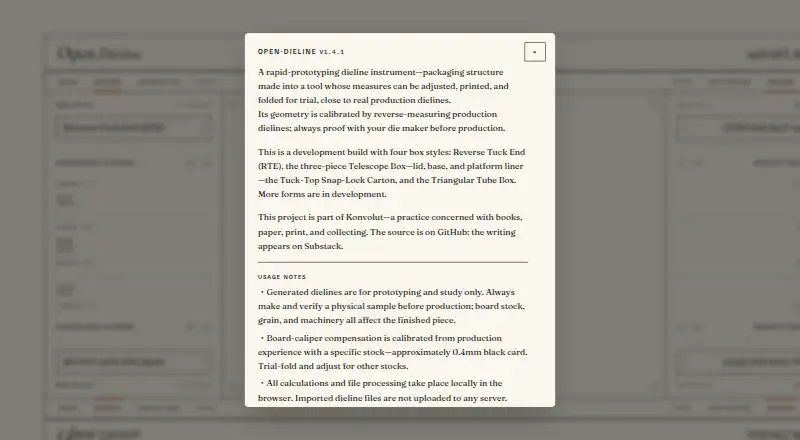
Open Dieline is a rapid-prototyping tool for creating adjustable packaging dielines for trial folding. It runs in a browser and is also available for self-hosting. Its editor offers Design, Imposition, and Fold modes, with four box formats: Reverse Tuck End, a three-piece Telescope Box, Tuck-Top Snap-Lock Carton, and Triangular Tube Box. Finished dielines can be downloaded as SVG or DXF. For reference, you can import a production SVG, calibrate its scale, and overlay it on the generated layer. Calculations and file processing happen locally in the browser; imported dieline files are not uploaded to a server. The maker says the geometry is calibrated through reverse measurement of production dielines. Board-caliper compensation is calibrated using approximately 0.4 mm black card, so other materials may need trial folding and adjustment. Canvas dragging and calibration are designed for mouse input, and a desktop browser is recommended. Generated dielines are for prototyping and study, not production use without further checks: the maker advises verifying a physical sample and proof with a die maker before production. Open Dieline is an instrument by Konvolut, a Taipei-based practice concerned with books, paper, print, and collecting. Its project license is PolyForm Noncommercial 1.0.0; commercial-use inquiries and issue reports can be sent to [email protected].
Who it suits
Open Dieline suits packaging designers and makers who want to create adjustable dielines, inspect folds, or compare a generated design with a production SVG. It is aimed at prototyping and study, with desktop mouse input recommended for canvas work and calibration.
What it does well
- Creates four listed box styles in Design, Imposition, and Fold modes.
- Exports dielines as SVG or DXF.
- Imports production SVGs for scale calibration and overlay.
- Calculations and file processing stay local in the browser.
- Available as a web tool or for self-hosting.
What to know first
- The project license is for noncommercial use.
- A desktop browser is recommended for mouse-based canvas work.
- Production requires physical sample verification and die-maker proofing.
Limits
The project license is for noncommercial use under PolyForm Noncommercial 1.0.0. Generated dielines are for prototyping and study; before production, verify a physical sample and proof with a die maker. Board-caliper compensation is calibrated using approximately 0.4 mm black card, so other stocks may need trial folding and adjustment.
Getting started
- Open the Open Dieline website or use the self-hosted version.
- Use a desktop browser for mouse-based canvas dragging and calibration.
- Select Design, Imposition, or Fold mode.
- Choose one of the four listed box styles and adjust the dieline.
- Optionally import a production SVG, calibrate its scale, and overlay it for reference.
- Download the result as SVG or DXF.
Verdict
Choose Open Dieline if you need to prototype packaging dielines, test folds, or reference a production SVG, with local browser processing. Its noncommercial license and prototyping scope make it a poor fit for direct commercial use or production without further verification; commercial-use inquiries go to [email protected].
Questions
What does Open Dieline cost?
Pricing is on request.
Can I use it in a browser or self-host it?
It is available as a web tool and for self-hosting.
What box styles can I create?
The listed styles are Reverse Tuck End, a three-piece Telescope Box, Tuck-Top Snap-Lock Carton, and Triangular Tube Box.
What file formats can I export or import?
You can download SVG and DXF files. You can also import a production SVG, calibrate its scale, and overlay it against the generated layer.
Are imported files uploaded to a server?
No. Calculations and file processing happen locally in the browser, and imported dieline files are not uploaded to a server.
Can the generated dielines go straight to production?
They are intended for prototyping and study. The maker advises verifying a physical sample and proof with a die maker before production.
Facts from open-dieline's own pages
- Box styles
- The development build includes Reverse Tuck End, a three-piece Telescope Box, Tuck-Top Snap-Lock Carton, and Triangular Tube Box styles. · tool.konvolut.art, 9 Oct 2026
- Commercial contact
- The maker directs commercial-use inquiries and issue reports to [email protected]. · tool.konvolut.art, 4 Oct 2026
- Design modes
- The tool provides Design, Imposition, and Fold modes. · tool.konvolut.art, 9 Oct 2026
- Desktop use
- Canvas dragging and calibration are designed for mouse input, and the maker recommends a desktop browser. · tool.konvolut.art, 4 Oct 2026
- Device guidance
- Canvas dragging and calibration are designed for mouse input, and a desktop browser is recommended. · tool.konvolut.art, 9 Oct 2026
- Dieline overlay
- Users can import a production SVG, calibrate its scale, and overlay it against the generated layer for reference. · tool.konvolut.art, 9 Oct 2026
- Exports
- The tool offers SVG and DXF downloads. · tool.konvolut.art, 9 Oct 2026
- Geometry
- Its geometry is calibrated by reverse-measuring production dielines. · tool.konvolut.art, 9 Oct 2026
- Headquarters
- Taipei, Taiwan · tool.konvolut.art, 28 Sept 2026
- License
- The project is licensed for noncommercial use under PolyForm Noncommercial 1.0.0; the maker asks commercial users to contact them. · tool.konvolut.art, 9 Oct 2026
- Local processing
- Calculations and file processing take place locally in the browser, and imported dieline files are not uploaded to a server. · tool.konvolut.art, 9 Oct 2026
- Maker
- The site identifies Open Dieline as an instrument by Konvolut, a practice concerned with books, paper, print, and collecting. · tool.konvolut.art, 4 Oct 2026
- Material calibration
- Board-caliper compensation is calibrated using approximately 0.4 mm black card, and the maker advises trial-folding and adjusting for other stocks. · tool.konvolut.art, 9 Oct 2026
- Overlay
- Users can import a production SVG, calibrate its scale, and overlay it against the generated layer for reference. · tool.konvolut.art, 4 Oct 2026
- Production guidance
- Generated dielines are for prototyping and study, and the maker advises verifying a physical sample and proofing with a die maker before production. · tool.konvolut.art, 9 Oct 2026
- Production limit
- Generated dielines are for prototyping and study; the maker says to verify a physical sample and proof with a die maker before production. · tool.konvolut.art, 4 Oct 2026
- Purpose
- Open Dieline is a rapid-prototyping tool for adjustable, printable packaging dielines that can be folded for trial. · tool.konvolut.art, 9 Oct 2026
Where open-dieline stands on Freedom251
- Packaging Design Software#24 of 27