Freedom251 › Image Converter Software
Online Image Converter
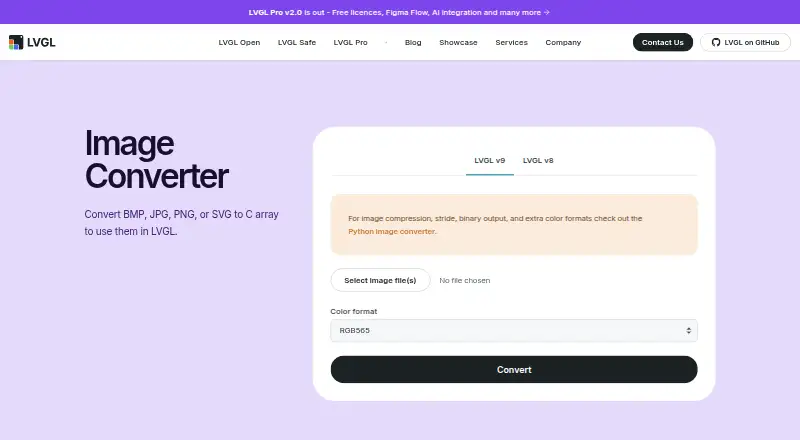
What Online Image Converter is
Online Image Converter is a free web tool that turns BMP, JPG, PNG or SVG images into C arrays for LVGL projects. It offers separate LVGL v8 and v9 choices and lets users convert one image or several images before downloading the generated files. Settings include color format, alpha byte, chroma keying, dithering, output format and big-endian output. The resulting C file is intended to be copied into an LVGL project, where application code declares the image with LV_IMG_DECLARE and sets it. The tool is designed for preparing assets for LVGL, an open-source graphics library aimed at MCUs, MPUs and display types. It supports color mode conversion but does not resize images. For compression, stride, binary output or additional color formats, the page points to a Python converter on GitHub. Documentation and a community forum are linked.
Who it suits
It suits developers preparing image assets for LVGL-based projects on embedded graphics systems. It is useful when C-array output and selectable color settings are needed in a browser.
What it does well
- Free web-based conversion
- Accepts BMP, JPG, PNG and SVG
- Supports single or batch conversion
- Offers LVGL v8 and v9 options
- Provides color and output settings
What to know first
- Does not resize images
- Advanced conversion uses a separate Python tool
- Output requires copying files into an LVGL project
Limits
The converter does not resize images. Compression, stride, binary output and extra color formats are handled by a separate Python image converter.
Getting started
- Open the Online Image Converter website
- Choose LVGL v8 or LVGL v9
- Select one or more BMP, JPG, PNG or SVG images
- Set the color and output options
- Convert and download the generated files
- Copy the C file into your LVGL project
- Declare and set the image in application code
Verdict
Online Image Converter provides a focused browser workflow for converting common image formats into LVGL-ready C arrays. Its settings cover color and output choices, while more advanced processing is handled by a separate Python converter.
Questions
Is Online Image Converter free?
Yes. It is presented as a free web tool with a free plan.
What files can it convert?
It accepts BMP, JPG, PNG and SVG images and produces C arrays for LVGL.
Which LVGL versions are supported?
The converter offers options for LVGL v8 and LVGL v9.
How do I use the generated file?
Copy the generated C file into an LVGL project, declare the image with LV_IMG_DECLARE and set it in application code.
Does it resize images?
No. Image resizing is not provided by this converter.
Who makes the tool?
LVGL Ltd, the company behind the LVGL ecosystem, provides it.
Facts from Online Image Converter's own pages
- Additional conversion tool
- For image compression, stride, binary output, and extra color formats, the page points users to a Python image converter on GitHub. · lvgl.io, 4 Oct 2026
- Batch conversion
- Users can choose one or more images and download the resulting files after conversion. · lvgl.io, 5 Oct 2026
- Conversion settings
- The converter provides color format settings, with additional controls for alpha bytes, chroma keying, output format, dithering, and big-endian output. · lvgl.io, 5 Oct 2026
- Generated file use
- The instructions say to copy the generated C file into an LVGL project and declare and set the image in application code. · lvgl.io, 5 Oct 2026
- Headquarters
- Cambridge, United Kingdom · lvgl.io, 28 Sept 2026
- History
- LVGL says the project began as a side project in 2016. · lvgl.io, 5 Oct 2026
- Input formats
- The page lists BMP, JPG, PNG, and SVG as supported input formats. · lvgl.io, 4 Oct 2026
- Intended ecosystem
- LVGL says its open-source graphics library targets MCUs, MPUs, and display types. · lvgl.io, 5 Oct 2026
- Intended users
- The converter is presented for people preparing images to use in LVGL projects. · lvgl.io, 4 Oct 2026
- LVGL versions
- The page offers separate LVGL v9 and LVGL v8 options. · lvgl.io, 5 Oct 2026
- Maker
- LVGL Ltd. describes itself as the company behind the LVGL ecosystem, including the open-source LVGL library, LVGL Pro, and LVGL Safe. · lvgl.io, 5 Oct 2026
- Maker background
- LVGL says the project began as a side project in 2016. · lvgl.io, 4 Oct 2026
- Privacy
- LVGL's privacy policy says it uses cookies and log files that can include IP address, browser type, ISP, timestamps, and visited pages. · lvgl.io, 5 Oct 2026
- Privacy policy scope
- LVGL says its privacy policy applies to online activities and information shared or collected on its website. · lvgl.io, 4 Oct 2026
- Purpose
- The Image Converter converts BMP, JPG, PNG, or SVG images to C arrays for use in LVGL. · lvgl.io, 5 Oct 2026
- Related tool
- The page points to a Python image converter for image compression, stride, binary output, and extra color formats. · lvgl.io, 5 Oct 2026
- Support
- The site links to LVGL documentation and a community forum. · lvgl.io, 5 Oct 2026
- Support resources
- The page links to LVGL documentation and a community forum. · lvgl.io, 4 Oct 2026
- Using the output
- The instructions say to copy the generated C file into an LVGL project and declare the image with LV_IMG_DECLARE. · lvgl.io, 4 Oct 2026
Where Online Image Converter stands on Freedom251
- Image Converter Software#26 of 36
- Image converters#10 of 10