Freedom251 › Digital Menu Software
OlaClick
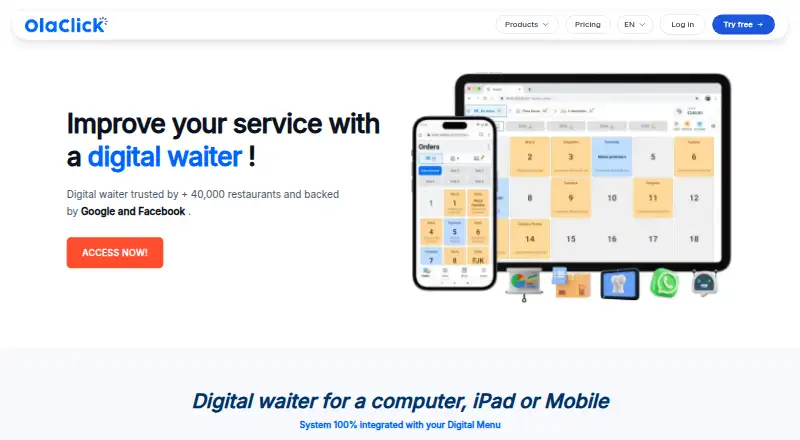
What OlaClick is
OlaClick combines a digital restaurant menu, online ordering, point of sale, delivery management, and WhatsApp automation. Customers can open a menu by QR code or link and order for delivery, pickup, or table service. Menus support multiple languages and online payments, and orders have no per-order commission. The POS includes table settings, order registration, a cash register, and a waiter app; kitchen tools cover stock levels and a display for organizing dish types. The chatbot can answer WhatsApp questions, send order updates, follow up on abandoned carts, and request reviews. Delivery integrations include iFood, Rappi, Uber Eats, 99Food, PedidosYa, and Didi Food, though availability depends on country. OlaClick runs in a browser on phones, tablets, and computers, with Android and iOS apps. Automatic printing requires a Windows computer with its printing app installed. A free plan is available; paid plans include Advanced at 73.30 BRL a month, Premium at 188 BRL a month, Elite at 440 BRL a month, and Infinity at 1,092 BRL a month. Payment methods and fees vary by country, and tax invoicing is a paid add-on in Brazil and Colombia.
Who it suits
OlaClick suits restaurants that need menu-based ordering alongside POS, delivery, and kitchen tools. Its multilingual menu and country-dependent delivery integrations may be useful for businesses serving customers through several ordering channels.
What it does well
- Menu access by QR code or link
- Orders without per-order commission
- WhatsApp updates and abandoned-cart follow-up
- Browser access plus Android and iOS apps
- Stock management and kitchen display system
What to know first
- Automatic printing requires Windows and its printing app
- Delivery integrations vary by country
- Payment methods and fees vary by country
- Tax invoicing costs extra in Brazil and Colombia
Limits
The Free plan is listed as free and has no commission per order. Advanced allows 400 orders per month; Premium allows 4,000. Elite and Infinity list unlimited orders.
Plans
| Plan | Billed and limits | Price |
|---|---|---|
| Free | Free plan · no commission per order | Free |
| Infinity | Monthly price shown as R$ 1.092,00; annual billing shown as R$ 928/mo, annual value R$ 11.136 · Unlimited orders · includes Advanced, Premium and Elite · Google Ads and Meta campaign management · monthly social media content | 1,092 BRL a month |
| Premium | Monthly price shown as R$ 188,00; annual billing shown as R$ 160/mo, annual value R$ 1.920 · 4,000 orders per month · includes Advanced · WhatsApp chatbot · loyalty program · automated inventory · kitchen management · delivery app integrations | 188 BRL a month |
| Elite | Monthly price shown as R$ 440,00; annual billing shown as R$ 374/mo, annual value R$ 4.488 · Unlimited orders · includes Advanced and Premium · POS integration | 440 BRL a month |
| Advanced | Monthly price shown as R$ 73,30; annual billing shown as R$ 64/mo, annual value R$ 768 · 400 orders per month · digital menu · custom domain · POS · delivery management · online payments | 73.30 BRL a month |
As olaclick.com lists them, read 8 Oct 2026. The maker's own page has the final word.
Getting started
- Open the OlaClick website in a browser or get the Android or iOS app.
- Choose the Free plan or a paid plan suited to your order volume and tools.
- Set up a digital menu for customers to open by QR code or link.
- Use the POS and delivery tools included with your selected plan.
- Install the printing app on a Windows computer if you need automatic printing.
OlaClick is a restaurant platform for businesses that want QR-based ordering alongside point-of-sale, kitchen, delivery and customer-messaging tools. It is strongest for operators who need those workflows connected, rather than only a digital menu. Its higher-tier plans add order capacity and automation, while country-dependent payments and delivery integrations are worth checking before choosing it.
Overview
Customers can open a menu by QR code or link and order for delivery, pickup or table service without a per-order commission. The system combines that ordering flow with a POS, delivery management and WhatsApp automation, with multiple menu languages and menu analytics. That breadth can reduce the need to assemble separate tools, though the practical fit depends on which delivery and payment services work in the restaurant’s country.
Key features
Ordering, POS and kitchen
The POS covers table settings, order registration, a cash register and a waiter app. Stock management can limit sales to remaining inventory, while the kitchen display system separates and organizes dish types. Together, these are useful for restaurants managing dine-in and online orders in one operation; smaller venues looking only to publish a menu may not need the wider system.
Messaging and integrations
The WhatsApp chatbot can answer questions, send order updates, follow up on abandoned carts and request reviews after delivery. But the terms warn that communications may rely on unofficial integrations, and OlaClick does not guarantee delivery because WhatsApp may block or reject messages. Treat messaging as an additional channel, not a dependable substitute for order-status workflows.
Delivery integrations include iFood, Rappi, Uber Eats, 99Food, PedidosYa and Didi Food, with availability varying by country. The menu also supports Facebook Pixel and Google Tag Manager. Customers can pay online through the menu, and businesses can connect a card terminal to the POS; payment methods and fees vary by country. Tax invoicing is a paid add-on in Brazil and Colombia.
Support, data and printing
OlaClick advertises real-time support in Spanish, Portuguese and English. Its privacy policy says personal data is stored on Amazon Web Services servers in the United States and may be shared with service providers needed to provide the service. The platform runs in a browser on phones, tablets and computers, but automatic printing requires a Windows computer with the printing app installed.
Pricing
The Free plan costs nothing and has no commission per order. It is a low-commitment way to start, but the published plan details do not give it the order capacity and feature bundle defined for paid tiers.
Advanced costs R$ 73,30 per month, or R$ 64/mo with annual billing (annual value R$ 768). It includes 400 orders per month, a digital menu, custom domain, POS, delivery management and online payments. This is the practical entry point for a restaurant that needs core ordering and POS tools but can operate without the chatbot and kitchen automation.
Premium costs R$ 188,00 per month, or R$ 160/mo with annual billing (annual value R$ 1.920). It includes Advanced and raises capacity to 4,000 orders per month, adding a WhatsApp chatbot, loyalty program, automated inventory, kitchen management and delivery app integrations. The extra cost is most defensible when those operational and retention tools replace manual work; restaurants with lower order volume may not need them.
Elite costs R$ 440,00 per month, or R$ 374/mo with annual billing (annual value R$ 4.488). It includes Advanced and Premium, allows unlimited orders and adds POS integration. Infinity costs R$ 1.092,00 per month, or R$ 928/mo with annual billing (annual value R$ 11.136); it includes the lower tiers and adds Google Ads and Meta campaign management plus monthly social media content. These top tiers target operators with unlimited order needs or a reason to pay for campaign and content support, rather than restaurants that only need the menu and core POS.
Platforms
OlaClick is available on Android, iOS, web and Windows. Its app is available through Google Play and the App Store; browser access also works on phones, tablets and computers. Windows is specifically required for automatic printing.
Who it's for
OlaClick suits restaurants that want to coordinate QR ordering, POS, kitchen processes and delivery, especially when the relevant local integrations are supported. The Free and Advanced plans can suit operators starting with digital ordering or core POS functions; Premium is the more complete operational package. A business that depends on guaranteed WhatsApp delivery, automatic printing without Windows, or country-specific payment and delivery options should assess those constraints before committing.
Pros and cons
- Pro: QR ordering supports delivery, pickup and table orders without per-order commission, giving restaurants several service modes in one menu.
- Pro: Premium combines chatbot, loyalty, inventory, kitchen management and delivery integrations, which can connect customer follow-up with restaurant operations.
- Pro: Browser access and Android and iOS apps cover common mobile and desktop use.
- Con: WhatsApp messages are not guaranteed and may be blocked or rejected, so automated updates should not be the only customer communication route.
- Con: Automatic printing requires Windows and a separate printing app, limiting that workflow for businesses without a Windows computer.
- Con: Payment methods, fees and delivery integration availability vary by country, making local compatibility a necessary part of the buying decision.
Alternatives
For a narrower digital-menu comparison, browse the Digital Menu Software directory.
Choose Screenza if a free plan for one screen, with limited image credits, menu parses and storage, is a better fit than OlaClick’s restaurant operations focus. GustoQR may suit a business seeking a free menu with 500 customers per year and full templates and AI features, but its free plan does not include a full POS. MENU TIGER is worth considering for a web-based menu with a free tier capped at one store, 10 tables, seven categories, seven items per category, 200 QR-code orders and 250 online orders monthly.
MenüQR may be a better fit for a small operation that can work within its free allowance of one restaurant, one menu, 50 items and one language. square.menu offers a free web plan capped at one menu, 25 products and three categories, with QR sharing and branding. SuperQR has a free plan for one location, 10 QR points, one staff member and 50 monthly credits, which may suit a QR-focused setup.
Tabemi is an alternative to consider if its founding-partner offer fits: it is free of subscription fees for the first 10 outlets, earned after 50 served orders while places remain. AviQR may suit a smaller menu with a free Starter allowance of 20 items, 50 orders per day, one QR code and basic analytics.
Verdict
OlaClick is a strong fit for restaurants that want QR ordering tied to POS, kitchen and delivery workflows, and that can use its integrations in their country. Premium is the clearest match for operators needing meaningful order capacity and automation; look elsewhere if dependable WhatsApp delivery or automatic printing without Windows is essential.
Verdict
OlaClick brings ordering, POS, kitchen workflows, and customer messaging into one restaurant system, with a free plan and several paid tiers. Check country-specific delivery and payment availability, and note that automatic printing requires Windows.
Questions
Is OlaClick free?
Yes. The Free plan is listed as free and has no commission per order.
What do the paid plans cost?
Advanced is 73.30 BRL a month, Premium is 188 BRL a month, Elite is 440 BRL a month, and Infinity is 1,092 BRL a month.
Which platforms does OlaClick support?
It runs in a browser on phones, tablets, and computers, and has Android and iOS apps. Automatic printing requires Windows with the printing app installed.
Can customers order through a QR code menu?
Yes. Customers can open a menu by QR code or link and order for delivery, pickup, or table service.
Which delivery services connect to OlaClick?
It lists iFood, Rappi, Uber Eats, 99Food, PedidosYa, and Didi Food. Availability varies by country.
Does OlaClick support tax invoices?
Tax invoicing is available as a paid add-on in Brazil and Colombia.
Facts from OlaClick's own pages
- Delivery integrations
- OlaClick says it connects with iFood, Rappi, Uber Eats, 99Food, PedidosYa and Didi Food, with availability varying by country. · olaclick.com, 8 Oct 2026
- Desktop requirement
- OlaClick runs in a browser on phones, tablets and computers; automatic printing requires a Windows computer with the printing app installed. · olaclick.com, 8 Oct 2026
- Headquarters
- Delaware, United States · olaclick.com, 28 Sept 2026
- Kitchen and inventory
- The digital waiter page lists stock management, selling based on remaining stock, and a kitchen display system for organizing and separating dish types. · olaclick.com, 8 Oct 2026
- Marketing integrations
- The menu page lists Facebook Pixel and Google Tag Manager among its advantages and identifies Google and Meta as supporters. · olaclick.com, 8 Oct 2026
- Menu and ordering
- Customers can reach a restaurant menu by QR code or link, and the page says the menu supports delivery, pickup and table orders without per-order commission. · olaclick.com, 8 Oct 2026
- Mobile apps
- OlaClick's help page says its app is available through Google Play and the App Store for Android and iOS. · help.olaclick.com, 8 Oct 2026
- Payments
- Customers can pay online through the digital menu and businesses can connect a card terminal to the POS; payment methods and fees vary by country. · olaclick.com, 8 Oct 2026
- POS
- The POS page lists table settings, order registration, a cash register and a waiter app. · olaclick.com, 8 Oct 2026
- Product
- OlaClick describes itself as a restaurant system with a digital menu, online ordering, point of sale, delivery management, WhatsApp chatbot and delivery app integrations. · olaclick.com, 8 Oct 2026
- Security and data
- OlaClick's privacy policy says user personal data is stored on Amazon Web Services servers in the United States and may be shared with service providers needed to provide the service. · olaclick.com, 8 Oct 2026
- Support
- The digital waiter page advertises real-time support in Spanish, Portuguese and English. · olaclick.com, 8 Oct 2026
- Tax invoices
- Tax invoicing is available as a paid add-on in Brazil and Colombia, according to OlaClick's FAQ. · olaclick.com, 8 Oct 2026
- WhatsApp automation
- The chatbot can answer WhatsApp questions, send order status updates, recover abandoned carts and request reviews after delivery. · olaclick.com, 8 Oct 2026
- WhatsApp limitation
- The terms say WhatsApp communications may use unofficial integrations and OlaClick does not guarantee message delivery because WhatsApp may block or reject messages. · olaclick.com, 8 Oct 2026
Where OlaClick stands on Freedom251
- Digital Menu Software#7 of 42