Freedom251 › Virtual Study Room Apps

Odakoo
What Odakoo is
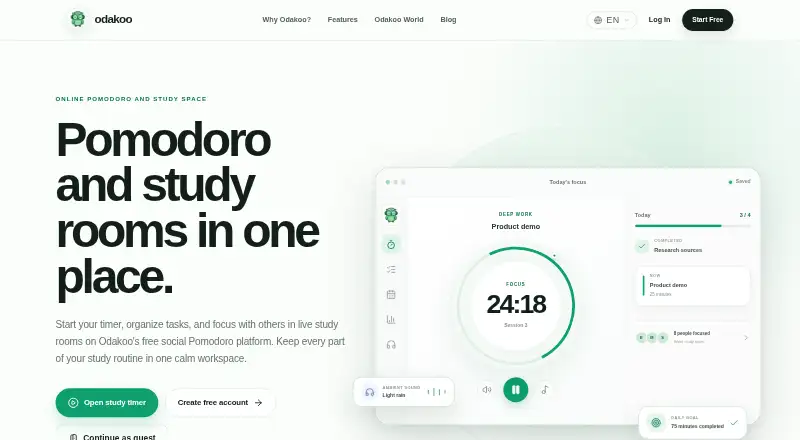
Odakoo is a web and Windows study platform that combines a Pomodoro timer with live coworking rooms. The timer includes 25/5 and 50/10 focus-and-break presets, plus custom durations. Rooms may be public, private, or password-protected, with chat and optional voice or screen sharing controlled by room permissions. Study Buddy pairs two people to set goals, use a shared timer, and check in after sessions lasting 25 to 120 minutes. Planning tools include task lists, a study planner, daily and weekly focus targets, and links between tasks and sessions. Account holders can review daily, weekly, and monthly focus statistics, completed sessions, and streaks. Ambient sounds, flashcards, a focus garden, themes, and Odakoo World add supporting tools. The solo timer needs no account; study rooms, planning, and personal statistics require a free account. The Free plan costs nothing, with no credit card required.
Who it suits
Odakoo suits students, remote workers, developers, designers, and others who organize work into regular focus blocks. It also fits people seeking shared study rooms or paired accountability.
What it does well
- Preset and custom focus schedules
- Public, private, and password-protected rooms
- Study Buddy sessions up to 120 minutes
- Tasks, planner, targets, and statistics
- Free plan with no credit card
What to know first
- Account required for rooms and statistics
- Voice or screen sharing depends on permissions
- No named third-party integrations
Limits
The Free plan costs nothing and includes the listed timer, rooms, task list, flashcards, focus garden, and statistics. A free account is required for study rooms, task planning, and personal statistics, while the solo timer does not require an account.
Plans
| Plan | Billed and limits | Price |
|---|---|---|
| Free | Timer, study rooms, task list, flashcards, focus garden, and statistics are free; no credit card required | Free |
As odakoo.com lists them, read 11 Oct 2026. The maker's own page has the final word.
Getting started
- Open https://odakoo.com/en in a web browser
- Use the solo timer without creating an account
- Create a free account for rooms, task planning, and statistics
- Choose a 25/5 or 50/10 rhythm, or set custom durations
- Join or create a study room and configure available sharing permissions
- Add tasks and focus targets to connect planning with sessions
Verdict
Odakoo combines timed individual work with shared rooms, paired check-ins, planning, and progress views. Its free plan covers the listed core tools, while account creation is needed for several features.
Questions
Does Odakoo have a free plan?
Yes. The Free plan costs nothing, includes the timer, study rooms, task list, flashcards, focus garden, and statistics, and requires no credit card.
Can I use Odakoo without registering?
The solo timer works without an account. Study rooms, task planning, and personal statistics require a free account.
Which platforms support Odakoo?
Odakoo is available on the web and Windows.
What timer schedules are available?
Presets include 25/5 and 50/10 focus-and-break rhythms. You can also set custom focus and break durations.
Does Odakoo support private coworking?
Yes. Rooms may be public, private, or password-protected, with chat and optional voice or screen sharing subject to room permissions.
Facts from Odakoo's own pages
- Account requirement
- The solo timer works without an account, while a free account is required for study rooms, task planning, and personal statistics. · odakoo.com, 11 Oct 2026
- Integrations
- The official features page describes its timer, rooms, tasks, and supporting tools but does not name third-party integrations. · odakoo.com, 11 Oct 2026
- Organization
- Odakoo includes task lists, a study planner, daily and weekly focus targets, and links between sessions and tasks. · odakoo.com, 11 Oct 2026
- Other features
- Additional tools include ambient sounds, flashcards, a focus garden, themes, and Odakoo World. · odakoo.com, 11 Oct 2026
- Platforms
- Odakoo works in modern mobile, tablet, and desktop browsers and offers a free Windows app for Windows 10 and 11. · odakoo.com, 11 Oct 2026
- Product
- Odakoo is an online Pomodoro and study platform that combines a focus timer with live study rooms. · odakoo.com, 11 Oct 2026
- Progress
- Account holders can review daily, weekly, and monthly statistics for focus time, completed sessions, and study streaks. · odakoo.com, 11 Oct 2026
- Security and privacy
- Odakoo says it may process account, usage, device, browser, IP, and technical log information to operate and secure the service, and describes data sharing with service providers under data-protection measures. · odakoo.com, 11 Oct 2026
- Study buddy
- Study Buddy pairs two people to set goals, focus on a shared timer, and check in afterward; sessions can last 25 to 120 minutes. · odakoo.com, 11 Oct 2026
- Study rooms
- Rooms can be public, private, or password-protected, with chat and optional voice or screen sharing subject to room permissions. · odakoo.com, 11 Oct 2026
- Support
- Users can contact support at [email protected] and are asked to include their device, browser, affected page, and approximate incident time when reporting technical issues. · odakoo.com, 11 Oct 2026
- Timer
- The timer offers preset 25/5 and 50/10 rhythms and lets users set custom focus and break durations. · odakoo.com, 11 Oct 2026
- Who it is for
- Odakoo says it is designed for students, remote workers, developers, designers, and anyone who wants to manage focus through regular work blocks. · odakoo.com, 11 Oct 2026
Where Odakoo stands on Freedom251
- Virtual Study Room Apps#19 of 37