Freedom251 › Guitar Tab Software

Note2Tabs
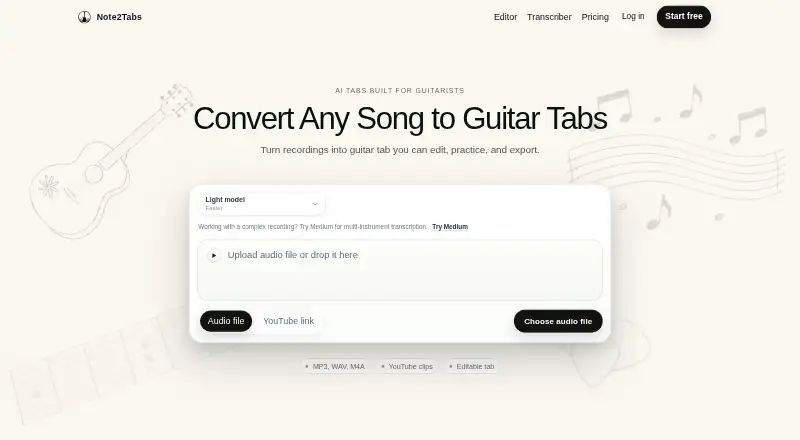
What Note2Tabs is
Note2Tabs turns audio recordings and YouTube clips into editable guitar tablature in a browser editor, with no installation required. Its tools include fingering optimization, key detection, chord tracks, and strumming controls. Guitarists can loop tab sections, change playback speed, and use speed training to raise the tempo toward a target. All plans include Light and Medium transcription models; Premium and Pro also include Heavy. The editor imports ASCII tab, MusicXML, MIDI, and supported Guitar Pro files, and exports TXT, MusicXML, MIDI, or Note2Tabs JSON. The free plan includes 10 transcription credits each month, audio clips up to 60 seconds, uploads up to 50 MB, and YouTube clips up to 30 seconds. Premium is $5.99 per month and includes 100 monthly credits, full-length audio transcription, uploads up to 200 MB, and YouTube clips within the first 10 minutes. Pro is $14.99 per month, with 250 monthly credits, uploads up to 500 MB, YouTube selections within the first 20 minutes, and priority email support. Unused credits roll over up to each paid plan’s stated cap. Generated tablature is approximate and may contain mistakes.
Who it suits
Note2Tabs suits guitarists who want to turn recordings or YouTube clips into tabs they can edit and practise in a browser. Its import and export formats may also suit users who work with tab, MIDI, or MusicXML files.
What it does well
- Browser editor requires no installation.
- More than 30 editing tools are available.
- Playback includes looping and speed training.
- Imports ASCII tab, MusicXML, MIDI, and supported Guitar Pro files.
- Exports TXT, MusicXML, MIDI, and Note2Tabs JSON.
What to know first
- Free transcriptions are limited to 10 credits each month.
- Free audio clips are limited to 60 seconds.
- Generated tablature may contain mistakes.
Limits
The free plan has 10 monthly credits, 60-second audio clips, 50 MB uploads, and 30-second YouTube clips. Premium costs $5.99 per month and has 100 monthly credits, 200 MB uploads, and YouTube clips within the first 10 minutes. Pro costs $14.99 per month and has 250 monthly credits, 500 MB uploads, and YouTube selections within the first 20 minutes.
Plans
| Plan | Billed and limits | Price |
|---|---|---|
| Free | $0/ month · 10 monthly credits · Light model · clips up to 60 seconds · uploads up to 50 MB · no credit rollover · full editor and practice tools | Free |
| Pro | $14.99/month billed today; cancel anytime · 250 monthly credits · full-length audio transcription · credits roll over up to 500 · uploads up to 500 MB · YouTube selections within first 20 minutes · priority email support · future early access eligibility | $14.99 a month |
| Premium | $5.99/month billed today; cancel anytime · 100 monthly credits · Light and Heavy models · full-length audio transcription · credits roll over up to 200 · uploads up to 200 MB · YouTube selections within first 10 minutes | $5.99 a month |
As note2tabs.com lists them, read 15 Oct 2026. The maker's own page has the final word.
Getting started
- Open the Note2Tabs website in a browser.
- Choose the free plan or a paid plan; a 7-day trial is listed.
- Use an audio recording or YouTube clip as the transcription input.
- Edit and practise the generated tab in the browser editor.
- Import or export tab and music files in a supported format.
Verdict
Choose Note2Tabs if you want a browser-based workflow for transcribing, editing, and practising guitar tabs. Look at Premium or Pro for the Heavy model and higher clip, upload, and credit limits; generated tabs may need correction.
Questions
Is Note2Tabs free?
Yes. The Free plan includes 10 transcription credits each month, Light and Medium models, and the full editor and practice tools.
How much do the paid plans cost?
Premium is $5.99 per month. Pro is $14.99 per month.
Which platforms does it support?
Note2Tabs is available on the web, and its editor runs in a browser without installation.
What file formats can it import and export?
It imports ASCII tab, MusicXML, MIDI, and supported Guitar Pro files. It exports TXT, MusicXML, MIDI, or Note2Tabs JSON.
Does Note2Tabs connect to YouTube?
YouTube clips can be used as transcription input.
Are generated tabs guaranteed to be accurate?
No. Generated tablature is approximate and may contain mistakes.
Facts from Note2Tabs's own pages
- Accuracy limitation
- The terms describe generated tablature as approximate and say it may contain mistakes. · note2tabs.com, 7 Oct 2026
- Analytics
- PostHog analytics and optional session replay may record editor-visible content, while users can disable analytics in settings. · note2tabs.com, 15 Oct 2026
- Browser workspace
- The editor is browser-based and requires no installation. · note2tabs.com, 15 Oct 2026
- Chord tracks
- Users can create separate chord tracks with fingering diagrams, alternate voicings and editable downstrokes, upstrokes and muted strokes. · note2tabs.com, 15 Oct 2026
- Company control
- Bolagsfakta lists Aron Salamon and Noel Solomon each controlling 25–50% of the company. · bolagsfakta.se, 15 Oct 2026
- Company founders
- The official terms identify Noel Solomon and Aron Salamon as co-founders and website representatives. · note2tabs.com, 15 Oct 2026
- Company history
- The maker says the project began in 2024 and its first analytical transcriber version was completed in early 2025. · note2tabs.com, 7 Oct 2026
- Company profile
- LinkedIn lists Note2Tabs as a privately held technology, information and internet company with 2–10 employees and a 2025 founding year. · linkedin.com, 15 Oct 2026
- Company size record
- Bolagsfakta reports zero employees at the listed workplace and no available financial statements. · bolagsfakta.se, 15 Oct 2026
- Content retention
- The terms say uploaded audio may be stored temporarily and files may be automatically deleted after processing; permanent storage is not guaranteed. · note2tabs.com, 7 Oct 2026
- Editing tools
- The editor offers more than 30 tools, including fingering optimization, key detection, chord tracks, and strumming controls. · note2tabs.com, 7 Oct 2026
- Editor
- The guitar-tab editor runs in a browser and requires no installation. · note2tabs.com, 7 Oct 2026
- File exports
- The editor exports TXT, MusicXML, MIDI and Note2Tabs JSON, but not native Guitar Pro files. · note2tabs.com, 15 Oct 2026
- File formats
- The editor imports ASCII tab, MusicXML, MIDI, and supported Guitar Pro files, and exports TXT, MusicXML, MIDI, or Note2Tabs JSON. · note2tabs.com, 7 Oct 2026
- File imports
- The importer accepts ASCII tab, MusicXML, MIDI and common Guitar Pro files including GP, GP3, GP4, GP5, GPX and GTP. · note2tabs.com, 15 Oct 2026
- Fingering optimizer
- The fingering tool compares alternate string and fret positions and can generate editable phrase cut positions. · note2tabs.com, 15 Oct 2026
- Founded
- 2024 · note2tabs.com, 28 Sept 2026
- Guest mode
- The editor can be opened as a guest and requires sign-in when users want to save work. · note2tabs.com, 15 Oct 2026
- Headquarters
- Bolagsfakta lists Telegrafgatan 5, 169 72 Solna, Sweden as the company workplace address. · bolagsfakta.se, 15 Oct 2026
- Independent product description
- A Reddit launch post describes a two-part workflow: audio or YouTube transcription followed by browser editing, refinement, practice and export. · reddit.com, 15 Oct 2026
- Integrations
- The site describes YouTube links as an input for transcription and lists no other named third-party product integrations on the pages reviewed. · note2tabs.com, 7 Oct 2026
- Intended users
- The maker describes Note2Tabs as a tool for guitarists to transcribe, create, edit, and practice guitar music. · note2tabs.com, 7 Oct 2026
- Keyboard editing
- Keyboard shortcuts cover note selection, timing, playback, bends, hammer-ons, pull-offs and arrangement operations. · note2tabs.com, 15 Oct 2026
- Key detection
- The editor estimates a likely key from notes and chords and can snap newly placed notes to the selected scale. · note2tabs.com, 15 Oct 2026
Where Note2Tabs stands on Freedom251
- Guitar Tab Software#17 of 32
- Music Transcription Software#19 of 31