Freedom251 › Coding Challenge Platforms
NextJudge
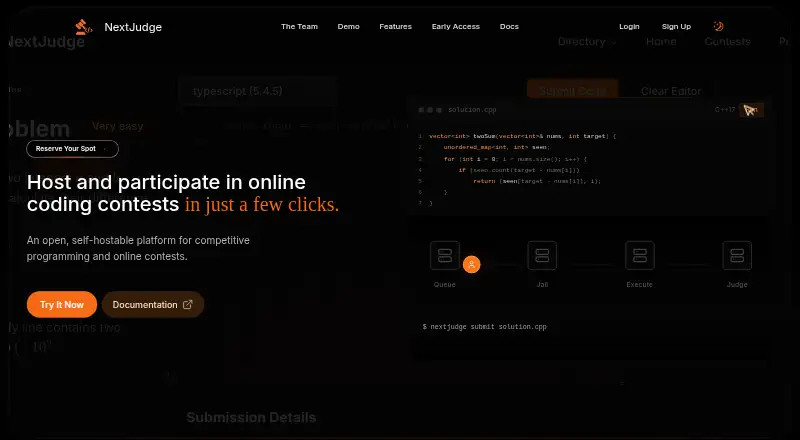
What NextJudge is
NextJudge is a free, open-source platform for hosting and taking part in competitive programming contests. It supports timed contests with scheduled problems, registration, clarifications, standings, live leaderboards, Q&A and live submissions with feedback. In its browser workspace, participants can read a problem, review sample tests, choose a language and write code in a Monaco editor with syntax highlighting and multiple themes. Submissions go to a RabbitMQ queue and a Python judge worker, where they are compiled and evaluated in nsjail. Documentation describes execution without network access and with CPU, memory and filesystem restrictions. The platform supports multiple languages, including C++, Python, JavaScript, Go, Rust, Java and Haskell, and offers a REST API and CLI for automation. Optional GitHub OAuth and Elasticsearch problem search are documented. Participant data, problems and submissions are stored in PostgreSQL on infrastructure controlled by the operator. NextJudge is MIT-licensed and invites visitors to join a waitlist for early access.
Who it suits
It suits contest organizers and participants who want a self-hostable programming contest platform, as well as operators who need API or CLI access. Teams should be prepared to run its supporting services and manage deployment security.
What it does well
- Free and MIT-licensed, with no seat limits or feature tiers
- Timed contests include registration, clarifications and standings
- Monaco editor offers syntax highlighting and multiple themes
- REST API and CLI support automation
- Judge execution is isolated in nsjail
What to know first
- Local deployment requires Docker and Docker Compose
- Needs at least 4 GB RAM; 8 GB with web and judge together
- Operators manage databases, queues, backups and network isolation
- Stored problem limits do not change fixed judge defaults
Limits
NextJudge is free and MIT-licensed, with no seat limits or feature tiers. For local deployment, the minimum RAM requirement is 4 GB, rising to 8 GB when web and judge run together; problem timeout and memory settings are stored but the judge uses fixed nsjail defaults instead.
Getting started
- Visit https://nextjudge.net/ and join the waitlist for early access.
- Prepare Docker and Docker Compose, at least 4 GB RAM (8 GB with web and judge together), and free ports 5000, 5432, 5672 and 8080.
- Deploy the self-hosted platform and its services on infrastructure you control.
- Register with email and password, or use GitHub sign-in if OAuth is configured.
Verdict
NextJudge brings contest management, a browser coding workspace and isolated judging together in a self-hosted package. Its infrastructure requirements and ongoing operations make it a better fit for teams ready to administer their own deployment.
Questions
How much does NextJudge cost?
It is free and open source, under the MIT license. The license has no seat limits or feature tiers.
Can I use NextJudge without hosting it myself?
The platform is described as self-hostable, and the landing page invites visitors to join a waitlist for early access. New users will be onboarded when the team is ready.
Which languages does it support?
The landing page lists Python, JavaScript, C++, Go, Haskell, Kotlin, C#, Java, TypeScript, PHP, Swift, Rust, C, Lua and Ruby.
What do I need for a local deployment?
You need Docker and Docker Compose, at least 4 GB RAM (8 GB when web and judge run together), and available ports 5000, 5432, 5672 and 8080.
Does NextJudge integrate with GitHub or Elasticsearch?
Its configuration documentation describes optional GitHub OAuth and optional Elasticsearch for problem search.
Where is contest data stored?
Participant data, problems and submissions are stored in PostgreSQL on infrastructure controlled by the operator.
Facts from NextJudge's own pages
- API and CLI
- The project documents a REST API and a CLI for automation, downloading problems, local testing, and submitting solutions. · docs.nextjudge.net, 7 Oct 2026
- Authentication
- The getting-started guide supports email/password registration and GitHub sign-in when OAuth is configured. · docs.nextjudge.net, 7 Oct 2026
- Availability
- The landing page invites visitors to join a waitlist for early access and says new users will be onboarded when the team is ready. · nextjudge.net, 7 Oct 2026
- Browser workspace
- The solving workspace combines a problem statement, sample tests, a language selector, and a Monaco editor, with separate run and submit actions. · docs.nextjudge.net, 7 Oct 2026
- Code editor
- Its code editor uses Monaco and provides syntax highlighting and multiple themes. · nextjudge.net, 4 Oct 2026
- Contests
- Timed contests include scheduled problems, registration, clarifications, and standings. · docs.nextjudge.net, 7 Oct 2026
- Contest tools
- The platform includes live leaderboards, contest Q&A, live submissions, real-time submission feedback and activity overviews. · nextjudge.net, 4 Oct 2026
- Data control
- The maker says participant data, problems and submissions are stored in PostgreSQL on infrastructure the operator controls. · docs.nextjudge.net, 4 Oct 2026
- Deployment requirements
- The getting-started guide requires Docker and Docker Compose, at least 4 GB RAM (8 GB with web and judge together), and available ports 5000, 5432, 5672, and 8080. · docs.nextjudge.net, 7 Oct 2026
- Execution
- Judge workers compile and run submitted code in nsjail sandboxes. · docs.nextjudge.net, 4 Oct 2026
- Integrations
- The configuration documentation describes optional GitHub OAuth and optional Elasticsearch for problem search. · docs.nextjudge.net, 7 Oct 2026
- Isolation
- The documentation says compile and run use nsjail with no network, capped CPU and memory, and a restricted filesystem. · docs.nextjudge.net, 7 Oct 2026
- Judge limit caveat
- Problem timeout and memory settings are stored and exposed, but the judge currently uses fixed nsjail defaults instead of applying those settings. · docs.nextjudge.net, 7 Oct 2026
- Judging
- Submissions are queued through RabbitMQ, then compiled and evaluated by a Python judge worker in nsjail. · docs.nextjudge.net, 7 Oct 2026
- Languages
- The landing page lists Python, JavaScript, C++, Go, Haskell, Kotlin, C#, Java, TypeScript, PHP, Swift, Rust, C, Lua, and Ruby. · nextjudge.net, 7 Oct 2026
- Language support
- The maker’s homepage lists Python, JavaScript, C++, Go, Haskell, Kotlin, C#, Java, TypeScript, PHP, Swift, Rust, C, Lua and Ruby. · nextjudge.net, 4 Oct 2026
- License
- The documentation identifies NextJudge as MIT-licensed and says the license has no seat limits or feature tiers. · docs.nextjudge.net, 7 Oct 2026
- Operational responsibility
- Self-hosters operate the database, message queue, judge images, backups, monitoring, and network isolation. · docs.nextjudge.net, 7 Oct 2026
- Operational tradeoff
- Self-hosters are responsible for operating the database, message queue, judge images, backups, monitoring and network isolation. · docs.nextjudge.net, 4 Oct 2026
- Purpose
- NextJudge is an open-source, self-hosted platform for competitive programming, practice problems, and online contests. · docs.nextjudge.net, 7 Oct 2026
- Requirements
- A local deployment requires Docker and Docker Compose, at least 4 GB RAM (8 GB with web and judge together), and ports 5000, 5432, 5672 and 8080 free. · docs.nextjudge.net, 4 Oct 2026
- Security operations
- The deployment guide recommends keeping judge workers network-separated from internal admin tools and rate-limiting authentication and password-reset routes at the proxy. · docs.nextjudge.net, 4 Oct 2026
- Support
- The product landing page lists [email protected] for questions and bug reports. · nextjudge.net, 7 Oct 2026
Where NextJudge stands on Freedom251
- Coding Challenge Platforms#29 of 30