Freedom251 › Digital Menu Software
NexSigns
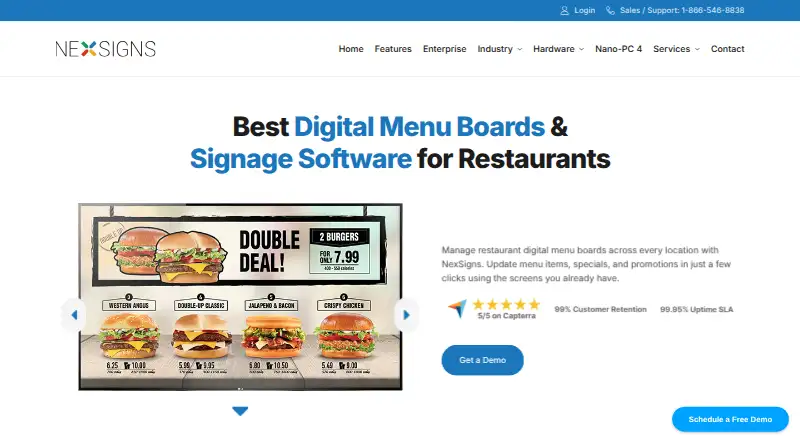
What NexSigns is
NexSigns is cloud-based digital signage software for creating and managing screen content, including restaurant menu boards and displays for other business settings. Users can remotely update menu items, prices, promotions, and layouts from an internet-connected device. For multiple locations, centralized controls allow shared menus while supporting local differences in prices, item availability, and promotions. Smart Menu Editor uses Intelligent Menu Positioning System to determine item placement and maintain consistency across screens. Scheduled Publishing lets teams plan content for all locations or selected sites, while dayparting can automatically switch displays for breakfast, lunch, dinner, and other periods. API-based menu data workflows include POS and online ordering integrations such as OLO; Kuusoft says NexSigns can pull OLO menu data and synchronize it to restaurant boards. It works with compatible hardware customers already own and can be paired with Kuusoft's Nano-PC 4 media player. Kuusoft says the software can continue operating during Wi-Fi or internet outages using internal and external storage. The product is presented for restaurants and QSRs as well as banking, education, grocery, healthcare, hotels, offices, and retail. Pricing is custom and available by contacting Kuusoft; the company says it varies by screens, locations, hardware, content setup, and software requirements.
Who it suits
NexSigns may suit restaurants, QSRs, and other listed sectors that manage digital displays across one or more locations. It is relevant to teams needing scheduled or time-based content changes and menu data workflows.
What it does well
- Remote updates cover menus, prices, promotions, and layouts
- Supports local differences across multiple locations
- Content can be scheduled or switched by daypart
- Works with compatible hardware customers already own
What to know first
- Pricing is available by contacting Kuusoft
- Custom pricing varies by screens, locations, and requirements
- No specific security certification or compliance claim is provided
Plans
| Plan | Billed and limits | Price |
|---|---|---|
| NexSigns | Contact Kuusoft for a consultation; pricing varies by screens, locations, hardware, content setup, and software requirements. · Custom pricing; no published plan limits | On request |
As kuusoft.com lists them, read 5 Oct 2026. The maker's own page has the final word.
Getting started
- Visit the NexSigns digital menu boards website.
- Contact Kuusoft for a consultation about pricing and requirements.
- Choose compatible hardware you already own or consider Kuusoft’s Nano-PC 4 media player.
- Use the Android or web platform to manage screen content.
Verdict
NexSigns focuses on remote display management, multi-location controls, and scheduled or dayparted content, with menu data integrations such as OLO. Its pricing is custom, so teams need to contact Kuusoft for a quote.
Questions
How much does NexSigns cost?
Pricing is custom and available by contacting Kuusoft for a consultation. Pricing varies by screens, locations, hardware, content setup, and software requirements.
Which platforms does NexSigns support?
The listed platforms are Android and web.
Can NexSigns connect to POS or online ordering data?
It supports API-based menu data workflows, including POS and online ordering integrations such as OLO. Kuusoft says it can pull OLO menu data and synchronize it to restaurant boards.
Does NexSigns work during an internet outage?
Kuusoft says it can continue operating during Wi-Fi or internet outages using internal and external storage.
What hardware can I use with NexSigns?
NexSigns works with compatible hardware customers already own and can be paired with Kuusoft’s Nano-PC 4 media player.
Facts from NexSigns's own pages
- Dayparting
- Dayparting can automatically switch content for breakfast, lunch, dinner, and other times of day. · kuusoft.com, 5 Oct 2026
- Hardware
- NexSigns works with compatible hardware customers already own and can be paired with Kuusoft’s Nano-PC 4 media player. · kuusoft.com, 5 Oct 2026
- Integrations
- NexSigns supports API based menu data workflows, including POS and online ordering integrations such as OLO. · kuusoft.com, 5 Oct 2026
- Intended customers
- The product is presented for restaurants and QSRs as well as banking, education, grocery, healthcare, hotels, offices, and retail. · kuusoft.com, 5 Oct 2026
- Menu editor
- Smart Menu Editor uses Intelligent Menu Positioning System to determine item placement and keep menus consistent across screens. · kuusoft.com, 5 Oct 2026
- Multi location
- The platform supports centralized menu control across locations while allowing local menu differences, prices, item availability, and promotions. · kuusoft.com, 5 Oct 2026
- Offline operation
- Kuusoft says NexSigns can continue operating during Wi-Fi or internet outages using internal and external storage. · kuusoft.com, 5 Oct 2026
- OLO integration
- Kuusoft says NexSigns can pull OLO menu data and automatically synchronize it to restaurant digital menu boards. · kuusoft.com, 5 Oct 2026
- Product
- NexSigns is cloud based digital signage software for creating and managing screen content. · kuusoft.com, 5 Oct 2026
- Remote management
- Users can remotely update menu items, prices, promotions, and layouts from a device with internet access. · kuusoft.com, 5 Oct 2026
- Scheduling
- Scheduled Publishing lets users plan content for all locations or selected locations in advance. · kuusoft.com, 5 Oct 2026
- Security and compliance
- The official pages opened provide no specific security certification or compliance claim. · kuusoft.com, 5 Oct 2026
- Support
- Kuusoft says support is available by phone, email, and video call, with unlimited free support calls during business hours. · kuusoft.com, 5 Oct 2026
Where NexSigns stands on Freedom251
- Digital Menu Software#34 of 42