Freedom251 › Enterprise Browsers

Netzilo Enterprise Browser
What Netzilo Enterprise Browser is
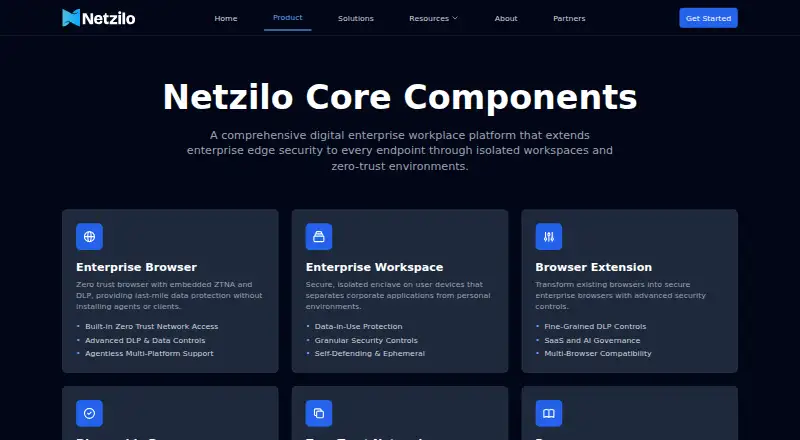
Netzilo Enterprise Browser gives organizations a controlled browsing environment for business critical web and SaaS applications, including when employees or contractors use personal devices. It is available as a standalone secure browser or as an extension that adds controls to a browser already in use. Administrators can configure protections by domain, including redaction, download restrictions, watermarking, and prompt injection blocking. The browser can also block screenshots, screen recording, and unauthorized printing. Netzilo describes keylog and clipboard protections, transparent encryption that keeps business data unreadable outside the protected environment, and policy checks during each session. Risky or unknown sites can open in a disposable browser isolated locally to contain threats such as ransomware. The desktop app is listed for Windows and macOS; extensions are listed for Chrome and Microsoft Edge, with options for Linux and ChromeOS. The service can be managed or fully on prem, and integrates with an existing identity provider and SIEM. The Free plan supports up to 5 users and 100 devices. Professional is $12 / Month, while Enterprise pricing is by request.
Who it suits
Netzilo Enterprise Browser suits organizations that need to control access to web and SaaS work for remote employees and contractors using personal or other devices. It may also fit teams that want centrally managed browser rules, identity provider and SIEM integration, and managed or on-prem deployment.
What it does well
- Available as a standalone browser or an extension.
- Domain controls include redaction, download restrictions, and watermarking.
- Can block screenshots, screen recording, and unauthorized printing.
- Risky sites can open in a disposable, locally isolated browser.
- Professional includes unlimited users and devices.
What to know first
- Free supports up to 5 users and 100 devices.
- Professional costs $12 / Month.
- Enterprise pricing is by request and requires a 10-user minimum for its free trial.
Limits
The Free plan is limited to 5 users and 100 devices, with community support only. Professional costs $12 / Month and offers a 14-day free trial with no minimum users; the Enterprise trial is 14 days with a 10-user minimum.
Plans
| Plan | Billed and limits | Price |
|---|---|---|
| Free | Free Forever · up to 5 users · up to 100 devices · MFA and passwordless support · disposable network · 99.9% best effort · community support only | Free |
| Professional | $12 / Month · unlimited users · unlimited devices · 14-day free trial · advanced posture checks · conditional access · external IdP and SIEM support · 99.9% SLA · on-prem support minimum 500 users · 8/5 professional support | $12 a month |
| Enterprise | Call For Pricing · unlimited users · unlimited devices · 14-day free trial with minimum 10 users · enterprise workspace and browser · PCI/HIPAA-oriented compliance · disposable browser and network · conditional access · external IdP and SIEM support · 99.9% SLA · on-prem support minimum 500 users · 24×7 premium support | On request |
As netzilo.com lists them, read 15 Oct 2026. The maker's own page has the final word.
Getting started
- Visit the Netzilo product website.
- Choose the standalone desktop app for Windows or macOS, or an extension for Chrome or Microsoft Edge.
- Select the Free plan or Professional plan; Professional includes a 14-day free trial.
- For Enterprise, contact Netzilo for pricing; its 14-day trial has a 10-user minimum.
- Deploy as a managed service or fully on prem and integrate an existing identity provider and SIEM.
Netzilo Enterprise Browser is a managed browser environment for business-critical web and SaaS applications. It is best suited to organizations managing remote workers, contractors, and personal devices alongside company devices. Its combination of deployment options and centrally managed controls is compelling for that job, though the Free plan is tightly capped and Enterprise pricing requires a sales conversation.
Overview
Organizations can use Netzilo as a standalone secure browser or add its controls to Chrome or Microsoft Edge through an extension. That flexibility lets teams retain a familiar browser or adopt a dedicated environment. Managed-service and fully on-premises deployment accommodate different operating requirements, and integration with an existing identity provider and SIEM can fit it into established security operations.
Identity controls, private app access, extension policies, and audit and reporting extend its focus beyond browser configuration. The product is aimed at keeping business activity controlled across varied devices, rather than serving as a general-purpose browser for individual consumers.
For a wider comparison, see Enterprise Browsers and Browser Isolation Software.
Key features
Controls over data and activity
Administrators can set controls by domain, including redaction, download restrictions, watermarking, and prompt injection blocking. Screenshot, screen recording, and unauthorized printing controls address ways sensitive work can leave the browser. This breadth is useful where teams need different rules for different web apps, though the product's value depends on those controls matching the organization's policies.
Netzilo says its keylog and clipboard guard stops keystroke capture and clipboard snooping. It also describes transparent encryption intended to keep business data unreadable outside the protected environment, alongside continuous policy checks for each session. These protections speak directly to risks on personal and contractor devices; organizations should assess them against their own security requirements.
Isolation for risky browsing
Risky or unknown sites can be opened in a disposable browser isolated locally, to contain threats such as ransomware. This gives security teams a way to separate uncertain browsing from business work rather than applying the same environment to every site.
Pricing
Netzilo uses a freemium model, with a 14-day free trial on its paid plans. The main trade-off is scale: Free is permanently limited to five users and 100 devices, while Professional removes those caps; Enterprise adds premium support but requires at least 10 users for its trial.
| Plan | Price and terms | What it suits |
|---|---|---|
| Free | free; Free Forever. Up to 5 users and 100 devices; Community Support Only. | Small teams evaluating or using the browser within the user and device caps. The caps make it unsuitable as a no-cost option for larger deployments. |
| Professional | $12 a month; $12 / Month. Unlimited users and devices; 14-day free trial with no minimum users. | Organizations that need uncapped users and devices without Enterprise's 10-user trial minimum. It does not include the Enterprise tier's stated 24×7 premium support. |
| Enterprise | Custom pricing; unlimited users and devices. 14-day free trial with a 10-user minimum. | Larger organizations seeking 24×7 premium support through a dedicated Slack channel. The trial's minimum makes it less suited to small teams. |
Platforms
The product supports desktop and mobile. Its standalone desktop app is listed for Windows and macOS; the extension is available for Chrome and Microsoft Edge, with an option for Linux and ChromeOS. The platform range also includes Android, iOS, and self-hosted, giving organizations several ways to accommodate mixed device environments.
Who it's for
Netzilo is a strong fit for organizations that need managed controls over SaaS and web work by employees and contractors, especially when personal devices or varied deployment requirements are part of the picture. It is less suitable for teams that need more than five users or 100 devices without paying, or that require Enterprise pricing before contacting the vendor.
Pros and cons
- Pros: Standalone and extension formats let organizations choose between a dedicated browser and controls added to an existing Chrome or Edge workflow.
- Pros: Domain-level data, screen, and input controls address multiple ways business information can be exposed.
- Pros: Managed-service and on-premises deployment, plus identity-provider and SIEM integration, support different operating environments.
- Cons: Free is capped at five users and 100 devices, limiting its usefulness for larger organizations that cannot move to a paid plan.
- Cons: Enterprise pricing is custom, and its 14-day trial requires at least 10 users.
- Cons: Free includes community support only; 24×7 premium support is reserved for Enterprise.
Alternatives
- Chrome Enterprise Premium is worth considering for teams seeking centralized management and advanced security protections at $6 per user monthly; it also lists Shadow AI detection.
- Mammoth Enterprise Browser is another paid enterprise-browser option for organizations comparing alternatives across Android, iOS, Linux, macOS, and Windows.
- Menlo Security Secure Cloud Browser may suit organizations looking for Protect, Secure, and/or Manage products with user licenses and custom-quote pricing.
- InstaSafe Secure Enterprise Browser is an alternative for teams comparing paid secure-browser options; its listed SSO and MFA plans each start at $1 a month billed annually, with startup terms for fewer than 50 user licenses on SSO.
- Check Point Harmony SASE is a paid alternative with a free trial and a license required after its 30-day trial; it has no free plan.
- Netskope One Private Access is a paid enterprise private-access option with a free trial and no free plan.
- Spirex Secure Enterprise Browser offers trial access for teams of 50 or more, with guided onboarding and access after approval and onboarding.
- Zscaler Private Access is a paid alternative with no free plan; its ZPA Standard plan is described as limited private access for 5% of users.
Verdict
Choose Netzilo Enterprise Browser if your organization needs centrally managed controls for web and SaaS work across employee and contractor devices, and values a choice of standalone or extension use and managed or on-prem deployment. The strongest reason to look elsewhere is cost visibility: Free has strict user and device caps, while Enterprise requires custom pricing.
Verdict
Choose Netzilo Enterprise Browser if your organization needs centrally managed controls for web and SaaS work across employee and contractor devices. Its standalone and extension options, along with managed or on-prem deployment, support different environments. Look elsewhere if the Free plan's 5-user and 100-device limits are too small or if you need Enterprise pricing upfront.
Questions
Is Netzilo Enterprise Browser free?
Yes. The Free plan is free forever and supports up to 5 users and 100 devices, with community support only.
How much does Professional cost?
Professional costs $12 / Month. It includes unlimited users and devices and a 14-day free trial with no minimum users.
What platforms does it support?
The listed platforms include Android, iOS, Linux, macOS, and Windows, along with browser extensions and self-hosted deployment. The standalone desktop app is listed for Windows and macOS; extensions are listed for Chrome and Microsoft Edge, with Linux and ChromeOS options.
Can it integrate with identity and security systems?
Netzilo says it integrates with an existing identity provider and SIEM. Identity controls, private app access, extension policies, and audit and reporting are listed.
How can an organization deploy it?
It is offered as a managed service or fully on prem.
What is the Enterprise plan price?
Enterprise pricing is listed as Call For Pricing. Its 14-day free trial has a 10-user minimum.
Facts from Netzilo Enterprise Browser's own pages
- AI guardrails
- In-page controls are provided for ChatGPT, Claude, Gemini and Perplexity interactions. · netzilo.com, 15 Oct 2026
- AI-provider integrations
- The documentation supports Anthropic Messages and OpenAI-compatible endpoints, including hosted or self-managed providers such as Ollama and vLLM. · doc.netzilo.com, 15 Oct 2026
- Apple app requirements
- The App Store listing requires iOS 15 or later and macOS 10.14 or later, and lists a 5.2 MB English productivity app. · apps.apple.com, 15 Oct 2026
- App-store complaint
- The visible App Store review complains that the assigned age rating is wrong and should be 16+. · apps.apple.com, 15 Oct 2026
- Browser extension
- An extension upgrades Chrome, Edge, Firefox and Safari with enterprise controls while users keep their existing browsers. · netzilo.com, 15 Oct 2026
- Company legal name
- The published security policy identifies the maker as Netzilo, Inc. · netzilo.com, 15 Oct 2026
- Company profile
- Gartner lists Netzilo as a private company founded in 2024, headquartered in San Francisco, with 11–50 employees and reported annual revenue below $50 million. · gartner.com, 15 Oct 2026
- Data-loss controls
- Administrators can control downloads, uploads, clipboard use, printing, screenshots and screen recording by domain. · doc.netzilo.com, 15 Oct 2026
- Data loss prevention
- Its browser controls include redaction, download restrictions, watermarking, and prompt injection blocking configured centrally by domain. · doc.netzilo.com, 30 Sept 2026
- Deployment platforms
- The standalone browser is listed for Windows, macOS, Android and iOS, while the extension covers Chrome, Edge, Firefox and Safari. · netzilo.com, 15 Oct 2026
- Documentation depth
- The docs include configuration guides, installation pages, API resource references, self-hosting instructions, troubleshooting and open-source license notices. · doc.netzilo.com, 15 Oct 2026
- Domain policy administration
- Administrators can assign domain controls by user group, time window and geographic location. · doc.netzilo.com, 15 Oct 2026
- Encryption and posture
- The product describes transparent encryption that keeps business data unreadable outside the protected environment and continuous policy checks for each session. · doc.netzilo.com, 30 Sept 2026
- Enterprise integrations
- The pricing page lists external identity-provider and SIEM support, and the browser documentation says mobile deployments integrate with existing IdP and SIEM systems. · netzilo.com, 15 Oct 2026
- Headquarters
- Campbell, CA · netzilo.com, 23 Sept 2026
- Input protection
- Netzilo says its keylog and clipboard guard stops keystroke capture and clipboard snooping. · doc.netzilo.com, 30 Sept 2026
- Integrations and deployment
- Netzilo says the browser is delivered as a managed service or fully on prem and integrates with an existing identity provider and SIEM. · doc.netzilo.com, 30 Sept 2026
- Limit: Safari network visibility
- The browser-extension documentation states Safari does not provide a network log, so guardrails requiring HTTP inspection are skipped there. · doc.netzilo.com, 15 Oct 2026
- Limit: setup learning curve
- The title of a Gartner review explicitly identifies a setup learning curve despite the review's 5.0 score. · gartner.com, 15 Oct 2026
- Linux coverage
- The browser extension is the stated Enterprise Browser option for Linux and ChromeOS. · doc.netzilo.com, 15 Oct 2026
- Notable news: AIDR rules
- Netzilo announced on June 9, 2026 that its AI Detection and Response Sigma rules were released as an open-source community library. · netzilo.com, 15 Oct 2026
- Notable news: AI Edge
- On November 20, 2025, Netzilo announced The AI Edge, an agentic SASE platform aimed at treating AI agents as enterprise users. · prnewswire.com, 15 Oct 2026
- Open-source component
- The public AIDR Sigma rules repository is licensed Apache 2.0; this is a detection-rule library rather than the Enterprise Browser product itself. · github.com, 15 Oct 2026
- Plan limit and support
- The Enterprise tier includes the Enterprise Browser, lists unlimited users and devices, and offers 24×7 premium support through a dedicated Slack channel. · netzilo.com, 30 Sept 2026
Where Netzilo Enterprise Browser stands on Freedom251
- Enterprise Browsers#1 of 16
- Browser Isolation Software#3 of 24