Freedom251 › Classroom Management Software

NetSupport School
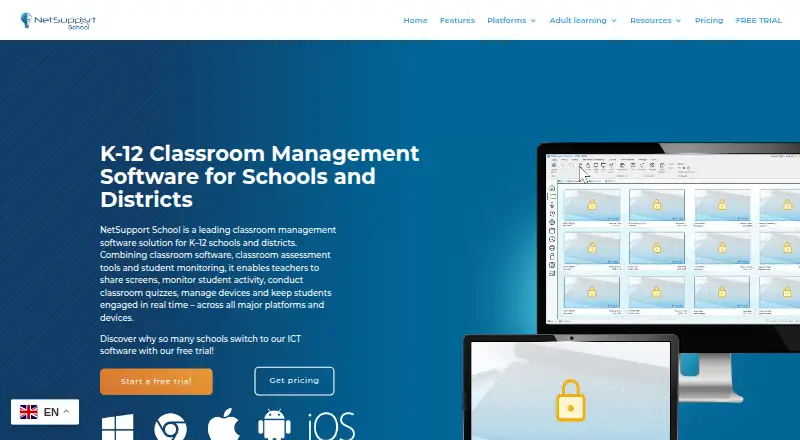
What NetSupport School is
NetSupport School is classroom-management and student-monitoring software for teaching, managing devices and assessing students. Teachers can keep an adjustable thumbnail view of student screens, applications, websites, typing and collaboration. They can also take remote control of student screens or blank and lock selected screens. For lessons, teachers can share screens, applications, presentations, videos and websites, with annotation tools, and distribute files or folders to students before collecting their work. The software includes activity monitoring, live screen viewing, web filtering, device controls and behavior tracking.
NetSupport School connects classes using Windows, macOS, ChromeOS, Android and iOS devices. SIS mode links with ClassLink OneRoster and Google Classroom. Pricing is available on request, with device-based licensing and buy-once options. A 30-day trial provides all features for up to 40 devices and does not require a credit card. Pricing includes free weekday support across global time zones and online training. NetSupport Limited, established in 1989, says customer data is stored in UK or EU hosting locations and that it complies with GDPR, the UK Data Protection Act 2018 and PECR.
Who it suits
NetSupport School suits teachers and schools that need to monitor student activity, manage devices and deliver lessons across mixed-platform classes. It also fits teams using ClassLink OneRoster or Google Classroom in SIS mode, provided they can install the required Windows Server component.
What it does well
- Monitors screens, applications, websites, typing and collaboration.
- Teachers can control, blank or lock selected screens remotely.
- Shares lesson materials with annotation tools.
- Transfers files to students and collects their work.
- 30-day full-feature trial covers up to 40 devices without a credit card.
- Includes free weekday support and online training.
What to know first
- Pricing is available only on request.
- A 100-machine deployment requires a 100-user licence.
- SIS integration requires NetSupport Connectivity Server on Windows Server.
- Android student app requires Android 12 or later.
Limits
The trial lasts 30 days and supports up to 40 devices. A 100-machine deployment requires a 100-user licence, even when loaded from a server. Android tablets must run version 12 or later; versions from 15.10.0003 also require arm64-v8a.
Plans
| Plan | Billed and limits | Price |
|---|---|---|
| NetSupport School | device-based licensing · buy once and own forever options · no implementation fees · free support and training | On request |
As netsupportschool.com lists them, read 30 Sept 2026. The maker's own page has the final word.
Getting started
- Visit the NetSupport School website.
- Request pricing or begin the 30-day trial.
- Use the trial on up to 40 devices without a credit card.
- Connect teacher and student devices across supported platforms.
- Install NetSupport Connectivity Server on Windows Server if using SIS integration.
Verdict
Choose NetSupport School if your classroom needs student monitoring, remote device controls and lesson sharing across Windows, Mac, ChromeOS, Android or iOS. The 30-day trial covers up to 40 devices, and support and training are included with pricing. Look elsewhere if you need a stated upfront price or cannot meet the licensing and server requirements for your deployment.
Questions
How much does NetSupport School cost?
Pricing is available on request. Licensing is device-based, and buy-once options are available.
Is there a free plan or trial?
There is no free plan. The 30-day trial includes all features for up to 40 devices and requires no credit card.
Which platforms does it support?
It supports Windows, macOS, ChromeOS, Android and iOS, and allows teachers to connect mixed-platform classes.
Does it integrate with ClassLink OneRoster and Google Classroom?
Yes. SIS mode integrates with both, and requires NetSupport Connectivity Server installed on a Windows Server.
What does pricing include?
Pricing includes free support Monday to Friday across global time zones, plus free online training.
How is it licensed for larger deployments?
A 100-machine deployment requires a 100-user licence, even if the software is loaded from a server.
Facts from NetSupport School's own pages
- Android requirement
- The NetSupport School Student for Android supports Android tablets running version 12 or later and arm64-v8a on versions from 15.10.0003. · netsupportschool.com, 30 Sept 2026
- Connectivity requirement
- SIS integration requires the NetSupport Connectivity Server to be installed on a Windows Server. · help.netsupportschool.com, 30 Sept 2026
- Device licensing
- A 100-machine deployment requires a 100-user licence, even when the software is loaded from a server. · help.netsupportschool.com, 30 Sept 2026
- File distribution
- Teachers can transfer files and folders to students and collect files from them. · netsupportschool.com, 30 Sept 2026
- Headquarters
- Market Deeping, Peterborough, United Kingdom · netsupportschool.com, 28 Sept 2026
- Instruction
- Teachers can share screens, applications, presentations, videos and websites, with annotation tools. · netsupportschool.com, 30 Sept 2026
- Integrations
- SIS mode integrates with ClassLink OneRoster and Google Classroom. · help.netsupportschool.com, 30 Sept 2026
- Maker history
- NetSupport Limited was established in 1989. · resources.netsupportsoftware.com, 30 Sept 2026
- Mixed platforms
- The product supports Windows, Mac, Chromebooks, Android and iOS and allows teachers to connect to mixed-platform classes. · netsupportschool.com, 30 Sept 2026
- Privacy compliance
- NetSupport states that it complies with GDPR, the UK Data Protection Act 2018 and PECR, with customer data stored in UK or EU hosting locations. · netsupportsoftware.com, 30 Sept 2026
- Purpose
- NetSupport School is classroom-management and student-monitoring software for teaching, device management and assessment. · netsupportschool.com, 30 Sept 2026
- Remote control
- Teachers can remotely control student screens and blank or lock selected students’ screens. · netsupportschool.com, 30 Sept 2026
- Screen monitoring
- Teachers can monitor student screens, applications, websites, typing and collaboration through adjustable thumbnails. · netsupportschool.com, 30 Sept 2026
- Support
- Pricing includes free support available Monday to Friday across global time zones and free online training. · netsupportschool.com, 30 Sept 2026
- Trial
- The free trial lasts 30 days, supports up to 40 devices, requires no credit card and includes all features. · netsupportschool.com, 30 Sept 2026
Where NetSupport School stands on Freedom251
- Classroom Management Software#15 of 25