Freedom251 › Mass Notification Software
NetSupport Notify
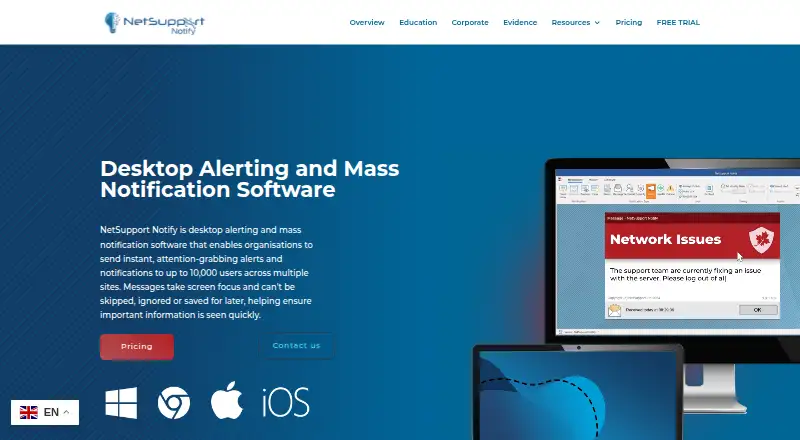
What NetSupport Notify is
NetSupport Notify sends one-way internal alerts for organisations and schools, from routine communications to critical or emergency notices. Senders can direct a notification to selected users, departments, devices, or all computers, and reach up to 10,000 users across multiple sites. Messages can be sent immediately, scheduled for a chosen time, or set to recur; senders can track delivery and acknowledgements. Administrators can use a hotkey combination to send pre-configured emergency response messages. Notifications can carry an organisation’s logo and branding, with chosen fonts, colours, and sounds.
The product integrates with Microsoft Active Directory and includes a browser-based notification template and COM object for connecting with existing systems. teamSOS responders can trigger a one-way takeover notification to users and digital signage. Security codes, user-defined accounts, and security keys restrict access. Multiple Notification Servers can be configured, and Agents can switch to another available server if one becomes unavailable. The Notification Server and desktop Console run on Windows; Agents are listed for Windows, macOS, ChromeOS, and Linux, with mobile Consoles for iOS and Android. A 30-day trial supports up to 50 devices, includes all features, and requires no credit card. An active TCP/IP connection among components is required to send notifications.
Who it suits
NetSupport Notify suits organisations and schools that need to send internal announcements or urgent alerts to selected groups or a large, multi-site audience. It may suit administrators who want scheduled delivery, acknowledgement tracking, custom-branded messages, or integrations with existing systems.
What it does well
- Targets users, departments, devices, or all computers.
- Supports alerts for up to 10,000 users across multiple sites.
- Schedules immediate, specific-time, or recurring notifications.
- Tracks delivery and acknowledgements.
- Includes a 30-day trial for up to 50 devices with all features.
What to know first
- The trial is limited to 50 devices.
- SMS, voice call, and email alerts are unavailable.
- Two-way messaging and mobile app alerts are unavailable.
- Sending notifications requires an active TCP/IP connection among components.
Limits
The free trial lasts 30 days and supports up to 50 devices. The listed perpetual or subscription licence is priced by custom quote based on licence count and organisational requirements; it includes all features and alerts for up to 10,000 users across multiple sites.
Plans
| Plan | Billed and limits | Price |
|---|---|---|
| Free trial | 30 days · Up to 50 devices · all features · no credit card · no obligation | Free |
| Basic | $2 per user one-time payment · Features include real-time notifications, mass notifications, scheduling, reporting and templates | $2, paid once |
| Perpetual or subscription licence | Custom quote based on number of licences and organisation requirements · all features included · alerts for up to 10,000 users across multiple sites | On request |
| Custom licence | Perpetual or subscription licence; quote depends on licence count · All features included · up to 10,000 users · multiple Notification Servers at no extra licence cost | On request |
As netsupportnotify.com lists them, read 15 Oct 2026. The maker's own page has the final word.
Getting started
- Visit the NetSupport Notify website.
- Start the 30-day trial, which requires no credit card and supports up to 50 devices.
- Install the Notification Server and desktop Console on Windows.
- Set up Agents on supported Windows, macOS, ChromeOS, or Linux devices; mobile Consoles are available for iOS and Android.
- Connect all NetSupport Notify components over an active TCP/IP connection.
- Configure authorised access and send a notification to selected users, departments, devices, or all computers.
Verdict
Choose NetSupport Notify if your organisation or school needs centrally managed one-way alerts with targeting, scheduling, and delivery tracking. Its trial provides all features for up to 50 devices over 30 days. Look elsewhere if you need SMS, voice calls, email alerts, mobile app alerts, or two-way messaging.
Questions
Is NetSupport Notify free?
There is no free plan. A 30-day trial is available for up to 50 devices, includes all features, and requires no credit card.
How much does a paid licence cost?
Pricing is available on request. The perpetual or subscription licence is quoted based on licence count and organisational requirements.
Which platforms does it support?
The product lists Android, iOS, Linux, macOS, web, and Windows. The Notification Server and desktop Console run on Windows; Agents are listed for Windows, macOS, ChromeOS, and Linux, and mobile Consoles are available for iOS and Android.
Can it send SMS, email, or voice call alerts?
No. SMS, email, and voice call alerts are unavailable; desktop alerts are supported.
Does it support two-way messaging?
No. Notifications are one-way, including takeover notifications that teamSOS responders can trigger for users and digital signage.
What integrations are available?
It integrates with Microsoft Active Directory and provides a browser-based notification template and COM object for use with existing systems.
Facts from NetSupport Notify's own pages
- Acknowledgements
- The system records delivery and receipt centrally and shows real-time acknowledgement status and searchable history. · netsupportnotify.com, 15 Oct 2026
- Company
- LinkedIn lists NetSupport as a privately held UK software company founded in 1989 with 51–200 employees and headquarters in Market Deeping, Lincolnshire. · linkedin.com, 15 Oct 2026
- Custom branding
- Administrators can set fonts, colours, logos, notification sizes, screen positions, sounds and custom notification icons. · netsupportnotify.com, 15 Oct 2026
- Customer deployment
- A January 2024 NetSupport case study says Intercommunal Hospital Centre of Aix-Pertuis installed Notify on 2,200 workstations. · netsupportsoftware.com, 15 Oct 2026
- Customization
- Notifications can include an organisation’s branding, logo, selected fonts, colours, and sounds. · netsupportnotify.com, 7 Oct 2026
- Data retention
- The GDPR document says message and acknowledgement history is stored on-premises in gateway.db, retained 30 days by default and configurable. · resources.netsupportsoftware.com, 15 Oct 2026
- Deployment
- A Deploy utility can remotely install, configure or uninstall agents, while ADMX templates support Group Policy and Intune deployment. · kb.netsupportsoftware.com, 15 Oct 2026
- Documentation
- The vendor provides manuals, installation guides, videos, brochures, whitepapers, a Learning Hub and a searchable knowledge base. · netsupportnotify.com, 15 Oct 2026
- Emergency alerts
- The product includes preconfigured emergency messages, audible alerts and a three-key emergency hotkey safeguard. · netsupportnotify.com, 15 Oct 2026
- Forced visibility
- Notifications take screen focus, including on locked screens, and are designed not to be skipped, ignored or deferred. · netsupportnotify.com, 15 Oct 2026
- Gateway architecture
- A Windows Notification Server gateway manages agents, supports multiple failover gateways and allows unlimited gateways within the standard licence. · netsupportnotify.com, 15 Oct 2026
- Integrations
- Official integration points include Active Directory, a browser notification component, a supplied COM object and a teamSOS incident workflow. · netsupportnotify.com, 15 Oct 2026
- Intended users
- The product is presented for organisations and schools sending routine communications as well as critical and emergency alerts. · netsupportnotify.com, 7 Oct 2026
- Legal registration
- Companies House records NETSUPPORT LTD, company 02386638, as an active private company incorporated 18 May 1989 for software development. · find-and-update.company-information.service.gov.uk, 15 Oct 2026
- Licence
- The EULA describes a proprietary, non-exclusive, non-transferable licence and prohibits modification, disassembly and reverse engineering without permission. · resources.netsupportsoftware.com, 15 Oct 2026
- Limit: deployment
- Reviewers report that the deployment facility can fail or be difficult to manage, leading them to use GPO or MSI methods instead. · capterra.com, 15 Oct 2026
- Limit: iOS app age
- Apple reviewers report broken dark mode, outdated screen-size support, few recent features and difficulty locating password or port settings. · apps.apple.com, 15 Oct 2026
- Limit: message handling
- Capterra feedback mentions configuration tracking problems, client flakiness, message truncation and unsigned DLL warnings from McAfee. · capterra.com, 15 Oct 2026
- Mobile console
- Free iOS and Android mobile consoles can send targeted or full-screen alerts through existing Notification Servers. · resources.netsupportsoftware.com, 15 Oct 2026
- Network requirement
- An active TCP/IP connection between all NetSupport Notify components is required to send notifications. · netsupportnotify.com, 7 Oct 2026
- Praise: accountability
- G2 reviewers highlight targeted groups, acknowledgement records and deployment through AD or GPO after setup. · g2.com, 15 Oct 2026
- Praise: ease and speed
- Capterra and GetApp reviewers repeatedly praise easy alert creation, quick mass delivery, recipient groups, scheduling and low one-time cost. · getapp.com, 15 Oct 2026
- Purpose
- NetSupport Notify sends internal one-way alerts and notifications designed to grab users’ attention. · netsupportnotify.com, 7 Oct 2026
- Rating on Apple App Store
- 2.3 out of 5 from 3 ratings · apps.apple.com, 15 Oct 2026
Where NetSupport Notify stands on Freedom251
- Mass Notification Software#10 of 34