Freedom251 › Video Annotation Software
Nacsport
What Nacsport is
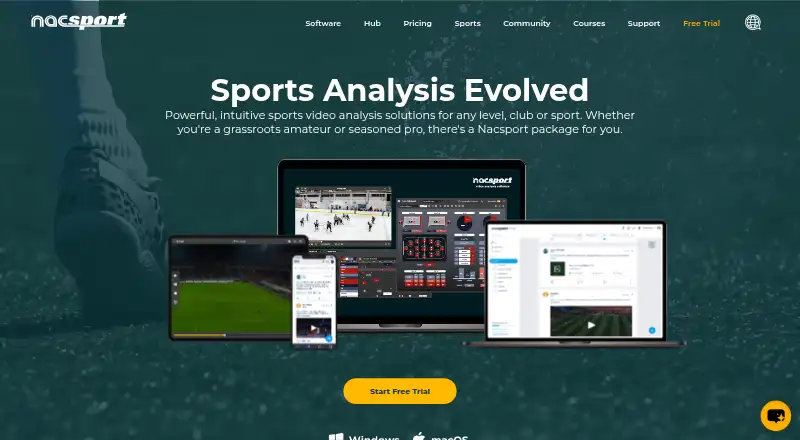
Nacsport is a sports video analysis suite for coaches, clubs, and analysts working with footage and data about athletes, teams, and opponents. Its workflow covers collecting tagged game video and data, reviewing clips and information, then presenting or sharing the findings. Analysis can happen during a match or afterward; the Live app can stream video and data to mobile devices. Nacsport Hub provides an online space for sharing analysis with coaches and players, online tagging, presentations, and team communication, with Hub apps for iOS and Android.
The desktop software is available for Windows and macOS, and the maker describes Basic through Elite as a range for beginners through professional analysts. KlipDraw and Hub integration are listed across the software range. Importing XML from other programs starts with Basic+; Scout, Pro, and Elite also list custom XML, custom Opta, Sportscode timeline, and Gamebreaker timeline imports. Plans include one-time software purchases and yearly Hub plans. A 30-day trial offers unlimited use of the selected software version during the trial period. The desktop download is for computer use, rather than a mobile application.
Who it suits
Nacsport suits coaches, clubs, and analysts who need to tag and review sports video and data, including during live play. The range spans beginners to professional analysts, while Hub is suited to teams sharing analysis and communicating online.
What it does well
- Supports live and post-match video and data analysis.
- Live app streams video and data to mobile devices.
- Hub supports sharing, online tagging, presentations, and team communication.
- Basic+ and higher versions include XML import.
- 30-day trial offers unlimited use of the selected version.
What to know first
- Desktop software is limited to Windows and macOS computers.
- There is no free plan.
- Custom XML, Opta, and timeline imports are listed only for Scout, Pro, and Elite.
Limits
The 30-day demo applies to the selected software version. Basic costs $165, paid once and includes up to 25 customizable tagging buttons; XML import from other programs starts at Basic+.
Plans
| Plan | Billed and limits | Price |
|---|---|---|
| Nacsport AI Ultimate token refill | 100,000,000 tokens | $140, paid once |
| Basic | Up to 25 customizable tagging buttons · live capture and post-game analysis · play-by-play table · video presentations · dashboard | $165, paid once |
| H300 | $2350/Year · 300 GB · 30 administrators · 300 users · up to 30 online tagging windows | $2,350 a year |
| Nacsport AI Small token refill | 10,000,000 tokens | $25, paid once |
| Nacsport AI | From $250/6m · 6 to 12 months of access · up to 30,000,000 tokens included · Scout, Pro or Elite users | $250, paid once |
| H500 | $3500/Year · 500 GB · 50 administrators · 500 users · up to 50 online tagging windows | $3,500 a year |
| Basic+ | From $365 · Up to 50 customizable tagging buttons · data matrix · XML import · 2 dashboards | $365, paid once |
| Nacsport AI Medium token refill | 25,000,000 tokens | $50, paid once |
The first 8 of 10 plans, as nacsport.com lists them, read 3 Oct 2026. The maker's own page has the final word. Every plan
Getting started
- Visit the Nacsport website.
- Choose a software version from Basic through Elite.
- Start the 30-day demo for unlimited use of the selected version.
- Download the desktop software for Windows or macOS.
- Use the Live app for mobile streaming or Hub apps for iOS and Android.
Verdict
Choose Nacsport if you need a sports analysis workflow that runs from tagging footage through sharing findings, with live analysis and a separate online Hub. Look elsewhere if you need the desktop software itself to run as a mobile application or require the higher-tier import options in a lower version.
Questions
Does Nacsport have a free plan?
No. A 30-day trial is available, with unlimited use of the selected software version during that period.
What platforms does Nacsport support?
The desktop download page offers Windows and macOS software and says it is for computer use, not a mobile application. Hub apps are available for iOS and Android, and the product lists Android, iOS, macOS, web, and Windows platforms.
How much does Basic cost?
Basic is $165, paid once. It includes up to 25 customizable tagging buttons, live capture and post-game analysis, a play-by-play table, video presentations, and a dashboard.
Which integrations are available?
KlipDraw and Hub integration are listed across the software range. XML import from other programs starts at Basic+; Scout, Pro, and Elite also list custom XML, custom Opta, Sportscode timeline, and Gamebreaker timeline imports.
What does Nacsport Hub include?
Hub is an online platform for sharing analysis with coaches and players, online tagging, presentations, and team communication. Its app is available for iOS and Android.
What are the Hub plan prices?
H300 costs $2,350 a year and includes 300 GB, 30 administrators, 300 users, and up to 30 online tagging windows. H500 costs $3,500 a year and includes 500 GB, 50 administrators, 500 users, and up to 50 online tagging windows.
Facts from Nacsport's own pages
- Data protection
- The site links to separate data protection and privacy policies for Nacsport and Hub. · nacsport.com, 3 Oct 2026
- Desktop limitation
- The desktop download page says Nacsport is not a mobile application and can only be used from a computer; it offers Windows and macOS downloads. · nacsport.com, 3 Oct 2026
- Higher-tier integrations
- Custom XML import, custom Opta import, Sportscode timeline import, and Gamebreaker timeline import are listed for Scout, Pro, and Elite. · nacsport.com, 3 Oct 2026
- Hub
- Nacsport Hub is an online platform for sharing analysis with coaches and players, online tagging, presentations, and team communication. · nacsport.com, 3 Oct 2026
- Hub mobile apps
- The Nacsport Hub app is available for iOS and Android. · nacsport.com, 3 Oct 2026
- Integrations
- The product comparison lists KlipDraw and Hub integration across the software range; XML import from other programs is available from Basic+ upward. · nacsport.com, 3 Oct 2026
- Intended users
- Nacsport describes Basic through Elite as a product range for different users, from beginners to professional analysts. · nacsport.com, 3 Oct 2026
- Live analysis
- Nacsport supports live and post-match analysis, including streaming video and data to mobile devices through the Live app. · nacsport.com, 3 Oct 2026
- Purpose
- Nacsport provides sports video analysis tools for coaches, clubs and analysts to analyze athletes, teams and opponents. · nacsport.com, 3 Oct 2026
- Security certification
- The maker's certificate states that GRUPO NAC SPORT's quality management system for developing and marketing video analysis software is certified to UNE-EN ISO 9001:2015, with expiry date 2028-11-13. · nacsport.com, 3 Oct 2026
- Support
- Nacsport offers a website live chat and a contact form for support enquiries. · nacsport.com, 3 Oct 2026
- Trial terms
- The 30-day no-obligation demo is described as unlimited for the selected software version during the trial period. · nacsport.com, 3 Oct 2026
- Workflow
- The software supports collecting tagged game video and data, analyzing clips and data, and presenting or sharing findings. · nacsport.com, 3 Oct 2026
Where Nacsport stands on Freedom251
- Video Annotation Software#24 of 34